Brizy Cloud Server Sync "Syncing in progress" message

I tried the cloud Server Sync feature. All is good & easy. However, I get the "Syncing in progress" at the bottom left of my page. (see image)
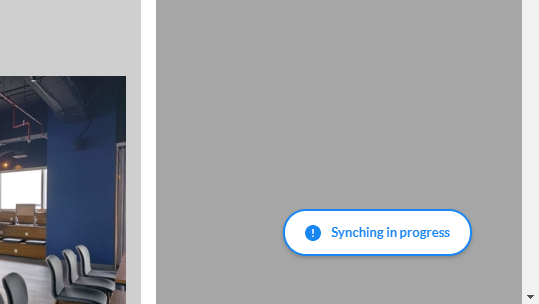
How do I remove it?
-

Hi,
when does this notification appear? When do you prepare the file for download or when you make changes? Appears on all pages? Does a hard-refresh not solve this?
0 -
HI Alex,
Its there permanently. Its now been 1 day, I checked and its still there. So a hard refresh doesnt work. I tried viewing in other browsers too. Same result.
Its only a single test page that I created. Nothing complex so very strange if its still syncing.
0 -
Hi,
that's strange. I have created a ticket for you so please send your FTP credentials there and we will look into it. Thanks.
0 -

this same thing is happening to me and i dont even have it set up to synch. Please remove!
0 -
Hi,
can you please give us more details? Do you have a project link? How was it published?
0 -

Hi, same thing here.
'Synch in Progress' button will not go away, even after several minutes.
I built the site in Brizy Cloud.
I also cleared mu cache and tried in in both Chrome & Firefox.
I just want to preview the site and take a screen shot, and this gets in the way.
Please help.
0 -
Hi David,
Does this happen to a specific project or to all that you have published via sync? Do you have any external code on the page?
0
Please sign in to leave a comment.
Comments
7 comments