Hamburger menu styling

Hello
Can anyone give me a hint how to design the background color and width of hamburger drawer, which pops out after clicking on the hamburger menu. I found only the option for side of the drawer, but I can't find any other options.
Thanks in forward for any help
-

Hi,
You can change the background color by clicking on a menu item and selecting the Color option. Please refer to this video: https://jumpshare.com/v/rFMN3c1igYjizIwFf3IG
about the width: I'm afraid we don't have an option for this and it has a preset width. You could play with custom CSS.
Hope this helps.
0 -
Thanks.
0 -

JUmpshare link doesnt' work
0 -
Hi,
here's a working link: https://jmp.sh/icqIRhz
0 -

Written instructions for hamburger menu styling, please. All jumpshare links are giving a dangerous website error for me currently, in latest Chrome.
0 -

HI,
At the moment there is a problem with the jump share domain, and you cannot open the link in Chrome. Please open all the jump share links in Firefox, Edge, or Safari.
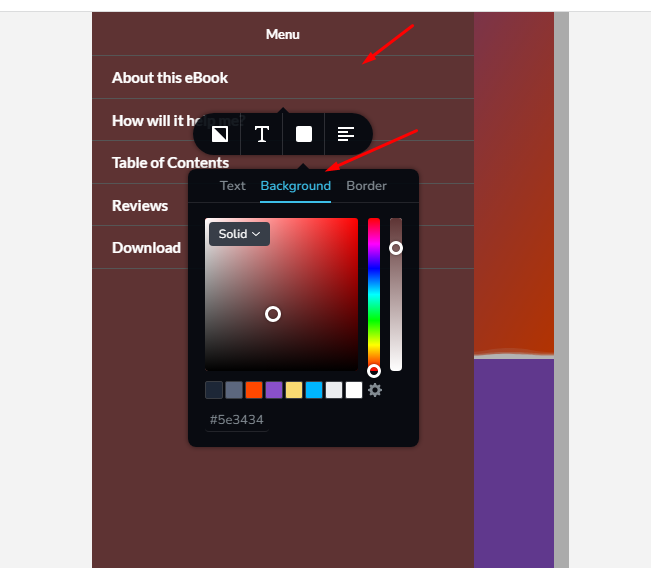
If you need to change the background color of the hamburger menu in the mobile version please click on Menu - Colors-Background - then change the color
Best regards,
Nelea.
0
Please sign in to leave a comment.
Comments
6 comments