External Popup via Click trigger

Hej Brizy Team,
we love your new update and try out the new external popup feature.
Could you please shortly explain me how I can use the popup on a external page with a click trigger?
How is the link to open the popup via click?
Thanks,
-

ok thanks
0 -
One year later: nothing 😢 Brizy, what's up? It's such a simple and meaningful function.
0 -
It's amazing that after all this time the most basic function for a popup is still not provided
0 -

Hi Peter,
I'm afraid you're right, but please understand that we have a lot of such functions on our to-do list. I will send the message to the managers and the list of priorities will probably have a change.
0 -
Sure I understand. And overall Brizy is a great product and value. Thanks for escalating our request.
0 -

me too. waiting the on click with an id to open the popup ...ALex, when will you add this function?
0 -
Hi,
I would like to honor you with a positive answer, but unfortunately we do not have an ETA :/
0 -

Hi Alex, Please rise the priority on this important task. Thx. Eric
0 -
Nice Idea. But it looks that Brizy don't listen his users.
0 -
Forwarded to managers. I hope we have good news soon)
0 -

Would like to have this feature. I'd like my privacy policy to appear as a popup when clicking "privacy" in the footer instead of sending the user to a new page.
0 -

Hi Raymond,
We will take into consideration it and will add it to the feature request we already created on this request.
Best regards, Nelea.
0 -
What I wanted to do is actually working.
1. Make a popup and set it to "on click"
2. Make it global
3. Create link on different page and choose the popup
The issue was when I was selecting the text for the link, it was choosing the first sentence in the paragraph instead of the text I selected.
I had to make a new block of text and assign the popup to it. It worked when I did it that way.
0 -

Am I correct that this feature has yet to be implemented, even though it was promised 2 years ago?
0 -

Hi Mathias,
You can implement an on-click popup with Brizy popup builder. It is launched from the link icon in Brizy. You can find it here. You can add an on-click popup to texts, buttons, icons images etc.
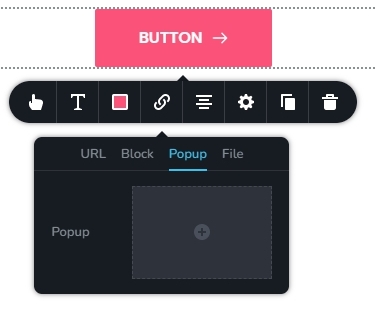
Brizy Cloud lets you make a popup and embed it on other websites. This is known as an external popup. The original poster was asking if the external popup might be triggered when a user clicked on the website where it was embedded; this does not look feasible. External popups cannot be triggered by a user's click. If a popup must be triggered by a user click, it should be internal to the website.
0 -
Hi KC,
Thanks for the update.
Technically what I am trying to do is to create a form with a checkbox and a link to the terms and conditions that open in a pop-up.
By using the javascript workaround another user suggested in this other thread (https://support.brizy.io/hc/en-us/community/posts/360073215351-Add-checkbox-for-GDPR-Compliance-to-forms), I've managed to add a link to the text, but I am struggling to find a way to get that link to open a pop-up.
I've created the pop-up just as you suggest, but it doesn't seem to be possible to "copy" the link from the button to the link in the checkbox text. That's why it would be very helpful to me if a pop-up could be triggered by a click on an element with a specific id.
I see now that this thread is for Brizy Cloud by the way. I am using Brizy for Wordpress, if that makes any difference.0 -
Hi Mathias,
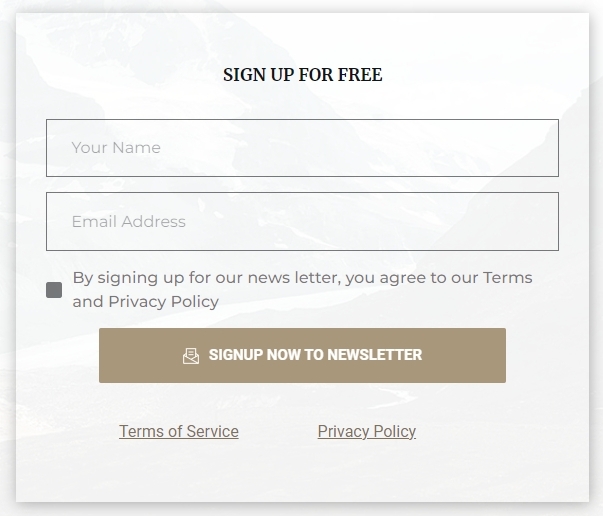
Even though linking to Terms of Service and Privacy Policy is not possible within a Brizy form, you can link to theme documents below the form as in this illustration. You can drag and drop the Text element to add the the links at the bottom. https://brizytest.online/signup-form
 0
0
Please sign in to leave a comment.
Comments
47 comments