Facebook Pixel for Brizy Cloud

Hi,
How do I install the Facebook Pixel to my webpage hosted on Brizy Cloud? I tried using the "code injection" module, but not successful. Could you help to look into it? Thanks.
Below is my facebook pixel code. Thanks.
<!-- Facebook Pixel Code -->
<script>
!function(f,b,e,v,n,t,s)
{if(f.fbq)return;n=f.fbq=function(){n.callMethod?
n.callMethod.apply(n,arguments):n.queue.push(arguments)};
if(!f._fbq)f._fbq=n;n.push=n;n.loaded=!0;n.version='2.0';
n.queue=[];t=b.createElement(e);t.async=!0;
t.src=v;s=b.getElementsByTagName(e)[0];
s.parentNode.insertBefore(t,s)}(window, document,'script',
'https://connect.facebook.net/en_US/fbevents.js');
fbq('init', '1234262346714355');
fbq('track', 'PageView');
</script>
<noscript><img height="1" width="1" style="display:none"
src="https://www.facebook.com/tr?id=1234262346714355&ev=PageView&noscript=1"
/></noscript>
<!-- End Facebook Pixel Code -->
-

Hi,
I also want to install the code injection from HubSpot.
Can your team guide me on how to do this?
Its actually a LIVE CHAT from Hubspot to be embed inside my website.
0 -

Hi,
what exactly is the problem? Does the Facebook Pixel script not appear in your project? Did you check it with the Pixel Helper Chrome extension? It will show you whether the pixel has been added to the site or not. Here you can find more out: https://www.facebook.com/business/m/pixel-set-up-step-4
Regarding HubSpot: at the moment, you can only add the tracking scripts to the header. I'm not sure about HubSpot. If it works in the header, then you can add it in the Injection Code section, if it needs to be added to the body, you can try using the Embed element. Unfortunately, only these two options are for adding external code. At least right now.
0 -
Alex, I managed to make it to work finally. Looks like the Facebook pixel script needs to be inserted into the "Footer" rather than "Header". Thanks for the help though.
0 -
I'm glad to hear that ;)
Should you need anything else, don't hesitate to contact us.
0 -

I need to install different Facebook events into different pages of 1 website. Is there a way to do so?
Thank you)
0 -
Hi @Hunter L Code,
Please refer to this discussion: https://support.brizy.io/hc/en-us/community/posts/360057934051--Facebook-Pixel-Code-Inject-Insert-in-the-same-Project-
0 -

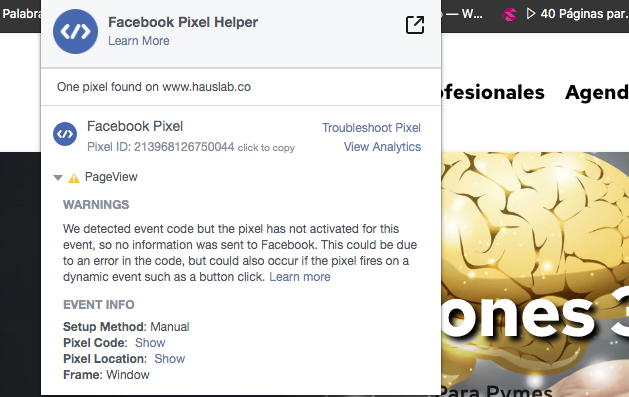
Hi. I am trying to insert facebook pixel but I can not. chrome extension detect the pixel but it does not send info to facebook. I tried insert pixel in header and footer. why?
 0
0 -
It took more than 2 hours to activate the pixel but it works now. Just be patient...
0 -
Hi,
I'm glad to hear that. What was the problem? Was it something related to Brizy?
0
Please sign in to leave a comment.
Comments
9 comments