Email notification for custom form in Brizy Cloud is not working

I have just set up the email notification for a custom form on the page: https://fig1087728.brizy.site/contact.
I have 'updated' the builder page, 'renewed the page' but when I try to send a message, it won't send, nothing happens.
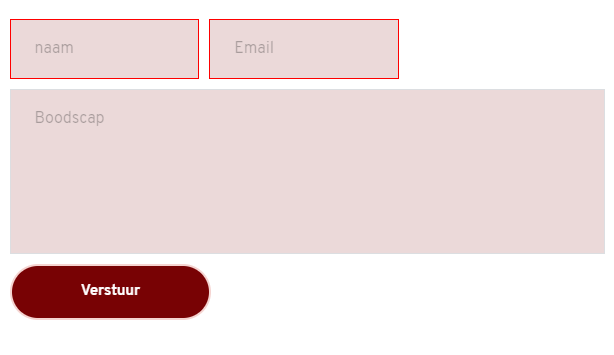
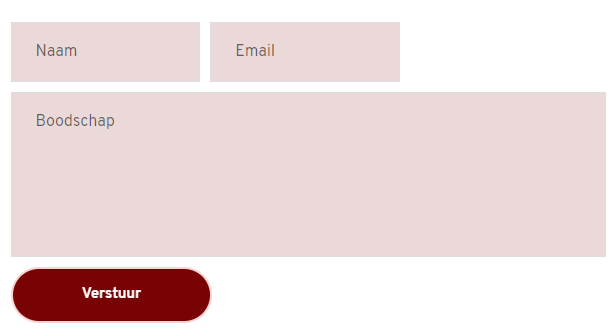
Another thing I noticed is that on the page, inside the message box, it sais 'boodscap', while in the builder it sais 'boodscHap' (which is what it is supposed to be)
What am I missing? ;)
Thanks!
-

Hi,
Just tested it and have a successful message: https://jmp.sh/m2PK6Ge Did you receive a test notification? I noticed that the fields are a bit confusing and instead of the text field in the name you have email. Maybe that's why the form validation doesn't happen: https://jmp.sh/JuQbIYK Try to solve this and check again.
Regarding the message box placeholder: can you please send a screenshot of the form in editor so I could see the text and compare it with the frontend appearance?
0 -
Hi Alex,
Yes, I did receive the test notification :) Only, if I tried it myself, again, it didn't send... So, about changing the confusing text field, I have no clue how or where to solve it, I have never used coding. I directly inserted a template for the contact form from the Brizy builder. Can you instruct me further on this one? Thank you!
Next are the screenshots about 'boodscHap' <> 'boodscap':
This one is the view on the published site:
This one is in the builder:
 0
0 -
Hi,
No code is required to change the field type. You can do this directly in the editor. Please refer to this video: https://jmp.sh/PrXiOzR You can also see in the video that the placeholder of the input is the same as in the editor. Do you have any extensions that work with text in the browser? It's a strange behavior that it doesn't display all the letters.
0 -
Hi Alex,
Thank you so much! All works fine now :)
I have rewritten 'Boodschap' in the builder and now it sticks, hurray!
0 -
yeah💪. Glad to hear that!
0
Please sign in to leave a comment.
Comments
5 comments