Phone Number Showing Dark Navy Blue By Default

Hi Brizy support,
I'm not sure why, but my phone number looks perfectly fine and exactly like the rest of the surrounding text when viewing my page in Brizy.
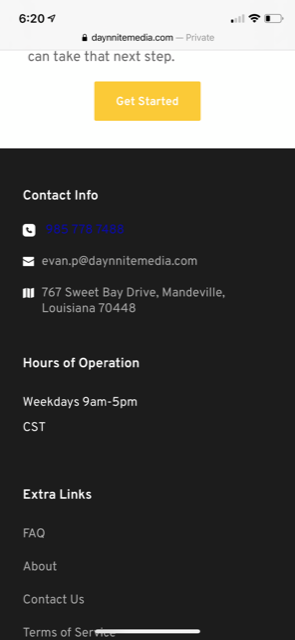
However, when I view it published live, the phone number is dark navy blue and I'm just wondering why that is. My site developer showed me his view on Android and the phone number was the color it was supposed to (gray). So I'm not sure if the dark blue is an emphasized hyperlinked thing on iPhones somehow.
My guess is that there was something with the Brizy scripts as I download the html files to upload them to my server, causing the phone number to turn navy blue.
It's not a big deal at all, more of a preference thing and wondering why it's happening. Please let me know what you think could resolve it.
Thank you
**Please see screenshot below**
-

Hi,
This problem seems to happen only on the Safari mobile browsers. I checked on the Chrome browser from my Android phone and also on an iPhone and all worked fine. In StackOverflow, I find that this is a common issue for Safari users. See here.
To fix this issue I suggest making the phone number a link for all devices. Then add a Custom CSS for it and change the colour and disable the point for it.Best regards,
Sandra0 -
Okay thank you for the initial response.
Can you tell please explain or show how to add custom css for Brizy script?I think a Loom video or step by step instructions would be quite helpful.Thank you,Evan P.0 -
Hi,
To add the Custom CSS to a Brizy element, you have to click on that element, go to Settings -> Advanced Settings. Here you will found the "Custom CSS" box where you can paste the custom CSS. See here.
Best regards,
Sandra0 -
Thank you very much for the help. We were able to resolve the issue!
0 -
Hi,
Thank you for updating us regarding this issue! Great to know that all is working fine now!
Best regards,
Sandra0
Please sign in to leave a comment.
Comments
5 comments