Space in the price element

Hi I'm using the woocommerce elements to create a product page:
https://rococodecohome.com.ar/producto/reloj-de-pared-blanco-mediano-copia
Do you know what can I do to avoid this this space that I mark you in red here?
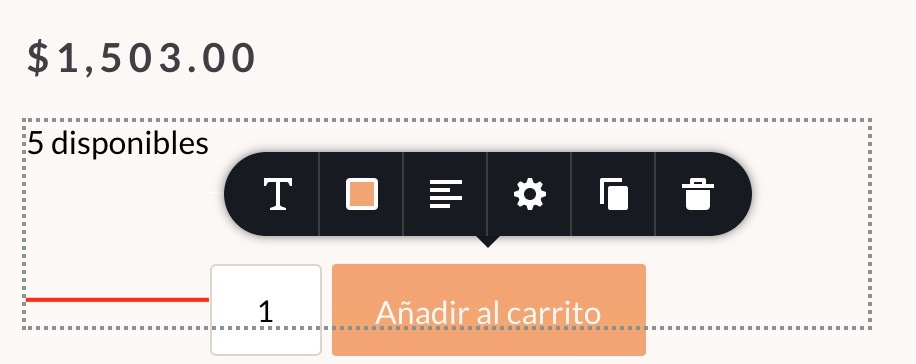
-

Hi,
Could you please check if you have the latest versions for Brizy Free 2.2.17, Brizy Pro 2.2.11 and WooCommerce 5.4.1? Just know I checked the alignment for the "Add to cart" button and all seems to work fine. See here. Could you please check if you didn't add some margin or padding to the "Add to cart" element?
Could you please send us the URL link of a product page?
Best regards,
Sandra0 -
Hi Sandra,
Yes, I have installed both latest versions.
I think maybe it's because of the stock element (maybe there is a conflict there).
I didn't add margin or padding to the "Add to cart" element.
I sent you the link, here is again: https://rococodecohome.com.ar/producto/reloj-de-pared-blanco-mediano-copia
Please let me know if you need to access to it
0 -
Hi,
Thank you for the URL link. Yes, this is caused by the Stock element. We already informed our team about this aspect and they will investigate it deeper.
Best regards,
Sandra0
Please sign in to leave a comment.
Comments
3 comments