Woocommerce Shop Page does not display Products

Hi,
I've created a few products in Woocommerce using Brizy Templates and those are displaying fine individually.
However, while setting up my main Shop page using Brizy (Image 1), 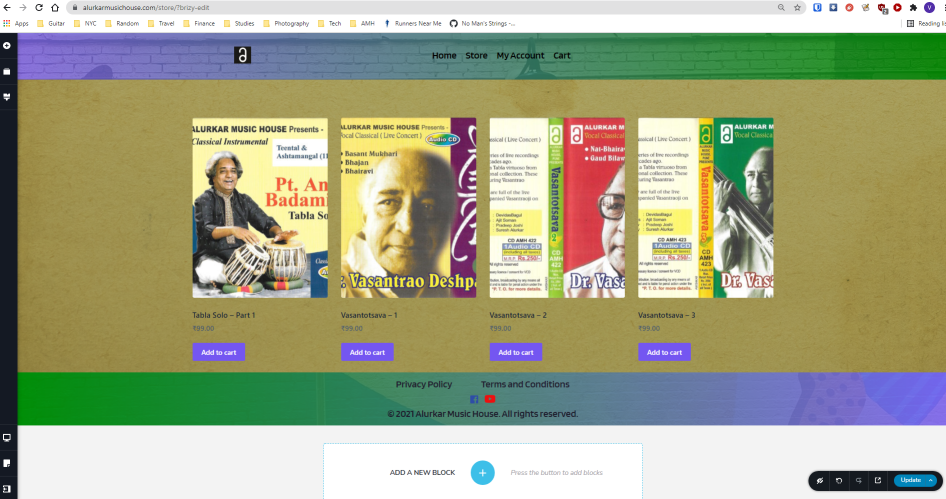
these products are not appearing when I preview the page or open it from the menu (Image 2). I've tried dragging both the Products element from Brizy as well as using the [products] shortcode provided by WooCommerce. I either get a "blank" block or just the shortcode in the final page.

Can you please help identify the issue? The website is currently under maintenance so I can provide you with credentials if you need to login.
(The Product Category (Archive) templates which I created using Brizy have been designed in a similar way and they work fine. This seems to be a problem with just the Shop page. Also, I've tried switching to the default theme and disabling all plugins except for WooCommerce)
-

Hi Varun,
Could you please give us more details about how did you create the Shop page? Did you create a template? What display conditions did you set for this template?
Here I provide the steps for creating the Shop page with Brizy builder. Could you please follow them?
1 - Set up un the WooCommerce settings what page do you want to set as a Shop page https://jmp.sh/bdxiyGA;
2 - Go to Brizy -> Templates -> Add new and create a template https://jmp.sh/V7gT3G2;
3 - In the template add a suggestive name and most important add the right display condition. For the Shop page, you have to select the Product Archive and from here add the "Include -> Shop page". See here https://jmp.sh/mcF5TiR. Don't forget to click on "Add" and after this on the "Publish" to publish the template;
4 - Inside this template, you have to add the elements you want to display on the Shop page (header, footer, block with Archive element - we suggest adding this element because it will select all products from all category and will display on this page) https://jmp.sh/xMRRb1G.One important tip, on the Shop page from "Pages", you shouldn't have activated the Brizy editor. If for the Shop page you see this https://jmp.sh/b5qtE9p, please deactivate the editor for this page in such a way https://jmp.sh/9a5TgwQ.
Best regards,
Sandra1 -
Hi,
Thanks for the clarification, I was not aware that a Product Archive template was required for the Shop page as well. The shop page now works after creating one.
I am now attempting to create a Search Results (for Products) page using Brizy. The input for this page is a "Product Search" widget on the Shop page using the Page Builder Framework. How can I design this page? I created a Product Archive template and added the condition for the Search Page, but I did not see any element in the Builder that could connect it to the Product Search page.
For reference, the URL of the Product search page is in the following format:
https://<domain>.com/?s=<query>&post_type=product
0 -
Hi,
Great to know that all is fine with the Shop page! Thank you for updating us regarding this!
Unfortunately, at the moment, it isn't possible to create the search result page for the WooCommerce products. We are informing our managers about this suggestion and they will investigate it deeper.
Now, when it created a template for the Search page, the user creates a results page for the entire site not especially for the WooCommerce products. In this case, it is recommended to use the Archive element.
Best regards,
Sandra0
Please sign in to leave a comment.
Comments
3 comments