Long page load time, after editing page

Hello,
after editing a page, the page loading time is very long (>20s, sometimes >40s)
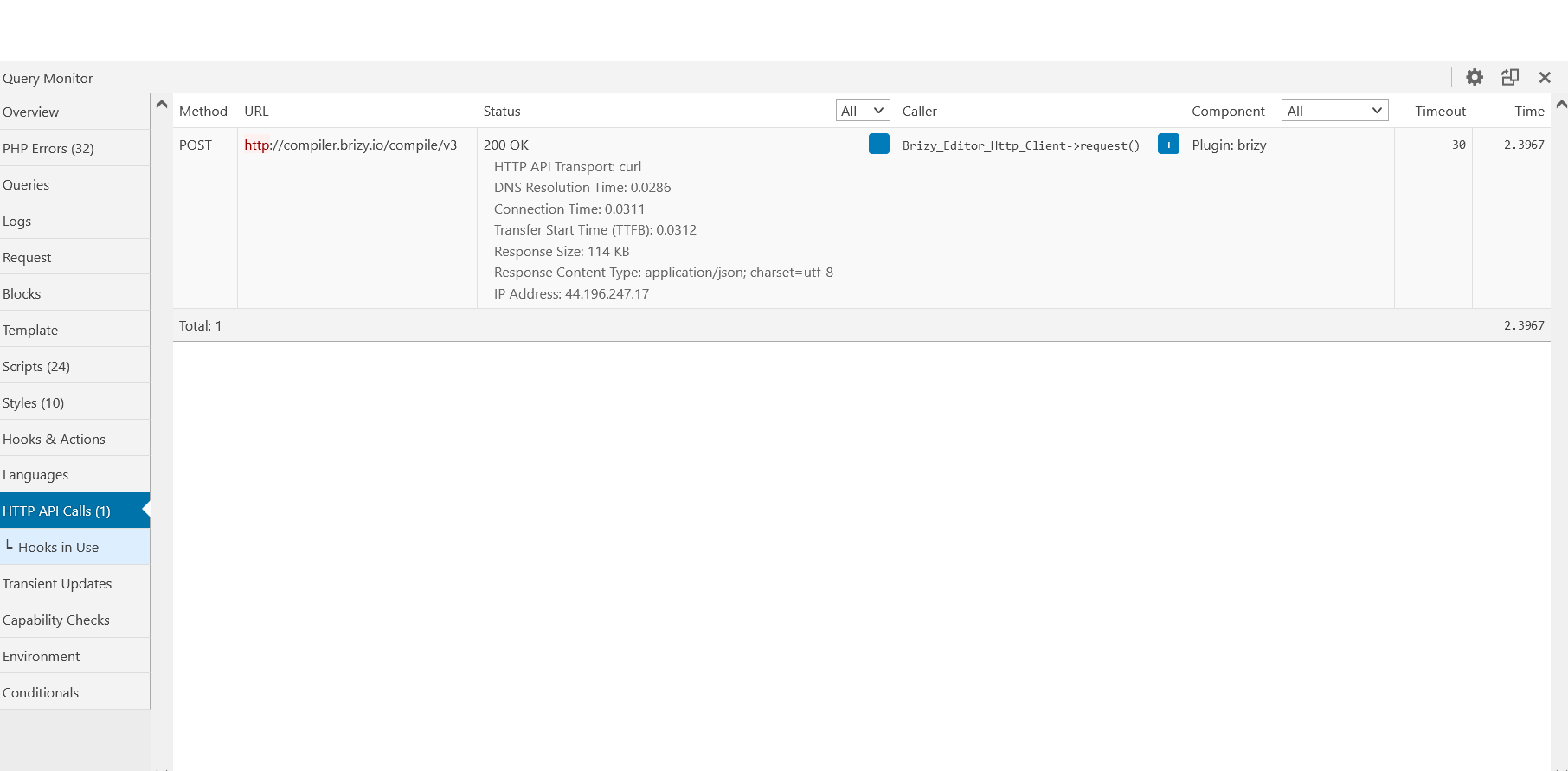
The query monitor plug-in shows Http-Api calls with long response time for brizy compile:
(last column is the time: 26s)
| POST | http://compiler.brizy.io/compile/v3 | 200 OK-
|
-
|
Plugin: brizy | 30 | 26,8702 |
When I reload the page, the load time is <1s and there is no http-api call ...
Please help.
Matthias
-

Hi,
Yes, it is possible on the first load after editing a page, it loads a bit longer as usual. This happens because all modification you made on the page needs to be propagated and rewritten on the server. On the update, it is created a new version of the entire page, and this version has to be saved. After this, the page will load fast.
Best regards,
Sandra0 -
Hi Sandra,
the load time is sometimes over 40 seconds.... this is not a bit ;-)
Is the page compiled on http://compiler.brizy.io/compile/v3 or on my host?
Is the recompiling neccesary when the plug-in is updated?
Thanks.
Best regards,
Matthias
1 -
Hi,
The compilation for Brizy pages is made on our servers. The page load time depends a lot on its size and for this reason, a long page can have the first load in ~30-40 seconds. After it is updated and saved, the load will happen faster.
Best regards,
Sandra0 -

Why cant this take place... at a different time?
 0
0 -

Hello Raymond,
Thank you for your message!
Regarding your question, can you please give us more details? Do you encounter any problem? Is something not working right? The screenshot is not really clear either. Hope to hear from you soon!
Have a nice day and kind regards,
Doina
0 -

I am having the same issue. How can I avoid this issue?
I am running a multisite setup with WaaS subscription. This happens when I load the page the first time but I think it's doing it again after some time when is loaded and not in use. Like it's cached, but to me it happens even when caching plugins ar totally deactivated.
 0
0 -
Hello Andrei,
Thank you for your message!
Can you please make sure you have the latest Brizy Versions: Free 2.3.21 and Pro 2.3.16? Hope to hear from you soon!
With kind regards,
Doina
0 -
I just checked and these are the versions that I have installed. Thank you!
0 -

Hi Andrei,
This option appears after you reorder a global block on your page. The reorder request is sent to the server, it is not an issue, in this way works Brizy builder.
Best regards, Nelea.
0 -
After I edit a page it does this. But If that's true how do you explain that if I wait for some time and enter back on that page does it again. It looks to me like a broken "feature" if can be called a feature (it is more of a drawback).
If your intentions are to compile that code it should be done one time and then stored in the websites database. Why not compile it on save or with cron and most importantly ONLY ONE TIME.Thank you!
0 -
Hi Andrei,
This compilation is done every time when you reorder a global block and it takes more time until all the information is compiled to the server. Sorry, but In this way was made Brizy builder and we cannot change anything.
Best regards, Nelea.
0 -

load times take more like 20-30 mins... and these aren't galleries' either with heavy files. It's frustrating, this speed issue when updating needs to be fixed as it makes the process cumbersome
0 -

Hi Carlos,
The average Brizy WP page load time is a few seconds. Even if it takes 20 seconds to load, which is still excessively long in my opinion. Some troubleshooting is required to identify the root of the problem. Can you please respond to these questions?
- Please share the URL of the website where you are having this issue.
- Please share the total number of pages, posts and products you have on your website
- Total number of Active Plugins in your WordPress Dashboard https://jmp.sh/cixVzJDe
- What hosting provider and which hosting plan are you on?
- In your WordPress Dashboard under Tools - Site Health- Info tab, please share the screenshot of the accordion "Directories and Sizes" https://jmp.sh/RI7a8Qq
- Are you using a plugin which takes snapshots of your database like WP Reset?
0
Please sign in to leave a comment.
Comments
13 comments