video brizy free mobile and ipad

Hi Brizy,
In one of my pictures in my website I have a link to vimeo.
But the picture and link doesn´t show in iPad and phone layout.
Can that be true, or is there anything I can do?
I have made it in brizy free.
Video intro test - Eva Pesik Nielsen
Best regards, Eva
-

Hi Eva,
I checked the URL you share with us and I found the link is set up in tablet and mobile mode. See here. The problem that I encounter is that the image isn't displayed on mobile mode.
Do you have the latest versions for Brizy Free 2.2.16 and Brizy Pro 2.2.11? Could you please delete the site cache? Also, could you please delete the image element and re-add it again? Do make some modification to the image in the mobile mode?
Thanks!
Best regards,
Sandra0 -
Hi Sandra,
Thank you for your very quick respons.
It helped, so thank you very much.I have another problem though.
My picture in this URL is very pixilated no matter what I do with the size of the picture.
https://www.evapesik.dk/nyhedsbrev/
Can you help me, and tell me what I'm doing wrong?
And one last question - what is generation the end name of the URL fx. "nyhedsbrev"?
Is the name what I call it in brizy or what I call the site in Wordpress?
Have a great day.
Best regards, Eva.0 -
Hi,
Thank you for your message and reply. I checked the site and the image you said is pixelated. I notice that the image have the 834x2560px but in the editor, it is added in an Image element with 1170x3589px. For this reason, the image is stretched to fit inside the element. to solve this inconvenience I can suggest uploading an image with a higher dimension or minifying the Image element and set the width and height with 100%.
The slug of the page (/nyhedsbrev) is added inside the WordPress editor. From here you can customize it.
Best regards,
Sandra0 -
Thank you again for your quick answer : ) The answer about the changing the slug worked perfectly.
But I can't get the picture to work. I have tried making it 1170 px but when I upload in the media library, its like it is made smaller. I don't know if the size is to big?
I'm sorry but i don't understand how to set the with to 100%. I looks to me like I have set it to 100%, but maybe I'm looking the wrong place?
https://www.evapesik.dk/nyhedsbrev/
Best regards,
Eva0 -
Hi,
Thank you for all these details. Could you please decrease the image width to 50-60% or till the value you find that the image doesn't look blurred?
Best regards,
Sandra0 -
Hi Sandra,
Thanks for your answer. Now I have tried to scale the with to 70%. I still thinks it looks blurry. When I upload the picture to the image bank, its like it down scales the picture from a 3600 px length to 2560 px length and ads "-scaled" to the image name. I don't know if this has anything to do with Brizy?
Best regards
Eva0 -
Hi,
Could you please give us some more details? Do you have the latest version for Brizy Free 2.2.17 and Brizy Pro 2.2.11? Did you optimize the image before adding in the Brizy builder?
What are the dimensions of the original image uploaded to WP Media Library? See here. Where did you find the "-scaled" word added to the image name? Could you please send us a screenshot? In the inspect element, I didn't find this word. See here.
Best regards,
Sandra0 -
Hi Sandra,
Im using the Brizy Free 2.2.17.
I optimised the image in Adobe Photoshop and made it 1170 x 3600 px.
If you look in the screenshot, you can see that it has added the word "-scaled" after the image name.
I have now added that image to the site - I removed it before because it didn't look so good.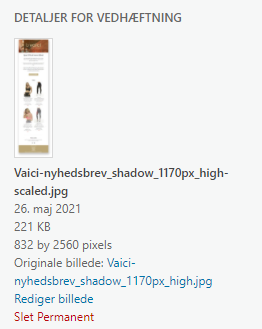
I think the image hight 3600 px is to big, that's why its scaling it to 2560 px.
Best regards,
Eva0 -
Hi,
The "-scaled" word, isn't added by the Brizy. It is added by the WordPress Media Library when is added a bigger image. The WP Media Library scale the image to 2560px on width. See here. As you can see in this video, I deactivated the Brizy Free and Brizy Pro plugin and uploaded the image to the WP Media Library. After uploading it, you can notice that the dimensions were scaled and the "-scaled" word was added to the file name.
Could you please change the dimension of the image, make sure that it isn't blurred and then upload it to the WP Media Library. Is it still look blurred?
Best regards,
Sandra0 -
Hi Sandra,
Thank you for all your help. I have made the picture smaller but I still thinks it look a little blurry.
But I think that i will give up now, and stop here.Thank you and have a good dag.
Best regards,
Eva0 -
Hi Eva,
Thank you for updating us about this inconvenience!
Let us know if we can help you with something else!Best regards and have a great day too,
Sandra0
Please sign in to leave a comment.
Comments
11 comments