Contact form doesn't send emails

Hello
On this site with both the latest versions of Brizy Pro and Free (2.2.17 & 2.2.11) https://dantasyfoils.com/nl/blog-nl/terug-naar-het-werk-met-onze-luchtreiniging/ The contact form doesn't work.
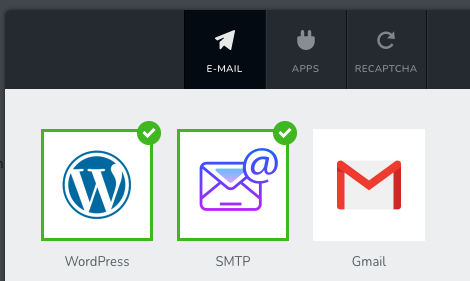
First, I had only activated the "Wordpress" connection. The contact form said the message was succesfully sent, and indeed, it showed up in the Leads. But the message didn't arrive in the receipents inbox, nor the junk. Also not when I changed the reception e-mail address.
So I tried something else and configured the smtp connection. That succeeded, but now when I fill in the form, it gives the error "your email was not sent".
What should I do?
-

Hi,
Could you please check what email did you use for connecting the form with the WordPress method? It is a private email from the email server? In this way, you have to connect the email only with the SMTP method. Could you please check this article and follow all the steps? https://support.brizy.io/hc/en-us/articles/360043766792-Email-notification-via-SMTP
Best regards,
Sandra0 -
Hi Sandra
The email Email to is an Office Exchange (Office 365) address: info@dantasyfoils.com.
The username however is the standard DirectAdmin: dantasy@dantasyfoils.com, port 465 and ssl is turned on. The popup also says "dantasy@dantasyfoils.com". Also, I can't unselect the Wordpress mode. Wordpress and SMTP are activated at the same time.
0 -
Hi,
To deselect the WordPress method, I recommend duplicate the form and connect the duplicated form with the SMTP method (only). Then, the first form, you can delete.
Best regards,
Sandra0
Please sign in to leave a comment.
Comments
3 comments