adding text block causes refresh

Pro license
Working on a draft page and adding a title of "Group Coaching" causes the page to require a refresh EVERY TIME. I refresh the page and try to add the title again, I get this message:
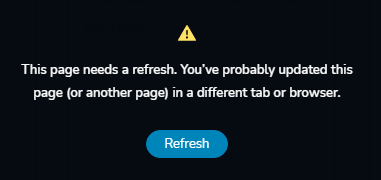
I have managed to get the text block on the page, but now I can't move it to where I want it to go - every time I move it now, it gives the message above. I refresh and I get the message again after I move the text block.
This is the only page I have open (no other tabs). I was even able to change the text to "Party Coaching" (which is not what is wanted), but that saved no problems. If I try to change it back to "Group Coaching" I get the 'page needs a refresh' message. Nobody else is working on the page.
Sounds similar to this issue: https://support.brizy.io/hc/en-us/community/posts/360069069792-Random-blocks-make-pages-uneditable-This-page-needs-a-refresh-, but I do not see a resolution.
-

Hi Eric,
Before we log in to your site and inspect the problem we need to check some basic things. Can you please confirm you have this issue with the latest Brizy versions - Free 2.2.17. and PRO 2.2.11? Also, do you have the same problem if you disable all your external plugins? Once confirmed I will create a private ticket for you and we will look into it. Thanks.
0 -
I was able to replicate the issue with the latest versions of the free and pro plugins and with all other plugins deactivated.
It doesn't behave the same with every text block or every bit of text. For example, I was able to copy an existing header text block and rename it, but not completely. As stated earlier, I was able to rename the header block "Party Coaching", but if I try to change it to "Group Coaching" it throws a fit. I was able to get a "Group Coaching" text block in place elsewhere on the page, but it's in the wrong spot, and I can't move it up to where it is supposed to be - as I get that error when I drag/drop it in place.
0 -
Hi Eric,
thank you for investing time in this. I have created a private ticket for you so please send your login details there and we will look into it. Thanks.
0 -
how/where do I see the private ticket?
0 -
Hi Eric,
I'm not sure why a ticket wasn't created. Maybe a glitch from Zendesk. I have now sent a repeated request. You should have received a notification. Please reply to that email.
0 -
This issue is still happening. The private ticket has gone dead - no response there either. I've also responded there.
I have a page that this continues to happen on. Certain words or characters can be added without issue, but for some reason the phrase "Group Coaching" does NOT allow the page to save, I keep getting the refresh message. Even when I just add a single letter at a time, I can get to "Grou Coaching", but if I add the final 'p', I get the error when I save.
0 -
Hi,
from what I see the last message is from Natalia and after that we didn't receive any answer from you: https://jmp.sh/3SGem3h I created a new ticket to continue the conversation with you.
0 -
I don't understand why, I replied at least 3 times - I see the new ticket and I've replied to that - I've been having issues with zendesk not getting my replies lately.
Can you confirm you got my response to the new ticket: 12266
client has informed me this is happening on a new page now too
0 -

Hi Eric,
Last message was posted 24 hours ago by my colleague Natalia. Since then we didn't receive any replies from you. Please, login in your account on brizy.io. In "Support" section you should be able to see all conversations and tickets.
Kind regards,
Denis.0 -
yeah, so for some reason none of my emails ever went through... thank you for pointing out the ticket location.. btw, it's under "My Activities" now - not sure if that was renamed recently.
Thank you
0 -
Hi Eric,
Sorry for late reply, support is limited on weekends.
We replied to your ticket, please, check it.
Best regards,
Denis.0
Please sign in to leave a comment.
Comments
11 comments