Contact Form Issues with the wordpress option

Hi there team,
I have followed the steps on the guide with no luck.
I have multiple forms on my website, but when I try to send through a test form it says email not sent.
Could I have a hand?
-

Hi,
Do you have the latest version of Brizy Free 2.2.17 and Brizy Pro 2.2.11? Do you receive the error message when you send the email? Could you please send us the URL of the page where you have the form? When you send a test lead, did you use the same email you use to configure the form? Could you please use another email?
Also, do you have the "Upload file" field? What is the Maximum Upload Size you set? Could you please check if this value doesn't exceed the site "upload_max_filesize" value https://jmp.sh/laLni8Z? If the form Upload file size is set with a higher value, then the email will not be sent.
Thanks!
Best regards,
Sandra0 -
Hi Sandra,
Thanks for your response. Yes both Brizy and Brizy pro are up to date. When I hit the button the send the form I see the error message that email is not sent. I have also tried with alternative emails. There is not upload file field.
The website is http://justizcommunity.org/contact/
Thanks for your help!
0 -
Hi,
Thank you for all these details. Could you please temporary deactivate all external plugins (except Brizy Free and Brizy Pro) and activate a WordPress default theme? Do you have the same problem? Could you please send us a screenshot of how did you connect the form?
Thanks!
Best regards,
Sandra0 -
Hi Sandra,
I deactivated all plugins and reverted to theme twenty-twenty (from Astra).
I've attached a photo, please let me know if you'd like something else.
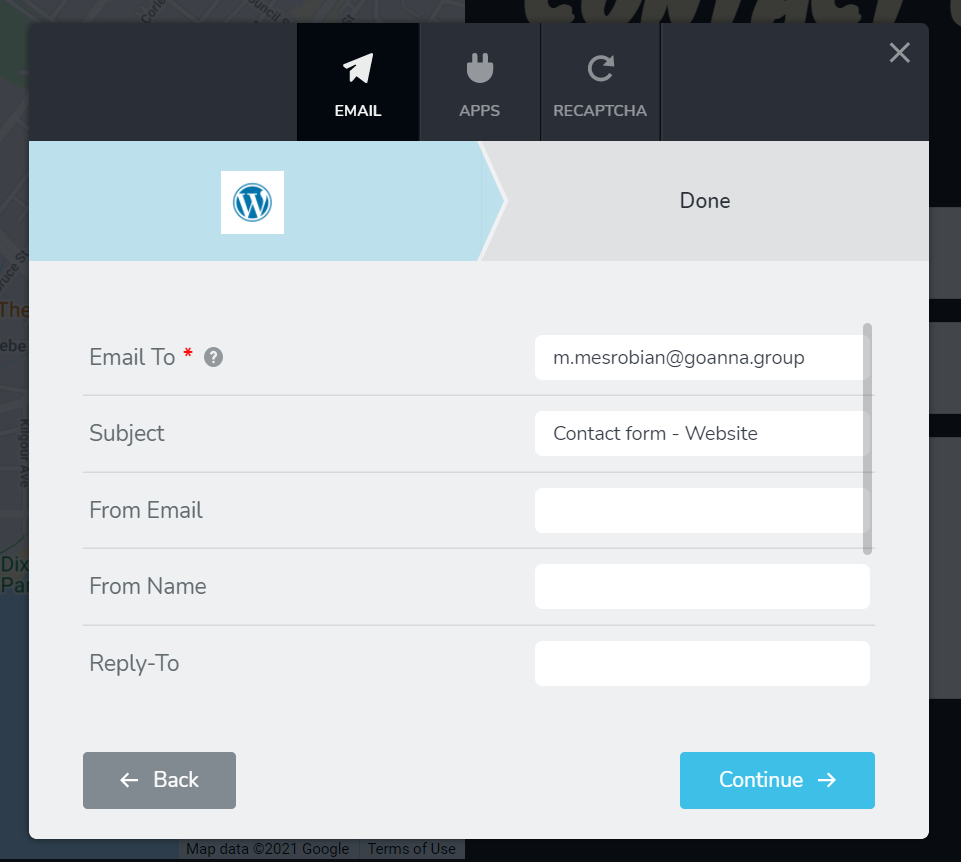
Regards,
Matt
0 -
Hi,
Does the email you try to connect to the Brizy form is a private email? If it is an email server, it is recommended to use the SMTP method. See here for more details about how to connect it https://support.brizy.io/hc/en-us/articles/360043766792-Email-notification-via-SMTP.
Best regards,
Sandra0
Please sign in to leave a comment.
Comments
5 comments