Problems with Brizy Builder

Hello there, I have encountered few problems with brizy builder.
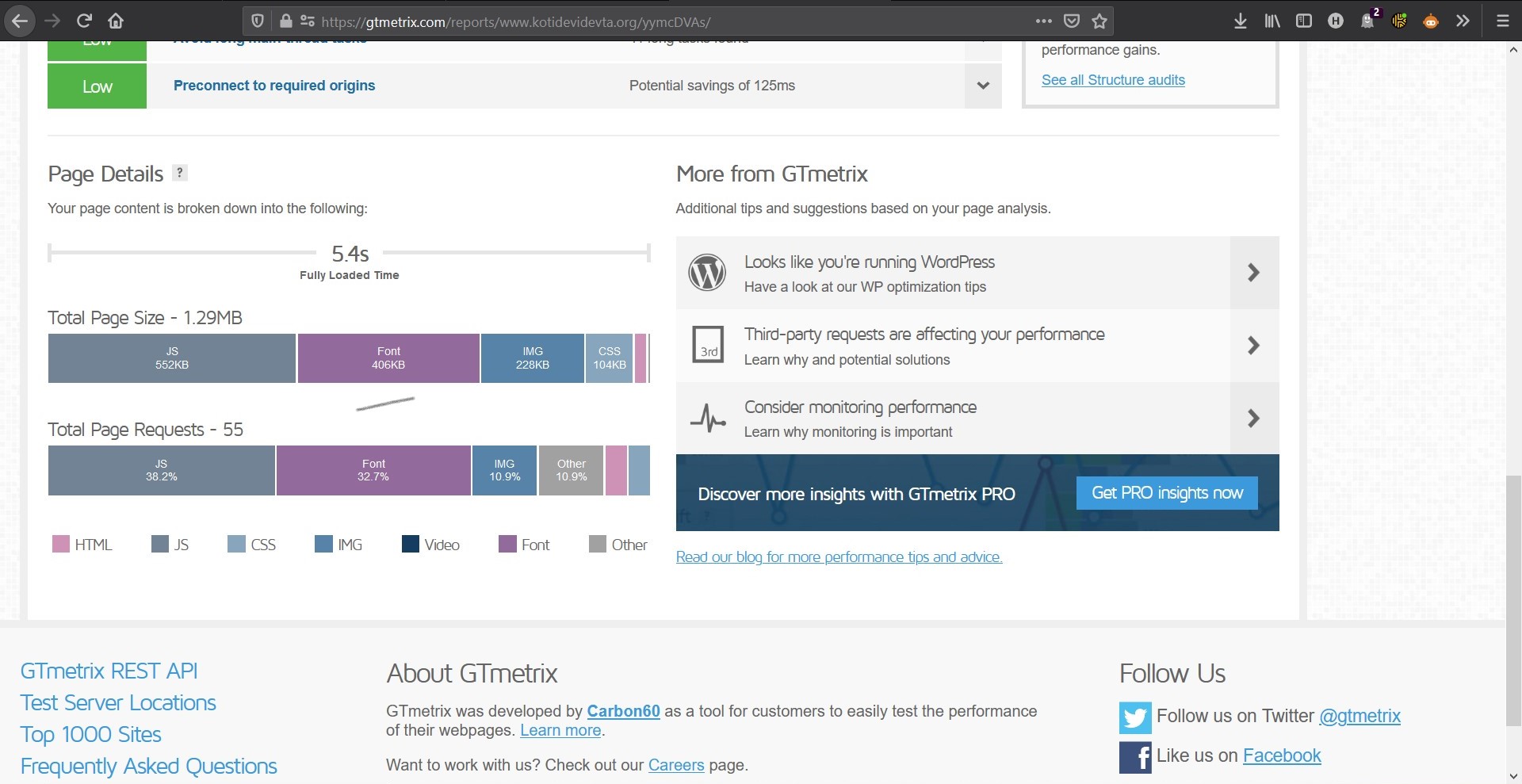
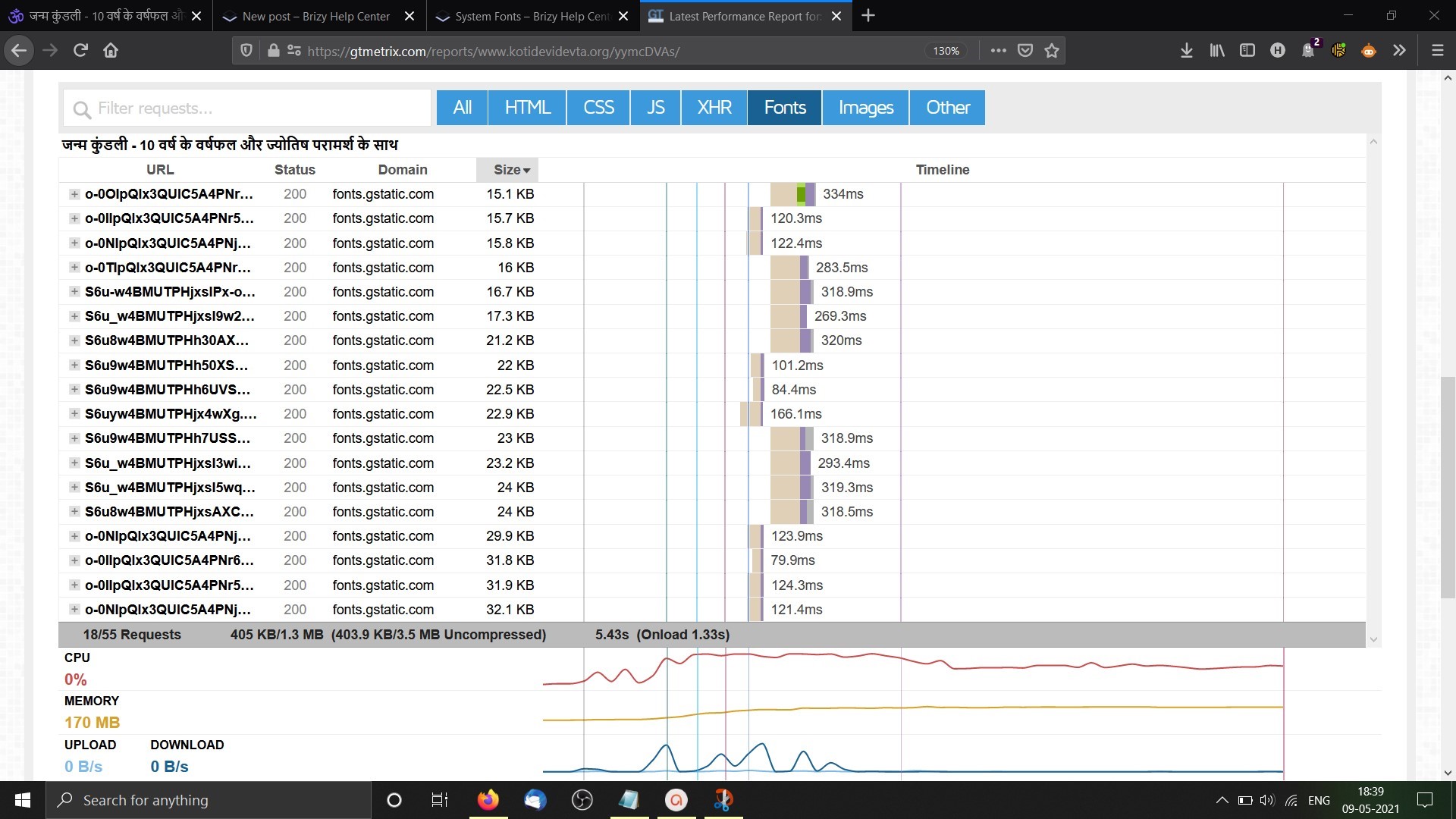
1. Google Fonts: The fonts are loading in a bunch. Same font is loading for 9 times and I cannot delete the Lato Font.
For Ex. I am using the Nato sans font on my site but i don't know why the Lato font is still loading on the pages.
Here is the screenshot of Gtmetrix. The font has a massive of 406 kb and the page size is 1.29 Mb.
Screenshots Here
Screenshot 1:
Screenshot 2:
2. Issue with the Builder
I have some css animation applied to images on my site. And when i am editing the page the site works very differently. Click to see the video.
This is the code i am using for animation and I don't think there is any problem with that. On front end it is working fine but while editing it goes north south.
Link to the video.
And yes, it takes like 10 to 20 seconds to load after we click edit with Brizy.
So what is this problem?
How do i solve these problems?
I am a brizy pro member.
Link to my site: Site Link
Link to my page: Page Link
Waiting for your reply.
Regards,
Harshal
-
Hello, just a small update the css and animation problem as discussed in Point 2. Is still there but the i have deleted the css and animation code from the above mentioned as the page is live and receiving huge traffic. If you want i can replicate the same page with different url for showing you.
0 -

Hi Harshal,
sorry for not getting back to you sooner. Let's take them one by one.
1) The Lato font is a default Brizy font and cannot be deleted at the moment. We have an ongoing feature that will allow you to set your default font, so you will be able to upload a font, set it as the default, and delete Lato. This will be introduced in one of the next updates but unfortunately, we do not have an ETA for this.
Regarding the multiple font loads: this is a known issue and our developers are working on it. We don't have a fix for it yet but in one of the next updates it will be solved.
2) Does the problem only appear when you apply your code to the images on that page? On another page does the editor load well? Please create a test page where you can reproduce this problem so we can inspect it. Also, please attach the code you are using. Thanks.
0 -
Hello,
Sorry for getting back to you late.I thought to ignore the problem as the size was not that big but the problem is very big now.
1. Previously the problem was for 500kb of Google Fonts loading on each page but now it is loading 5.04 MB of Fonts. It is getting worse.
I am using one font only i.e Noto Sans Font and no other Font on my website.2. The second problem still exists, everytime when i have to edit the page, first i have to delete the css code for animation and before saving i have to enter it again. But this should not be the solution.
Link of the demo page - https://www.kotidevidevta.org/demo-test-page/
CSS Class - img-kun-ani
CSS Code -
.img-kun-ani {
animation: rotation 60s infinite linear;
}@keyframes rotation {
from {
transform: rotate(0deg);
}
to {
transform: rotate(359deg);
}
}My site is getting a lot of organic traffic and many pages are ranked 1 of my site. IF this problem exists it will create a problem for me.
0 -
Hi,
1) It's been a while since our last discussion so to get back to it we need to confirm if you have the same problem with the latest Brizy versions: Free 2.3.10 and PRO 2.3.8
2) I'm not sure if we can help you too much in this case. There are different classes and uploaded codes in the editor, so the code you use may affect other items than the one for which it was written.
You could try deleting the code only from the Inspect Element so that you can work in the editor and not affect the front end while working)
0 -
Yes, I am using the latest version and I still have the problem.
I also have a site with Flatsome and one with elementor free. THey seems to working fine with this. And I was gonna shift my other sites to birzy. But there are a lot of problems with BRIZY.
It's is humble request to first clear the bugs and problems which are existing before adding any new functionality. It creates a lot of problem.
What do you mean to say in "POINT 2"
It is really frustrating to delete the code every time when i use the edit with brizy button on that page.0 -
Hi,
1) For this, I'm afraid there is no local solution to help only you. The fonts are on our inspecting list and there will certainly be improvements but general for everyone, in the next big update.
2) When you open the Brizy editor in HTML there is a class "brz-ed": https://jmp.sh/fRnKmDA so you can use ::not from CSS and apply your CSS code when body does not have this class: https://developer.mozilla.org/en-US/docs/Web/CSS/:not So the code will not activate when you are in the editor.
0
Please sign in to leave a comment.
Comments
6 comments