How to remove large area in top and bottom of block

This block has a wide area at the top and the bottom, even though the margins are set to zero and the spacers to 15px. How can I reduce that pink part at the top and bottom of the slider block?
https://www.brizy.cloud/projects/3313661/editor
Thanks.
https://impello.brizy.site/#testimonials

-

Hi,
Thank you for the URL link. I found that you used the slider feature. When is used the slider features, each slide should have the same height and this height will be set regarding the higher slide and this one depends on the content added to the slide. In other words, if you have 3 slides where the first slide has 190px height of the content, the second one - 230px and the last one - 110px, then the height of all slides will be 230px. For the first and last slide will be added the top and bottom space to match the higher slider.
This isn't a problem but a way to make the slider work correctly and avoid other inconveniences with the blocks placed after the slider.
Best regards,
Sandra0 -
Hi, thanks very much for your answer, that makes sense.In that regard, do you know why the text at the bottom of the longest testimonial overlaps with the "sequence dots" at the bottom, see this pic below.
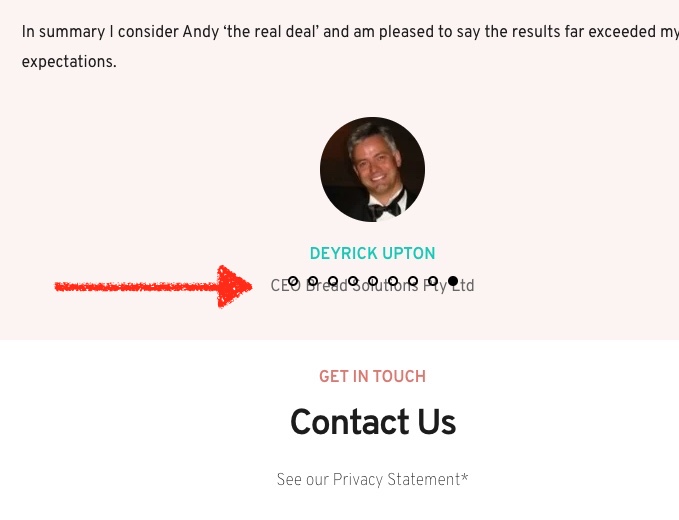 How could I fix this as it looks a little odd?It is here https://impello.brizy.site/#
testimonials 0 -
Hi,
Could you please check each element (column, text, image, etc) from this slider if it doesn't have some negative margin or padding?
If you don't have any negative margin and padding but you still have this inconvenience, you can solve this problem by adding a Spacer element after the customer/user details.
Best regards,
Sandra0
Please sign in to leave a comment.
Comments
3 comments