How do I change ownership of the site

Hi,
I was trying out Brizy cloud for a friend and ending up making their site for them (it was easy!).
But it's all on my account.. How do I move it to their account? I don't want to add them as collaborator as it will be their card being used.
Even if there's a way to export/import that will be fine.
Regards,
Ruchika
-

Hi,
To move a project from your account to your friend's one, you have to:
1 - Ask your friend to invite you to his project. Ask him to send an invitation on the email, you are using to log in your Brizy Cloud dashboard (it is recommended to assign you the Designer or Manager role);
2 - Accept his invitation;
3 - From your Brizy Cloud account, go to the project you want to move and access the general project option. There you will find the "Move" option. See here;
4 - Click on the "Move" option, select the Subaccount name where you want to send this project and then click on the "Move" https://jmp.sh/qj9nBPO;
5 - After you moved the project, you can access that subaccount and check if you see it there.After moving the site, all the forms will not be functional, therefore, you have to go inside the project and duplicate each form and then re-connect them one by one. The original form, you can delete. See here.
Best regards,
Sandra0 -
Hi Sandra, I don't see the move option.. see screenshot.
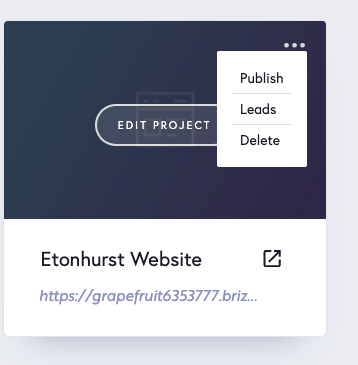 0
0 -
Never mind, it worked :) Thanks!
0 -

Hi,
Great to know that all is fine now! Let us know if we can help you with something else.
Regards,
Nelly
0
Please sign in to leave a comment.
Comments
4 comments