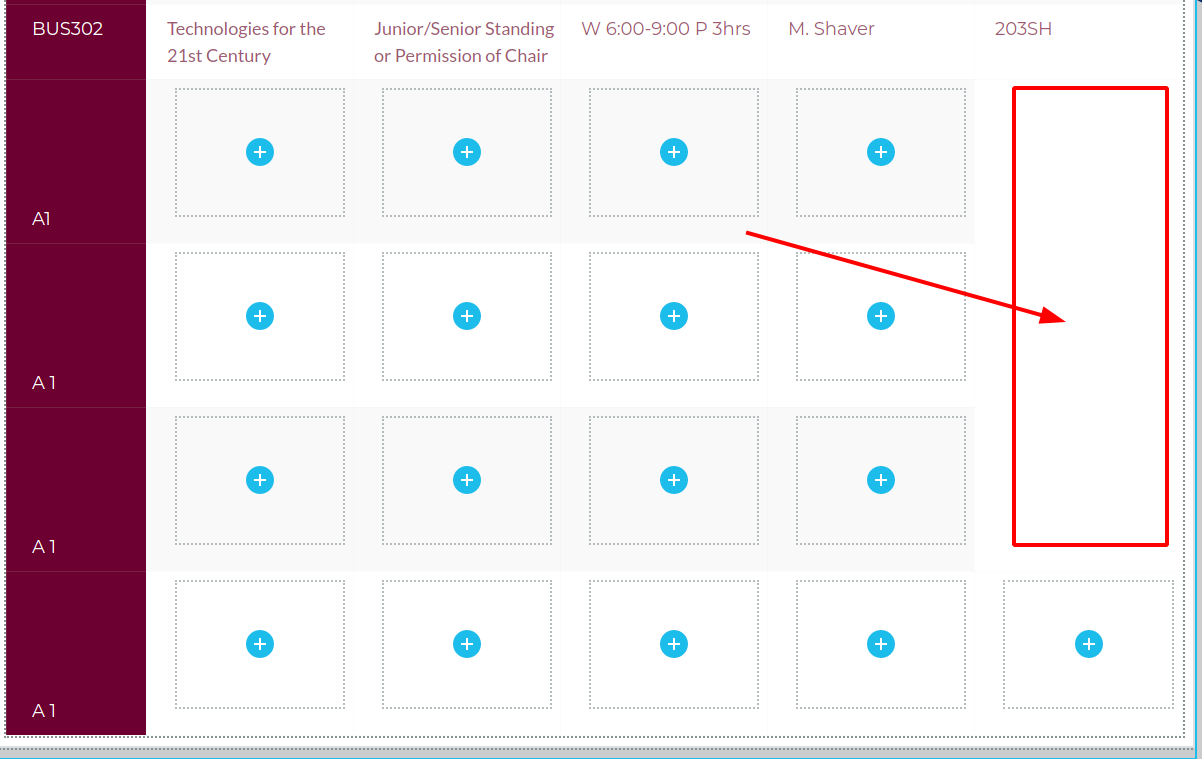
Table, adding new rows does not create enough columns

I have a table with 9 rows and 5 columns.
If I add 3 more rows column 5 is missing.
If I add more than 3 rows, all columns are there.
[Brizy support, your credentials are the same as previous ticket.]
-JL
-

Hi,
Works for me: https://jmp.sh/az2km0l Do you do the same thing?
btw: Can you please confirm you have this issue with the latest Brizy versions - Free 2.2.13. and PRO 2.2.9? Also, do you have the same problem if you disable all your external plugins?
0 -
Yes, I have the latest Brizy version and I tried disabling all plugins.
This is what I did to create the issue.
- Created a 9x4 table, added data
- Add 3 rows, all looks fine 9 rows, 4 cols
- Removed those 3 rows
- Add 5th column, looks good 9 rows, 5 cols
- Added 3 rows, those 3 rows (10-12) have only 4 cols
- Add additional rows 13-15, those additional rows have all 5 cols
Here is what I have determined: Brizy is retaining the previous created row/col structure somewhere and no matter what I do, it will bring those rows and data (if I entered any) back.
-JL
0 -
Hi,
thank you for these details. Is that how you usually create a table? )) Can you please send a screen recorder so we can see the actions and the issue and then try to reproduce it?
0 -
Hey Alex,
That is not the normal way I create tables, but sometimes we have to jump through these hoops because the customer keeps changing their requests.
I should've sent you a screen recorder in the beginning but it's too late now.
I went back to the TablePress plugin, which is awesome.
The Brizy table addon is not ready for anything other than simple tables. We need to be able to:
- Insert rows between those already created (example: I have a 9x8 table and want to insert a new row at row 4)
- delete rows within those already created, (example: I have a 9x8 row and later want to delete row 3)
- When #1 or #2 happens, the alternating background color of the rows should stay in sync.
- There should be an option to import tables from .CSV files. I had a 10x40 table which was a breeze to import using TablePress. I could not imagine doing this manually with Brizy.
- Once the table is created there should be an option to tell how many rows to display at a time to the user.
- For big tables there should exist a search box so the user can search for what they are looking for.
- On the front-end each column should be sort-able for the user.
Please pass this along to the development team.
Thx.
-JL
0 -
Hi,
Thanks for your time on this topic and I'm glad you found a solution. Please note that Brizy is not a table plugin but a page builder. It certainly needs more options and will have them but in the future. At the moment it works like this and all I can do right now is add your requests to our to-do list.
0
Please sign in to leave a comment.
Comments
5 comments