Scrolling Speeds different between pages

Hi, I am having a issue where the home page of my site scrolls at normal speed, but the other pages scroll slow. Are there any known issues of this problem? If not, I can give a link to the staging site
-

Hi,
Unfortunately, we don't know about this problem and can't reproduce it. Could you please send us the URL link of the site? All pages from the site are created with Brizy?
Could you please check if you have the latest Brizy Free 2.2.13 and Brizy Pro 2.2.9 version? Also, could you please temporary deactivate all external plugins (except Brizy Free and Brizy Pro) and activate a WordPress default theme? Do you receive the same problem?
Best regards,
Sandra0 -

I'm having the same issue. The home page is scrolling slowly, but other top-level pages are not. 5 subpages are scrolling slowly as well. They are linked from the home page, 5 blocks down, in this text: With over 38 years of experience, we proudly serve Pasco, Hernando, Citrus, Pinellas, and Hillsborough Counties in Florida.
0 -

Hi Nick,
Kindly have a look at my test at https://jmp.sh/N3Fa1YZ7 I am unable to reproduce the issue you have mentioned. What are the steps we must follow to reproduce the issue at our end? If possible, make a screen recording to demonstrate the issue.
0 -

Hello, i have the same problem as Nick France at my website : https://exlassurance.com/ .The Home page is scrolling slow (the problem appears when i scroll with the mouse scroll not with the bar on the left of the screen) and it persist on every browser (Brave, Chrome, Firefox, Edge) while the other websites pages scroll normally.
I have activated/deactivated the plugins, changed the quality of the video i am running on my homepage, the problem is still there.
Here I attached link with a screen recording showing the issue : https://jmp.sh/1khwz8UG
Thank you very much,
Orlando Zeng.
I repeat, mouse scrolling not bar scrooling.
Thank you very much.
Orlando Zeng.0 -

Hi Orlando,
Thank you for reaching out to us.
I tried to replicate the issue; however, your website is scrolling properly when using the mouse wheel. This is demonstrated in this screencast: https://youtu.be/UzgBfog_JF8
Can you please try clearing your browser cache or try using another browser and see if this makes any difference?
Best regards,
Ariel H.0 -

I'm having the mouse scroll problem all of a sudden on: https://theformationsmystery.com/.
The regular brizy plugin seems both necessary and sufficient to cause the problems. If I disable all the other plugins, it doesn't change the problem. The regular brizy plugin being active or disabled controls the problem.
I have a bunch of other brizy sites that aren't having this issue though, so there must be some other factor. I'll have more time this weekend to look into it.
0 -
Hi Katherine,
Thank you for reaching out to us.
I tried to replicate the issue, but it didn't occur on my end.
Could you please create a short screencast to demonstrate the issue you are facing and let us know which browser you are currently using?
In the meantime, please try using another browser and see if this makes any difference.
Best regards,
Ariel H.0 -
No problem! I actually took the video with my phone instead of normal screen cast software so that you could see my mouse wheel (which still works normally on all other sites).
In further testing, it seems like all the pages of my site scroll slow for me, except for the contact page: https://theformationsmystery.com/contact/
There must be some element on my other pages that is causing this to happen. Maybe I should make a duplicated test page and start deleting sections one-by-one to see if there is a culpret.
0 -
I narrowed down the cause! If the page contains any sections with a background image with parallax set to "animated," then the mouse scroll speed is super slow. Changing them to "none" seems to fix it.
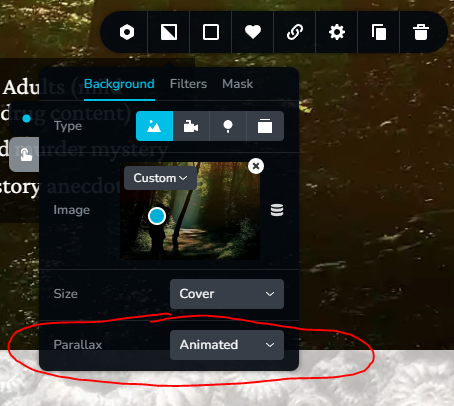
My live home page (theformationsmystery.com) still has 'parallax: animate' and it has slow scrolling.
My test page (theformationsmystery.com/test/) has the parallax changed to 'none' for two sections and has normal scrolling for me.
The https://exlassurance.com/ site posted above also scrolls slowly with my mouse wheel. And I see that site has a animated parallax effect as well. Perhaps this issue is only true for some mouse wheels? I only have this one mouse or else I would test more.
0 -
Hi Katherine,
I tried this at my end, but scrolling with the mouse wheel is working properly - https://youtu.be/15ZQrftqnuc.
Another user has also reported this issue. However, there might be some common software that you are using that is running on your computer that could be causing this issue. Are you running any security software in the background?
Best regards,
Ariel H.0 -
Thank you for checking! I'm glad that my site still works for the vast majority of people. This mouse did come with it's own fancy driver, so perhaps my mouse is a factor. Just now I googled 'websites with parallax effects' and I tested the first few hits which did scroll normal. But perhaps this mouse is wonky with just the brizy parallax effect.
My mouse is Redragon brand. Nick France and Orlando Zeng: what type of mouse are you using?
Maybe we all have a bad mouse brand!
0 -
I'm on a Mac, so I'm using a Magic Mouse. However, my client on a PC brought this to my attention.
0 -
Hello Katherine,
I apologize for the delayed response; I've been extremely busy these past few weeks and completely forgot about this issue. It's clearly not a mouse-related problem, as I've tested the website on different devices (PCs, laptops) and in various locations (work, friends' places, hotels), using different mice, and the scrolling issue persists across the board. Unfortunately, the pages only seem to work properly at the Brizy Team offices, which is quite ironic, but I can assure you the problem is not on our end.
0 -
and as you suggested i have change the animated effect into a fixed one and that solved the problem.
Thank you :)
0
Please sign in to leave a comment.
Comments
14 comments