Weird lines appearing on my pages

-

Hi Dmitry,
Could you please send us the URL link of the page where you receive this inconvenience? Is this problem happen on the preview mode or also on the editor mode too? If it is displayed only in the preview mode, could you also send us a screenshot of how is displayed the page in the editor mode?
Thank you!
Best regards,
Sandra0 -
Hi Sandra!
Is there a private channel of communication with support?
0 -
Hi,
No, this isn't a private channel but if you don't want to make public the URL link of the site or the screenshots/videos, let us know and we can delete these details before approving your reply. When the comment/post isn't approved it is visible only by the Brizy Support team.
Thank you!
Best regards,
Sandra0 -

This is happening to me too and i can't work out how to get rid of them.
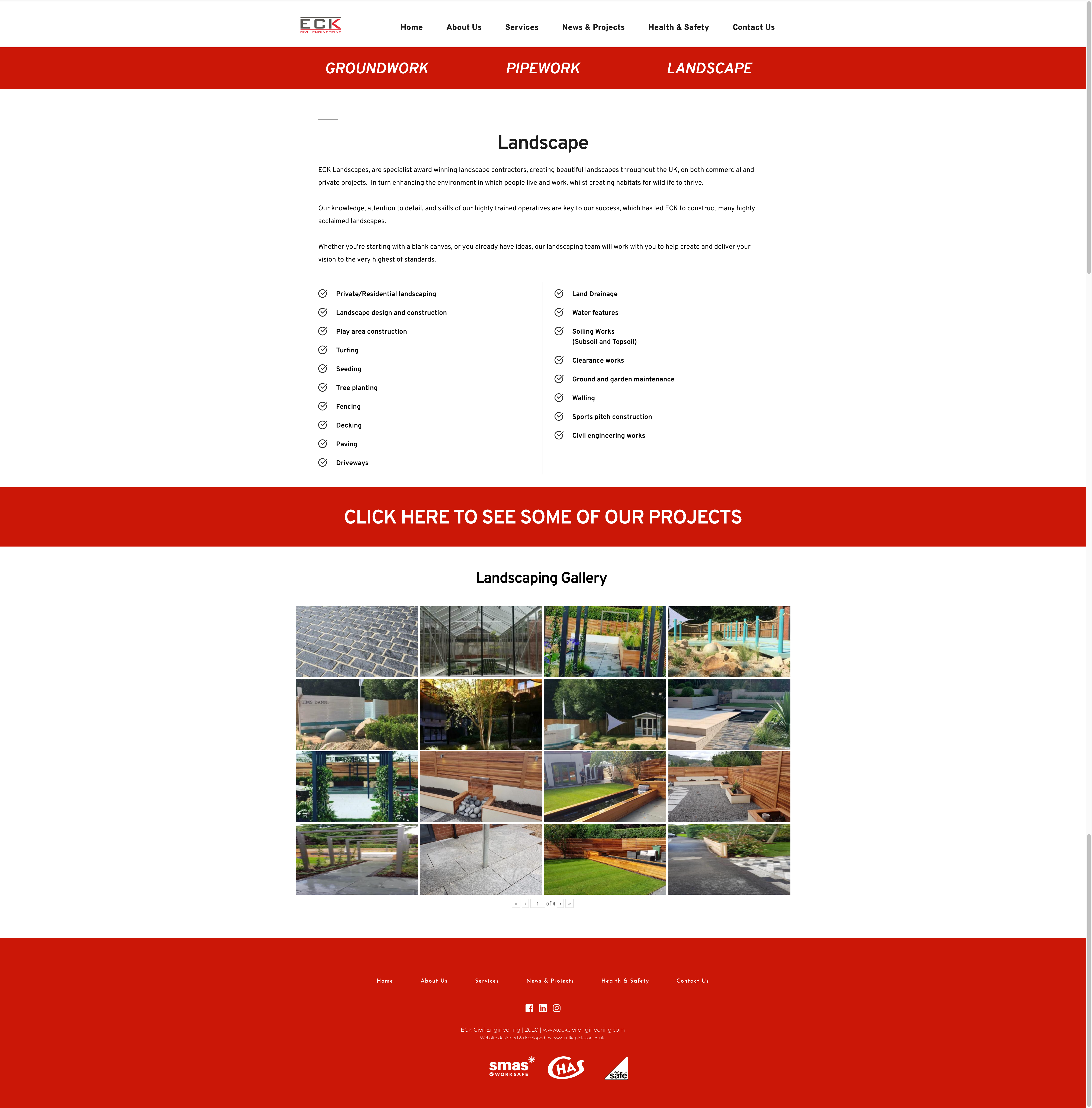
An example is on his page: https://www.eckcivilengineering.com/services/landscapeGray line also appears on mobile site too - but not when im in brizy edit mode.
0 -

Hello Mike,
Thank you for reaching out!
Regarding the problem you have, we checked everything and it works fine, there are no lines! Could you please provide a screenshot with what exactly do you see and what lines you are talking about? Besides this, if you have any problems or questions other than this, please feel free to ask!
Best regards,
Doina
0 -
This issue has been hanging for months and no solution so far. The issue is those lines appear on high resolution screens which most people are going to switch to. Brizy is obviously going for Cloud fantasies, not many people need that but ok, ignore major issues?
0 -
Natalia acknowledged the issue but said it's not the priority. Seriously? It's been months.
0 -
Hello Dmitry,
Thank you for contacting us once again.
Regarding the problem you have, you can check Mike's site in 4K in this link https://static.md/a5bd9cfecf963d4e1c7edc048d334eec.png and see that there no issues. Besides this, why do you think we ignore the problems? We are working very hard everyday and have a lot of questions that we deal with, and still, we make a priority each of our custumer. If you ever felt that your problems or questions were ignored, we are deeply sorry, but usualy we work on things that are indispensable. If a you have a question or problem, please feel free to ask and we will get back to you as soon as possible!
With that being said, i wish you have a nice day,
Doina
0 -
Hi there. In your screenshot you can actually see the line I’m referring to. It’s below the word “Groundworks” - just a small grey line.
That’s not in the site builder and shouldn’t be there. That’s repeated a few times on a few different pages.
0 -
Hello Mike,
Thank you for coming back to us,
Regarding the issue that you have, please see this link https://jmp.sh/WP37JHg. You can see in the CSS that the lines come from the default WordPress Twentynineteen Theme. So you see, the problem is not in Brizy (as a lot of questions that come from or are related to WordPress) but in other plugins and themes. If you do not need the functional from the themes, you can chose the Brizy Starter Theme, that will eliminate all the unnecessary things. https://github.com/ThemeFuse/Brizy-Starter-Theme
If you need the functional from themes, you can use this https://creativethemes.com/blocksy/
And if you do not want to change the theme, you should add Custom CSS and eliminate the lines from Twentynineten.
Brizy is an effective plug-in and we put a lot of work and dedication so you will have the best product! As well as our Support for customers that is working hard every day and is dealing with a lot of issues, that sometimes are not even related to us. By that being said, I hope you understand that everything is good and you do not need to worry for anything,
Have a nice day and best regards,
Doina
0
Please sign in to leave a comment.
Comments
10 comments