page block anchor link doesn't work

Hi, the small arrow on this page: https://www.bimlabs.ca/solutions#takeoff should navigate to the section right under it. It used to work. I randomly checked today only to realize it's now broken. I tried to re-establish the link but it still doesn't work. Can you look into it please?
Thanks
-

Hi,
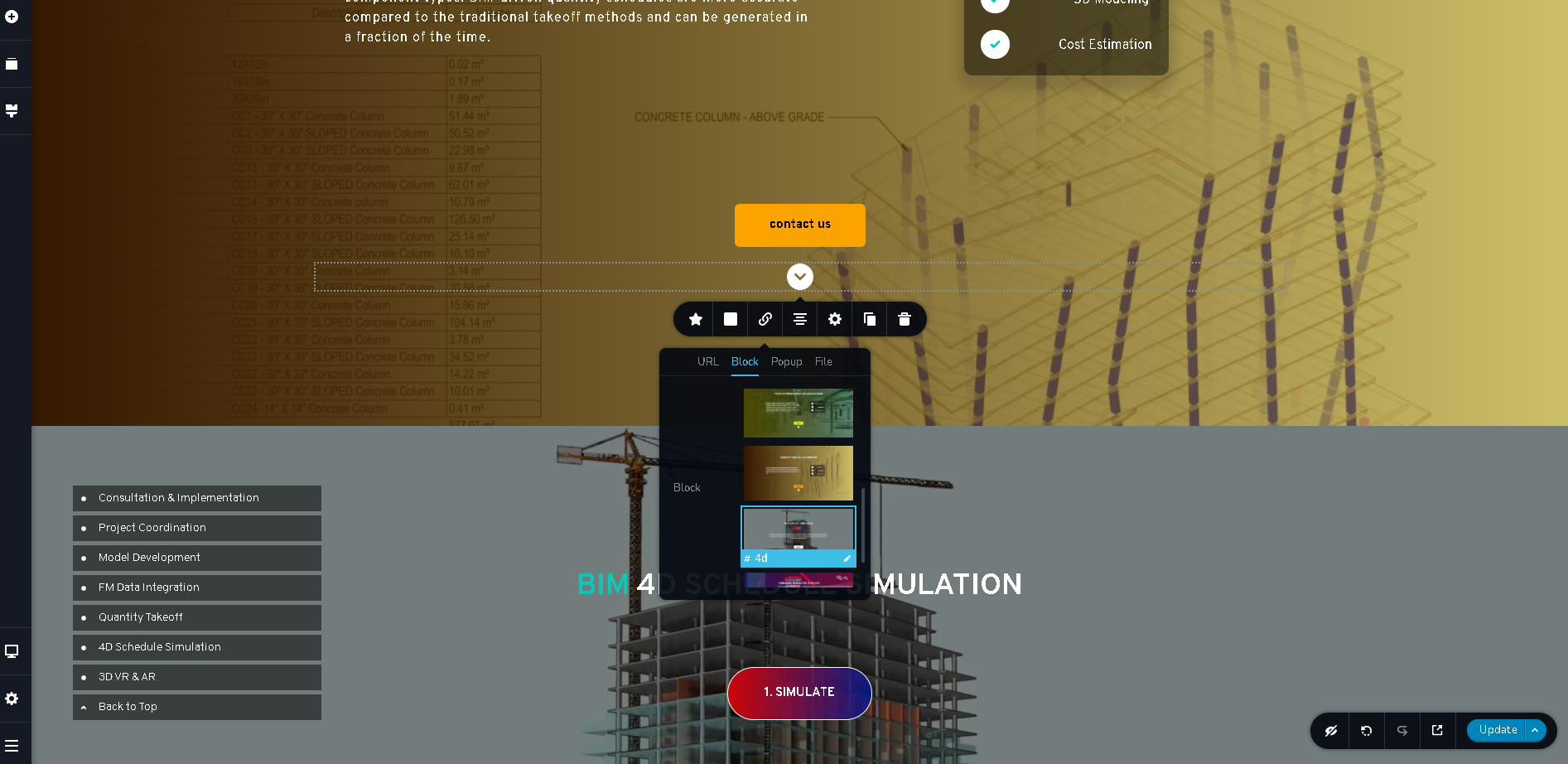
Could you please send us a screenshot from the editor of how did you set the anchor link?
Thanks!
Best regards,
Sandra0 -
Hi, please see the screenshot below.
 0
0 -
Hi,
We checked the entire page with all blocks and anchor link and we found that all are working fine, except this link to the "#4d" block. See here. Could you please change the block id from "4d" into another that doesn't start with a number? The Block id shouldn't start with the number and should be unique.
Also, could you please check if you have the latest versions for Brizy Free 2.2.10 and Brizy Pro 2.2.7?
Thanks!
Best regards,
Sandra0 -
Perfect! I changed the block name and it's now working. Thanks for the help!
0 -
Hi,
Thank you for updating us regarding this issue! Great to know that all is working fine now!
Best regards,
Sandra0
Please sign in to leave a comment.
Comments
5 comments