Menu text won't change font and size

Hi there,
when I implement menu cart in the menu, font and font size can't be changed
Thank you,
Jovana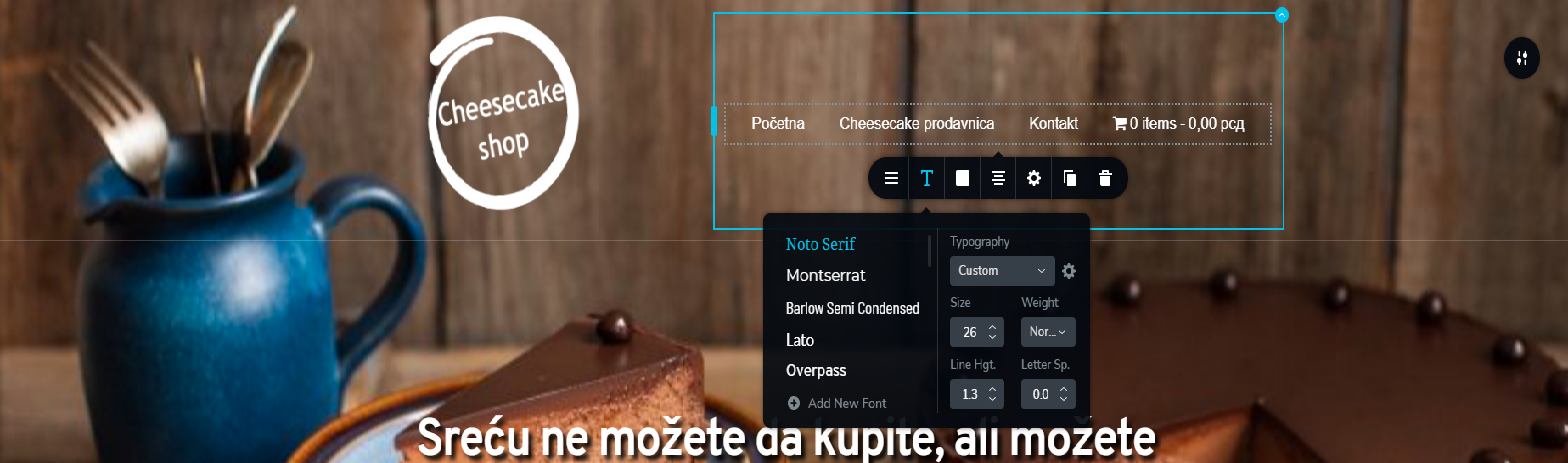

-

Hi Jovana,
How did you add the cart to the menu? Did you use any plugins for this?
0 -
Yes, I used WooCommerce Menu Cart plugin.
0 -
Hi Jovana,
This is a third-party plugin so there could be some conflicts. I tried to test, but I can't display it in a Brizy menu. Do you have the PRO version of their plugin? In any case, I would recommend using the Cart element: https://jmp.sh/Ox5qXAV because even if we test the plugin and there are some problems, we can't have an instant fix.
0 -
Hi,
No, I don't have the PRO version of WooCommerce Menu Cart. When you install the plugin, you should choose, in plugin options, which menu you want to add the cart icon. Then, in Brizy, you should, add again a menu, and then will show you the cart icon in the menu.
Also, I don't have the PRO version of Brizy, so I don't have the option to add woocommerce cart element.
0 -
Hi,
The interesting fact is that it does not work with Brizy PRO. Works only with the menu item from Brizy Free. In any case, I have no fix currently for this. I will create an internal issue and maybe our developers will take a look at this plugin. In the meantime, you can try customizing the menu with custom CSS.
0
Please sign in to leave a comment.
Comments
5 comments