Brizy PRO missing "PRO elements"

Hello,
I am unable to add PRO elements such as "timeline" or "wordpress posts". They are missing.
I downgraded Wordpress from 5.7 to 5.6, because of post formatting problem (no spacing). Also I am running PHP 7.2.24, I downgraded from 7.4.16, because many functions of Brizy stopped working properly.
I am using latest Brizy Free 2.2.9.1 and Brizy PRO 2.2.6.
EDIT 21.03 CET 23:16:
I was looking for errors in "Chrome Developer options" and found that Brizy PRO scripts don't use https for loading pro scripts, so Chrome is disabling it for insecurity.
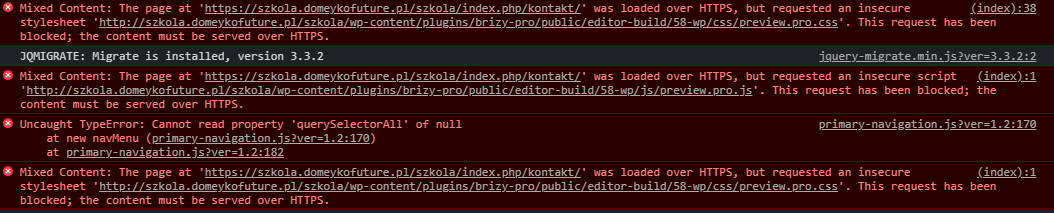
After installing simple plugin called "SSL Mixed Content Fix" it replaced http (in Brizy PRO) with https and now I can see PRO elements in editor.
Best regards,
Mikolaj
-

Hi,
Thank you for updating us regarding this problem. Great to know that all is fine know.
From the errors you show us from the Console, I can suppose that your site was set-up with an SSL certificate but the Site URL and WordPress URL from the WordPress settings didn't update with the HTTPS and remain with HTTP. For this reason, appeared this problem. When you added the external plugin "SSL Mixed Content fix" it fixed this inconvenience and replaced these values. For checking, you can go to the Settings -> General and check the URL address and WordPress address. See here.
Best regards,
Sandra0 -
Hi Sandra,
I had https in "General Settings" in Wordpress before installing "SSL Mixed Content fix". Other plugins provided their scripts with https. Only Brizy PRO has this problem.
Best regards,
Mikolaj
0 -
Hi,
Thank you for all these details. Unfortunately, we didn't encounter this problem on our sites and can't reproduce it but if you are still facing it and you want we check this problem from your dashboard, let us know and we will create a private ticket for your request. But firstly, please, deactivate the "SSL Mixed Content" plugin, delete the site cache, check the "Settings - General" if there you have the HTTPS for the Site URL and WordPress URL, save the changes and check again the Brizy pages.
Thanks!
Best regards,
Sandra0
Please sign in to leave a comment.
Comments
3 comments