How to remove 'Lato' as base-font?

Hey!
I use 'Overpass' and 'Montserrat', but 'Lato' is still the base font and gets applied to some elements (for example the Breadcrumb on Product Pages).
How can I change it from Lato to Overpass?
Please find a screenshot of the corresponding CSS.
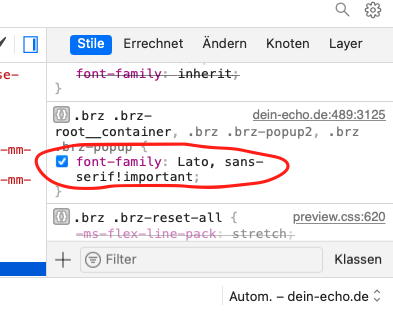
Thanks in advance and best Regards
Patrick
-

Hi,
At the moment, the Lato font is the one that can't be deleted from the editor because it is used inside the editor. We are working to improve this aspect and in the future you will be able to delete the Lato font too.
Regarding the font for the breadcrumbs element - did you use the Brizy breadcrumbs element? In this case, you can select another font and customize the typography for the Breadcrumbs element. See here. In this video, I added the breadcrumbs element in the template for products.
Best regards,
Sandra0 -
Thanks for your fast response! Everything is clear.
0 -
Happy to help!
Best regards,
Sandra0
Please sign in to leave a comment.
Comments
3 comments