Back to Top popup

Hi,
I've created an icon popup as a transparent overlay for all pages that takes you back to the top. The trigger is set to - On Scroll, Down, 30 and the icon link set to #header. The condition is set to Include All.
This mostly works. On first load the icon will appear after you scroll 30%, click and it takes you back to the top, but now the address is domain.com/#header and the icon doesn't appear again. If I remove #header from the url and reload the page, it appears.
The second issue is that it doesn't disappear if you scroll past 30% and manually scroll back up. Once you've passed 30 it will always show.
Any solutions for these issues?
Thanks.
-

Hi,
1 - I can suggest to set-up the link for the icon in such a way as "#header" without the domain name. If you have the same header with the same Block name on all pages, you can't use the long form of the link because it will reload the entire page.
2 - As it is a pop-up, once it has appeared it can't disappear when you are on the top of the page. Unfortunately, this behaviour can't be changed.
Best regards,
Sandra0 -
Hi,
Thanks for the info. The link is set-up in that way, it only has "#header".
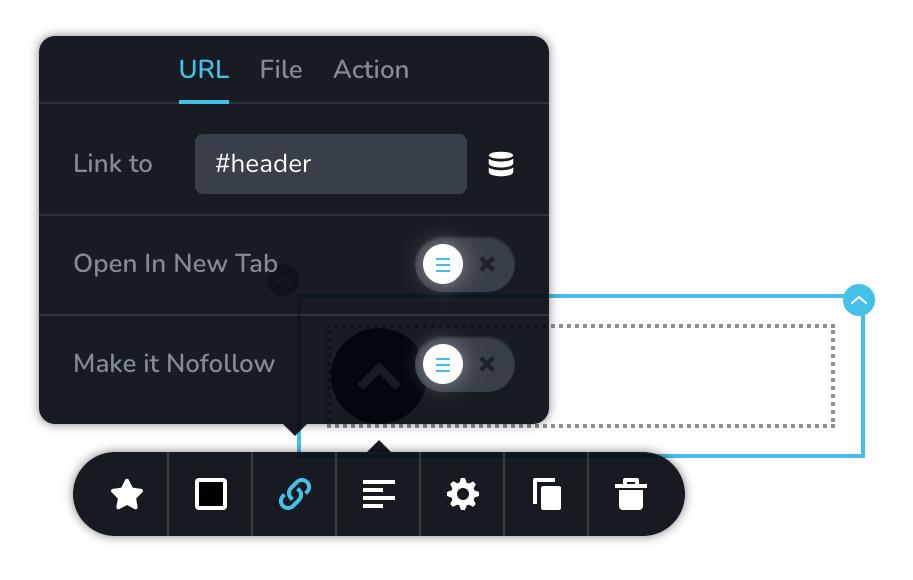
I'm attempting to use this on a single page site. Clicking the button will take you to the header but also adds "#header" to the URL and for some reason the popup refuses to appear on any domain that includes the block ID.
It's a shame about the behaviour, this could be really useful if this changed at some point.
Best regards,
Sam
0 -
Hi,
Yes, it is right and at the moment it isn't possible to hide the "#header" from the URL because it is an anchor to the first block. In such a way it is working and mostly this is a useful workaround at the moment. If you want to make it working on all Brizy pages, I suggest, to go to each page and give the Block Name "header" to all first blocks.
Best regards,
Sandra0 -

Hi,
I have a workaround for those interested.
Do not set any link to the icon.
Set the CSS ID as "scroller".
Place a EMBED CODE element UNDER the icon.
Paste the following code in the Embed Code element (you can make it slower by increasing the number mentioned in the comment):
<script>

const scrollToTop = () => {
const c = document.documentElement.scrollTop || document.body.scrollTop;
if (c > 0) {
window.requestAnimationFrame(scrollToTop);
window.scrollTo(0, c - c / 5); //the bigger the number the slower the scroll
}
};

document.getElementById("scroller").setAttribute("onclick","scrollToTop();");</script>
0 -
Hi Rick,
Thank you for your implication and your tip&trick!
Best regards,
Sandra0 -

Thank you to Rick. I used the code today and it works fantastic.
0
Please sign in to leave a comment.
Comments
6 comments