Display the current year on, my footer

Hi,
Id would like to show the current year on my footer.
I have this code on the blocksy theme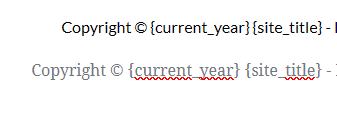 How can I display the current year on my footer?
Thanx in advance
-

Hi,
You can use this script inside the text element, to display the current year:
<script>document.write( new Date().getFullYear() );</script>
Best regards,
Sandra0 -

I couldn't work out how to get the above to work, the following works in embed on WordPress, only shows the year when you preview the page
<div>©<script>document.write(new Date().getFullYear());</script> Company Name.
</div>0 -

Hello Sonia,
Thank you for contacting us.
I'm sorry but our dev team is very busy at the moment and they can't check the code. As long as the code works correctly in preview mode I don't see a big problem here. Also, many codes show only in preview but not in editor mode.
Best regards, Nelea.
0 -

Hi Sonia
You can try this code.
<style> div {text-align: center;} </style>
Copyright ©
<span id="footer-year"></span>
<img src="/error_source.jpg" style="display: none;" onerror="document.getElementById('footer-year').textContent = new Date().getFullYear();">
Jean-Pierre Michael.
All rights reserved
This should give you the copyright notice "Copyright © 2022 Jean-Pierre Michael. All rights reserved" Change it according to your need
0
Please sign in to leave a comment.
Comments
4 comments