Woocommerce Shop page issue when using brizy template adn Brizy-starter-theme

Hello,
I've notice an issue with woocommerce shop page when I try to use brizy to manage the shop template
Step to reproduce :
- Fresh wordpress install with woocommerce, brizy free and pro, and brizy starter theme.
- Create a shop template with brizy and apply it to woocommerce default shop page (Brizy template select display conditions > Product archive > include de shop page)
- View shop page in frontend the brizy template is showing well but also the woocommerce default template too
I manage to remove the woocommerce default content when I change in /wp-content/plugins/brizy/public/views/templates/brizy-blank-template.php line 27
`<?php if ( is_category() || is_archive() || is_tag() || is_404() || is_search() || is_home() ) : ?>
`
with
`<?php if ( is_category() || is_archive() || is_tag() || is_404() || is_search() || is_home() || is_woocommerce() ) : ?>
`
I've try to override the template by adding a new folder page-templates and a new brizy-blank-woo-template.php template in the brizy starter theme but no luck.
I'll send this issue to the brizy-starter-theme on github too.
Please can you provide a fix for this issue cause my change will be lost on next update Thx !
-

Hi,
If I correctly understand you want to design the SHop page with Brizy. Could you please remake the Brizy template set-up for Shop page by following these steps?
1 - Set up un the WooCommerce settings what page do you want to set as "Shop page" https://jmp.sh/bdxiyGA;
2 - Go to Brizy -> Templates -> Add new and create a template https://jmp.sh/V7gT3G2;
3 - In the template add a suggestive name and most important add the right display condition. For the Shop page, you have to select the Product Archive and from here add the "Include -> Shop page". See here https://jmp.sh/mcF5TiR. Don't forget to click on "Add" and after this on the "Publish" to publish the template;
4 - Inside this template, you have to add the elements you want to display on the Shop page (header, footer, block with Archive element - we suggest adding this element because it will select all products from all category and will display on this page) https://jmp.sh/xMRRb1G.
One important tips&tricks, on the Shop page from "Pages", you shouldn't have activated the Brizy editor. If for the Shop page you see this https://jmp.sh/b5qtE9p, please deactivate the editor for this page in such a way https://jmp.sh/9a5TgwQ.
Best regards,
Sandra0 -
Hi thx for your response I've tryed what you said but with no success
I can give you my credential if you want to check the issue by your self you have to know that I modify a file to make it work :
in /wp-content/plugins/brizy/public/views/templates/brizy-blank-template.php line 27
`<?php if ( is_category() || is_archive() || is_tag() || is_404() || is_search() || is_home() ) : ?>
`
with
`<?php if ( is_category() || is_archive() || is_tag() || is_404() || is_search() || is_home() || is_woocommerce() ) : ?>
`If i remove the fix the shop is displayed twice
0 -
Hi,
We don't recommend deleted or modifying something in the WooCommerce or Brizy files or folders. This action can generate some inconvenience or problem in working with WooCommerce pages and products.
From your primary message, you said that you want to design a Brizy template for the Shop page but you added this display condition "Brizy template select display conditions > Product archive > include de shop page". This isn't the right condition for the Shop page. To apply the template on the Shop page, you have to add this condition:
Template type: Archive;
Display condition: Include -> Shop page.See here. You can overview and re-check the steps I provide for creating the template for the Shop page. I was doing it in such a way and all are displaying fine.
Best regards,
Sandra0 -
Hi Sandra,
Thx for your response but I think there is an issue, you tell me :
"To apply the template on the Shop page, you have to add this condition:
Template type: Archive;
Display condition: Include -> Shop page. "But It's not possible to : Include > Shop page with the Archives template type
On the screenshot you send me you choose type Products Archives (not archives) to display the include > Shop page condition.
Please can you recheck for me THX
0 -
Hi,
Yes, I'm sorry for my little mistake :). I want to say "Template type: Product Archive", but great I also send a screenshot to illustrate better and practically how should be created the Display condition for the Shop page.
Let us know if we can help you with something else.
Best regards,
Sandra0 -
Hi,
I'm sorry but it dosent works I've done everything you said and I still have the issue
please can you help me I send you some screenshot of the issue for better understanding :
As you can see on the front the shop content is duplicated there is the brizy template and after the footer the woocommerce default content shop page

The Shop page is not a brizy page

And the template as the right display conditions
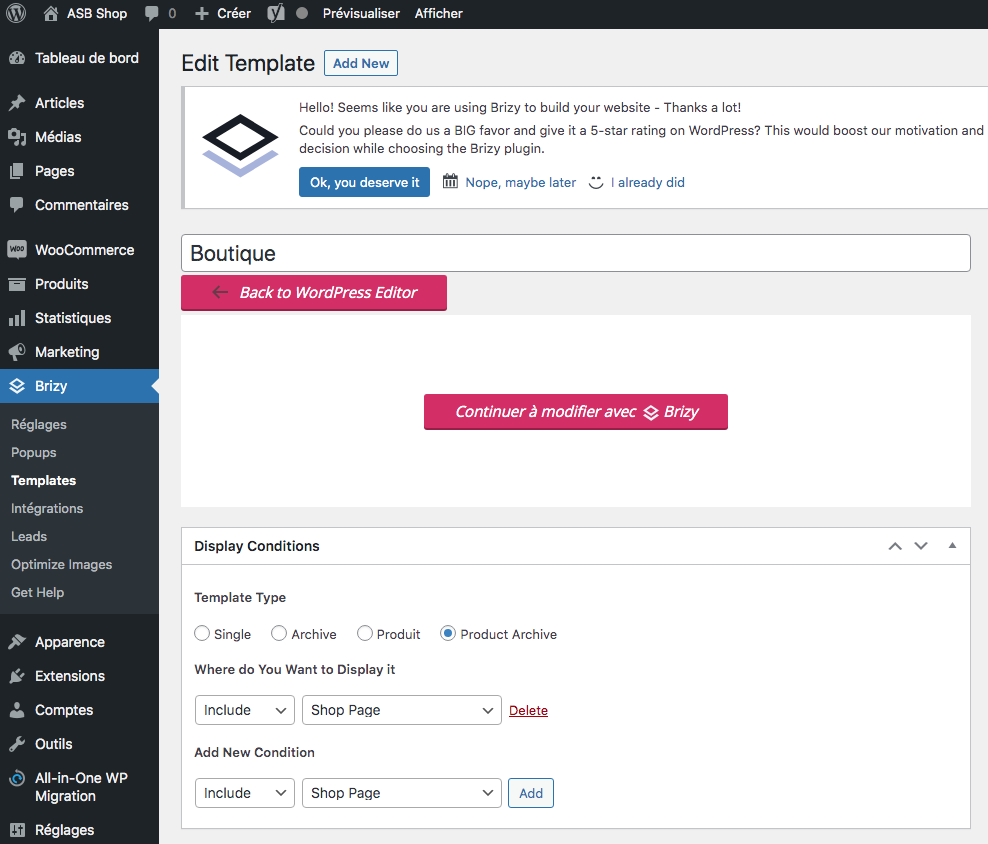
Here is th url of the front https://asbshop.fr/
The only solution I found that works is to add " is_woocommerce() " condition in brizy-blank-template.php
I've been using the Brizy starter theme without any modifications.
Please can you check the issue I can provide you my credential if needed
THX !
0 -
Hi,
In your very first message, you say us "
I manage to remove the woocommerce default content when I change in /wp-content/plugins/brizy/public/views/templates/brizy-blank-template.php line 27
`<?php if ( is_category() || is_archive() || is_tag() || is_404() || is_search() || is_home() ) : ?>
`
with
`<?php if ( is_category() || is_archive() || is_tag() || is_404() || is_search() || is_home() || is_woocommerce() ) : ?>
`
I've try to override the template by adding a new folder page-templates and a new brizy-blank-woo-template.php template in the brizy starter theme but no luck."Could you please restore the initial state of all folders and files you deleted or changed? After you will save and will restore the files and folder to their original state, structure and code, could you please check again the shop page?
Thanks!
Best regards,
Sandra0 -
Hello,
The screenshot I've send you is after restoring the initial state of all folders and files I deleted or changed.
And I still have the issue even on a fresh wordpress install
0 -
Hi,
Thank you for all these details! We would like to check this problem from your dashboard. Could you please send us the WP credentials to this site?
I have created a private ticket for this request. You had to receive a notification regarding this by email. Could you send us in that private message the WP credentials to this site?But firstly, could you please temporarily deactivate all external plugins (except Brizy Free, Brizy Pro and WooCommerce) and check if you have the latest Brizy Free 2.2.9.1 and Brizy Pro 2.2.6 versions? do you still have this problem?
Thanks!
Best regards,
Sandra0
Please sign in to leave a comment.
Comments
9 comments