Fix Icon Alignment

Hey, so Brizy's icon alignment for icons that should be inline with text (buttons, for example) places the center of the icon towards the bottom of the text. This means that when you add an icon to a button, it looks like it's in the wrong place. Can we clean up the vertical alignment of these kinds of icons so they align to their associated text?
-

Hi,
Could you please check if you have the latest Brizy Free 2.2.9.1 and Brizy Pro 2.2.6 version? Could you please send us a screenshot of this problem and the URL link of the page where we can check this problem?
Thanks!
Best regards,
Sandra0 -
Hey Sandra, yep sure. I have a lifetime licence and the issue is pervasive over the eight sites I manage using Brizy. Here's a screenshot. The issue is still present in 2.2.9.1 and Pro 2.2.6
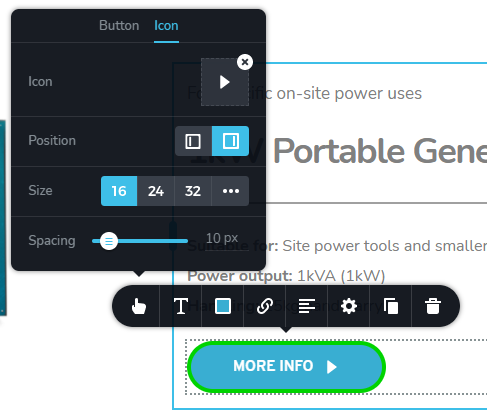
You can see the center of the arrow icon isn't vertically aligned to the text. If you reduce the size of the icon further, it looks like the alignment is set just above the text line:
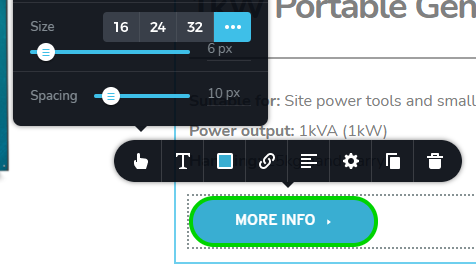
You can see the issue here: https://benjaminlindley.co.uk/#Contact
0 -
I've done some more digging after following your requests and recreating the problem. The issue is dependent on the font used. The font Montserrat displays inline correctly, but the font Overpass for example, does not. Can you try that at your end?
0 -
Hi,
I tried to reproduce the problem you reported but all seems to work with Overpass font too. See here.
Best regards,
Sandra0 -

I also encountered this. The icon is skewed below with some fonts, for some other fonts they work normally
0 -
Hi,
Could you please check if you have the latest Brizy Free 2.2.9.1 and Brizy Pro 2.2.6 version? Also, could you please temporary deactivate all external plugins (except Brizy Free and Brizy Pro) and activate a WordPress default theme? Do you have the same problem? Could you please send us the URL link of the page where we can check this inconvenience?
Best regards,
Sandra0 -
Is this a browser-specific issue? I still have this problem when viewing websites in Chrome (they're all up-to-date), but no such problem when viewing the same page in Opera. I'm viewing without being logged in. Sandra, does this help you guys recreate the issue?
0 -
We tested this inconvenience in the Chrome browser and all is working fine, as you can see from the videos provided by me before. Could you please try to delete the site and browser cache and check it again?
Also, could you please create a test page, create a button, display this inconvenience and send it to us to check it?
Thanks!
Best regards,
Sandra0
Please sign in to leave a comment.
Comments
9 comments