Can't Figure Out Hover Effects on Column

Hello, I'm new to Brizy Wordpress and trying to figure things out as I go.
My first website is using the Starter Template called, "Guide" - https://websitebuilder-demo.net/guide/
On the page of the template, there are three icon sections…

And when you hover over an icon section, the bottom border appears…

I've been trying for the life of me to edit this bottom border. I'd like to change the colour of the bottom border on hover. I can only change the colour of the border without hover.
How do I do that? Thank you in advance.
-

Hello Robert,
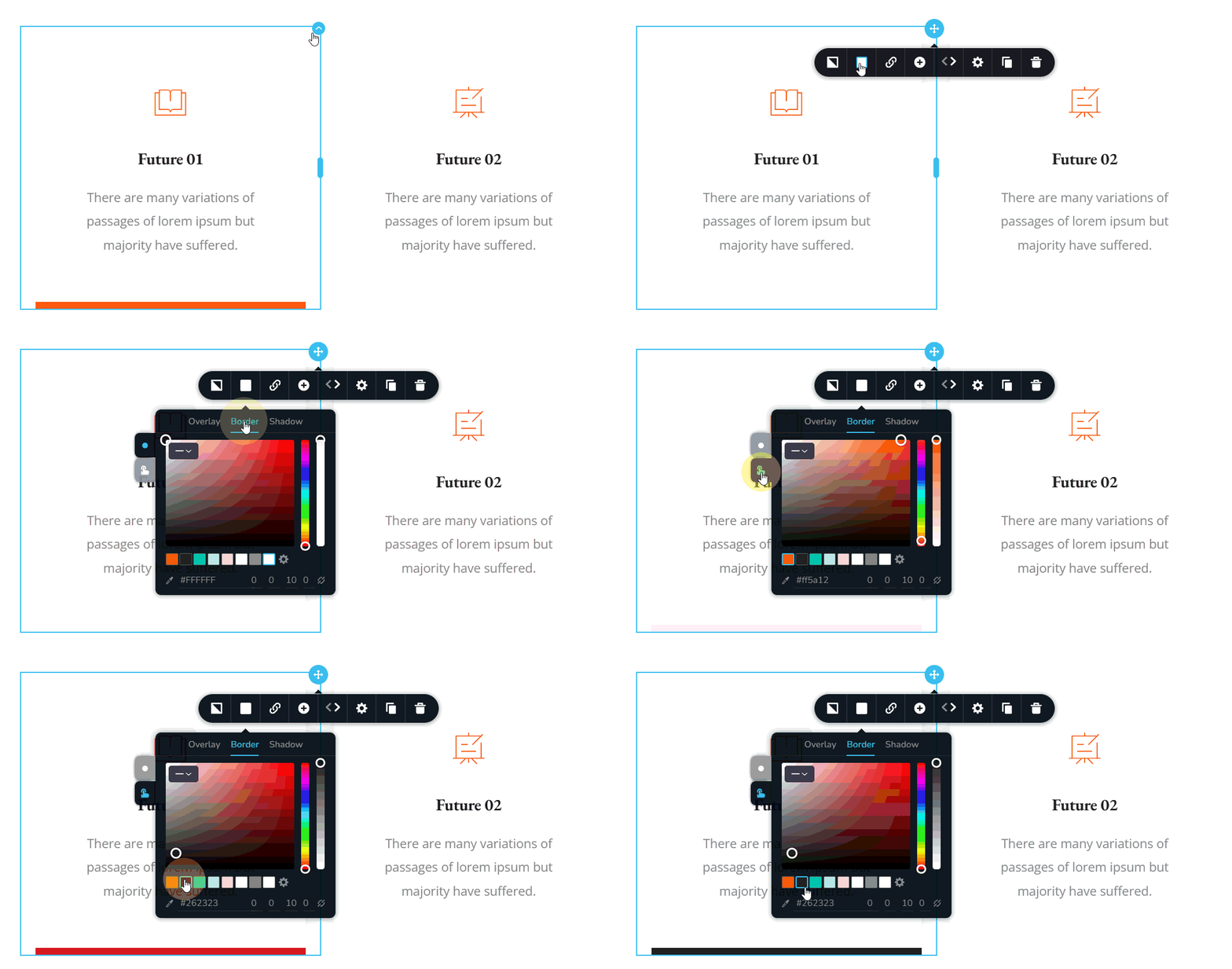
You can change the hover border color of a column by following these steps
- Click at the top right corner of the column where you want to change the border color
- In the toolbar that pops up, select the "color" icon
- A color pallette will popup. Select "Border" tab.
- Click on the "Hover" icon on the left and change the hover color.
 1
1 -
OMG! That's what that icon is for 🤦🏽♂️ I was wondering. LOL.
Thanks for your answer and video showing me what to do. Thank you.0
Please sign in to leave a comment.
Comments
2 comments