Brizy Cloud Redirect /index.php to /

I have a Brizy Cloud project where we launched a new website for a client. This client had an older website where the homepage was at "/index.php" - is it possible to add a redirect in Brizy Cloud so this "/index.php" is redirected to the homepage "/"? I tried adding this in the redirect section of the Project settings, but it's still showing an error.
Here's a screenshot of the redirect settings: https://share.zight.com/GGugGvNz
I get this error when I go to "clientdomain.com/index.php" https://share.zight.com/lluLGvDe
Let me know if you have any questions. I can send you the client domain/url if needed.
-

Hi,
Thank you for contacting us.
Could you please send us the client domain/URL so we can further check the issue? Brizy Cloud currently does not properly handle redirects using PHP-based paths such as:
/index.php /
As an alternative workaround, it is also possible to handle this using JavaScript if needed, though this would be considered more of a last resort compared to a proper redirect rule.
Once we have the domain, we’ll take a closer look and advise on the best approach. If you prefer to send the details privately, you can send them to communitysupport@brizy.io and add the reference number 35888389642770 in the subject line so we can quickly locate your request.
Looking forward to your update.
Best regards,
Ariel H.0 -
Hi Ariel, the client domain is tricityautoglass.com.
Let me know if you need anything else!
0 -
Hi,
As an alternative solution, we would recommend that you use CloudFlare for DNS and try to set up a 301 redirect.
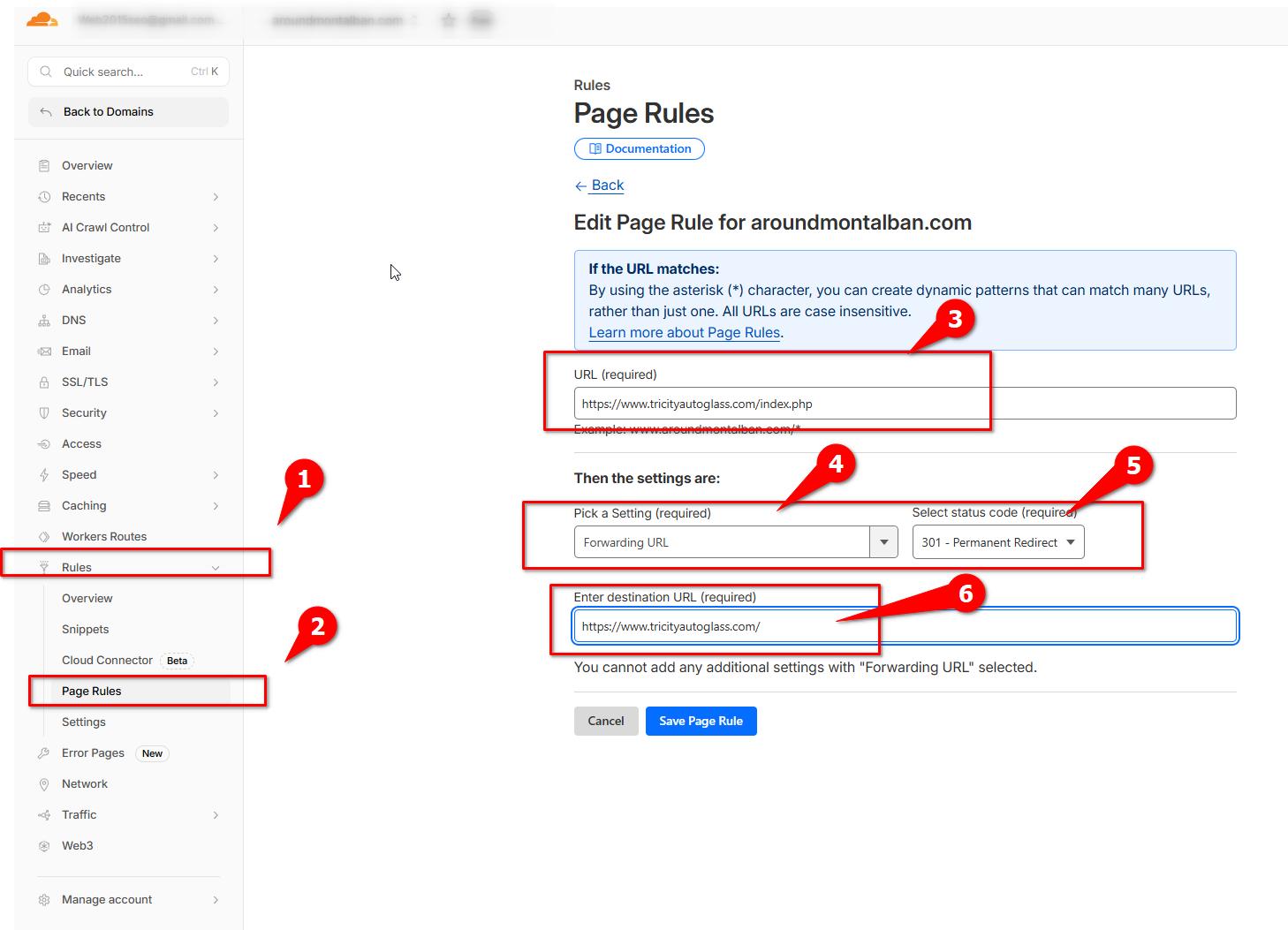
You can follow the steps demonstrated in this video tutorial:
https://www.youtube.com/watch?v=1dtgyllyQj4This should help redirect /index.php to the homepage.
Please let us know how it goes or if you have any further questions.
Best regards,
Ariel H.0 -

You can also try creating a file called:
.htaccess
Put this in the contents of that file:
RewriteEngine On
RewriteCond %{REQUEST_FILENAME} !-d
RewriteCond %{REQUEST_FILENAME}\.html -f
RewriteRule ^([^/]+)$ $1.html [L]0
Please sign in to leave a comment.
Comments
4 comments