Background image does not resize automatically

Hi Brizy, I have a problem with a home page, the background image does not resize automatically, even after I set it for auto, any suggestions as what else I can do so it can resize and fit in different size desktop monitors? For mobile and tablet I adjust it accordingly, this is the website:
https://havanaenclave.com/
Also, I am having a problem with playing a video that is also on that page, in other desktops it does not play at all, is there something I need to prepare the video?
Please, any help will be much appreciated and I can give you access to Admin if necessary.
Regards, James B.
-

Hi James,
Thank you for reaching out.
To help isolate the issue, could you please check if the problem can still be replicated after temporarily disabling all third-party plugins except Brizy and Brizy Pro? We also recommend temporarily switching to another theme to see if there may be a conflict causing the background image resizing and video playback issues.
If the issue persists, please provide temporary WP Admin access so we can further investigate it on our side. Kindly send the following details to communitysupport@brizy.io:
Community post link: https://support.brizy.io/hc/en-us/community/posts/35881036061970
WordPress Admin URL:
Username:
Password:We’ll be glad to assist as soon as we have access.
Best regards,
Ariel H.0 -
Hi Ariel, thank you for the fast response, I changed the theme but it still has the same issue and disabled all the plugins and nothing still the same, I just send you now the temporary access to the email above.
0 -
Hi James,
Thank you for your cooperation.
Upon checking, the issue occurs because the hero block currently has a very large top padding value (1789px). While this may look correct on the front end, it makes the background image non-responsive and prevents it from scaling properly based on the screen size.
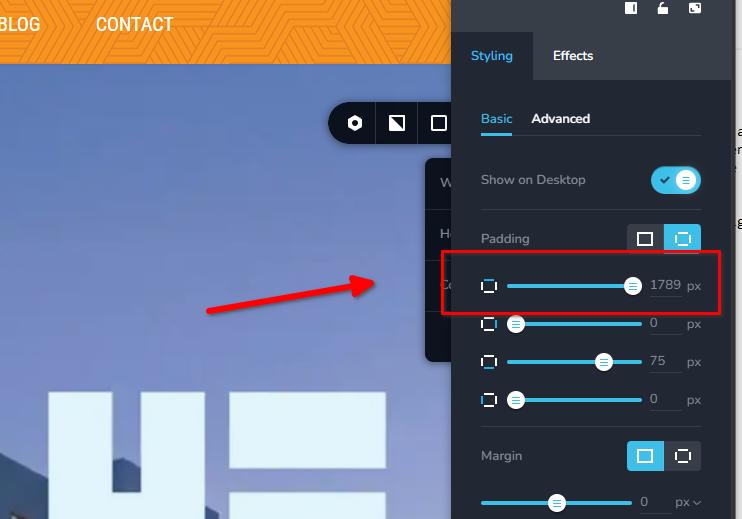
Instead of using large padding values, we recommend setting the entire block to "Full Height" and using a Spacer element inside the hero block instead.
This is demonstrated on the _test page, and we've created a screencast here:
https://youtu.be/dbCl2RagX3MThis works better because the background image can resize naturally, full Height also allows the hero section to adapt dynamically to different screen sizes. Additionally, we recommend updating the aspect ratio of the background image to 16:9, which usually works best for full-width hero sections.
About the video issue, we found that it is related to Speed Optimizer. When the plugin is disabled, the video plays normally with one click.
We also noticed that you already have WP Optimize installed, which provides similar optimization features. Running multiple optimization plugins together can sometimes cause conflicts, especially with video playback and front-end scripts.
Best regards,
Ariel H.0 -
Hi Ariel, thank you thank you!
The image is now scaling correctly by applying full height, the only issue now is that is cut off in tablet and mobile, what can I do for those issues? The video now is playing, will take note about those plugins, you were correct as always. One last item Ariel, right below the hero image I have 3 images, Amenities,0 -
Sorry send without finishing typing, the section Amenities, Location and Residences is a bit too small, when I try to make them large all at the same time, only one can be large the rest stay small, how can I make them all the same size and larger? Thank you again.
0 -
Hi James,
Thank you for the update.
For the tablet view, you can set the block height to "Custom" and adjust it to around 500px. The background image can still remain set to "Cover," and changing the height in tablet view will not affect the desktop height.
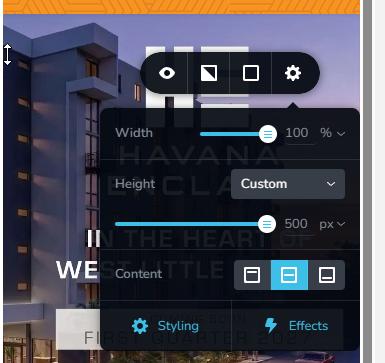 0
0 -
Perfect and I adjusted the mobile the same way and they both now display better, thank you.
What about the section Amenities, Location and Residences they are a bit too small? Thank you Ariel.0 -
Hi James,
Glad to hear both tablet and mobile views are displaying better now.
Yes, the Amenities, Location, and Residences sections do appear a bit small at the moment. We’d recommend increasing the size slightly, to make the text more readable and make the sections easier to view for all users.
0 -
Hi Ariel, I want to thank you for the help you gave this week, everything looks perfect now. Have a nice weekend. James
0
Please sign in to leave a comment.
Comments
9 comments