Problem With My Blog Posts

When I create a new blog post, it's coming out fine but i'm discovering the text body is also randomly copying itself onto older blog posts as well.I'm having to search through all my older blog posts to see if they have been affected. please see this example: https://www.thebookmarketer.pro/ethical-reviews-for-indie-authors-building-trust-with-your-readers
-

Hello Nick,
The above blog post has a global block with the heading "The Visibility Problem". This block is set to display on all pages and posts.
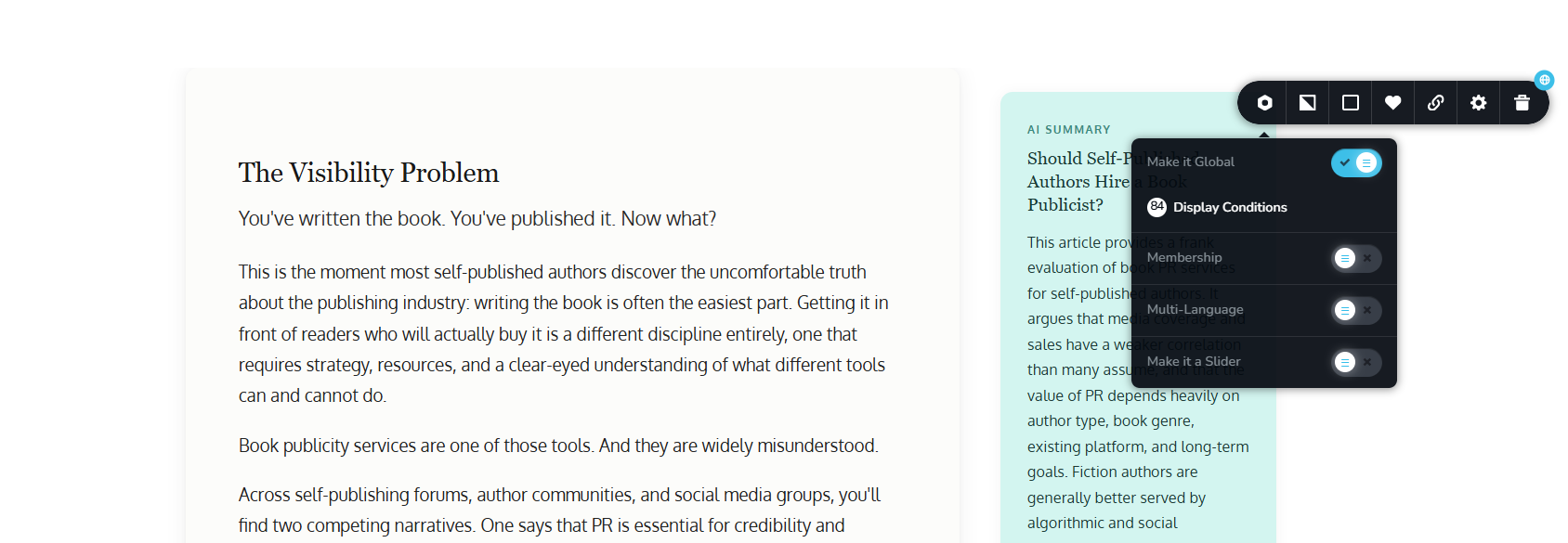
What is a Global Block? Global blocks are created once and reused across several pages/posts. For example, the header block is made once and reused across all pages and posts. As a result, it is configured as a global block. Similarly, the footer is designed once and reused across all pages/posts, making it a global block. The Display Conditions associated with a global block specify on which pages and posts the block will be displayed.
"The Visibility Problem" global block is configured to appear on all pages and posts. The first Display Condition, Include - All, sets the block to appear on all pages/posts of your website. When you deleted the block from several pages, each time, an Exclude condition was added to the block. Eg: Exclude - Pages - Home.
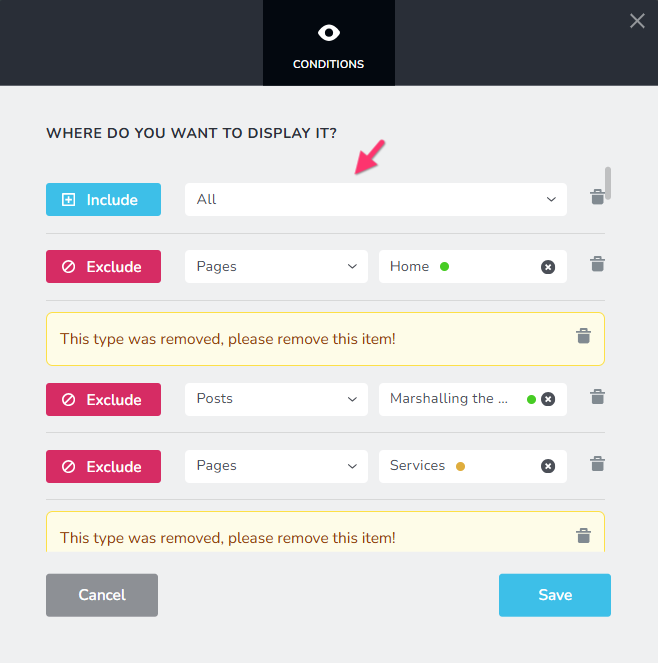
The right approach to remove a global block from multiple pages is to delete the appropriate Display Conditions. You can remove the Display Condition "Include - All" from the global block to remove the block from several pages.
How to implement the right fix?
- Open the blog post/page where the "The Visibility Problem" block is expected to be.
- Select the Block Settings icon towards the top right corner of the block (the black dot)

- Access the Display Conditions
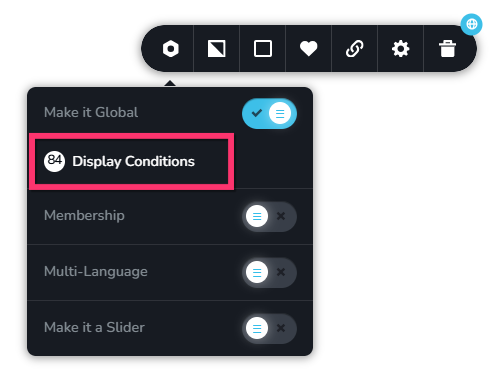
- Remove the Display Condition Include - All
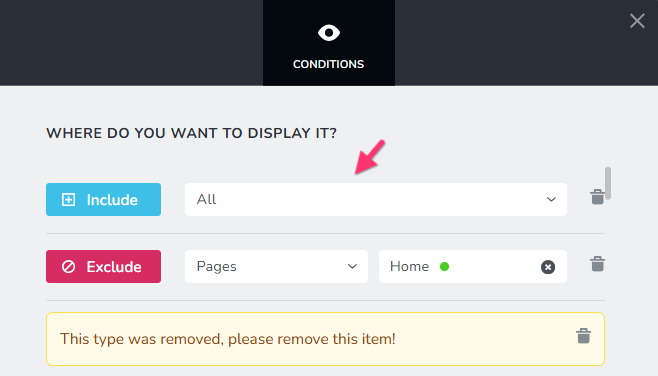
- If you want the block to be displayed on more than one blog post, add appropriate display conditions like

- Remove all Exclude display conditions and save you work by clicking on the "Save" button.
0 -
I only want the blog post on a single blog page. I've turned off the global icon but the post is still on all my other blog posts. How do i fix this situation?
0 -
It's also happened with an update i've made on my team page which has now appeared on my blog artciekls as well. Why is the changes i'm making defaulting to global when i haven't turned it on? How do I delete all these repetitions? Just switching off global isn't doing it.
0 -
Hello Nick,
The "The Visibility Problem" gloabl block still has the Display Condition Include -All.
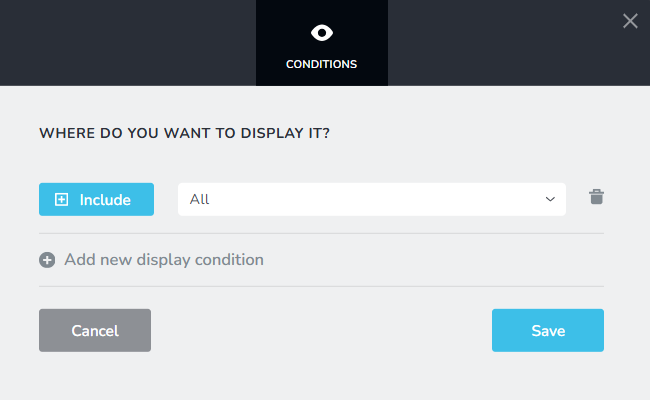
Can you please let us know the blog post where the "The Visibility Problem" block belong? We can make the change for you.
Please also let us know the URL of the team page and the specific content that is being repeated on blog posts
0 -
The Visibility Problem should only be on https://www.thebookmarketer.pro/book-publicity-services-for-self-published-authors-when-it-works-when-it-doesnt
Also the same is happening with an update I made to the About Us page : https://www.thebookmarketer.pro/about please the screenshot attached of Joanna. This bio of her needs to appear only on the about page.
Thank you
 0
0 -
Hello Nick,
I have removed the two global blocks. Please check if the two blocks are present only in the appropriate blog post and page.
0 -
HI KC now all my other blog posts are missing?
0 -
see this example below. the header remains but the actual posts which I had in a html code box has been wiped. this seems to have happend to all my blog posts:
0 -
Hello Nick,
If you feel you have data loss, we will have to restore your website from a backup. When was the last time you remember seeing the Embed content on your blog posts?
0 -
I've been working on them this morning. They dissapeared after you removed the global blocks.
0 -
Hello Nick,
Do you think the embed content was part of the deleted global blocks?
When you say you've been working on them this morning, how many hours before was it? Can you specify a time and your time zone? We will restore your website to that specific hour.
0 -
yes it must have been part of the global blocks as I copy blog posts and reedit them each time son if you deleted all the global blocks you would have deleted my posts i presume
0 -
Hello Nick,
What about restoring from a backup around 10 hours before? This would be before you attempted to delete the global blocks and I removed the global blocks?
0 -
Yes can you do that please
0 -
Hello Nick,
We checked backups starting from yesterday to all the way upto 30 days ago. None of the backups are showing content different from blog posts you have on your website currently. Recent backups show the global block which was removed with the same content.
Except for these four blog posts, it appears that all of the other blog posts' content is intact.

Do you have copies of the embed content for above 4 blog posts? Adding the embed content again would be the best option for you.
0
Please sign in to leave a comment.
Comments
15 comments