Hamburg Menu Stopped Working

Ariel wrote to give me the 'green light' that I could update all sites to the latest version of Brizy and Brizy Pro and I have just discovered that on at least one site (https://neminiskids.tempurl.host/, a site still under development) the hamburger menu slider will not appear, and the page locks until I click somewhere on the screen.
-

Hi Michael,
Thanks for the update, and sorry to hear about the issue after the update.
Could you please temporarily disable any caching or optimization plugins active on the site and check if the hamburger menu slider starts working properly?
If the issue still persists, please send us your site credentials so we can check it further on our end. Kindly send the following details to communitysupport@brizy.io:
Community post link: https://support.brizy.io/hc/en-us/community/posts/35486894238738
WordPress Admin URL:
Username:
Password:We’ll be glad to assist as soon as we have access.
Best regards,
Ariel H.0 -
Deactivating Hummingbird Pro did solve the problem, but I am not willing to leave it deactivated. I will be sending the credentials for the site via email. Thanks, Ariel.
0 -
Hi Michael,
We've disabled Delay JavaScript Execution and purged the cache. It appears to be working properly on our end now.
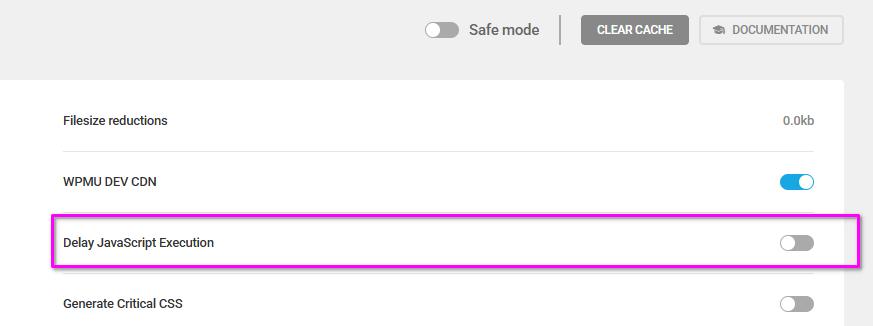
Could you please check on your side and let us know if everything is working correctly now or if you have any further questions?
0 -
The issue now appears to ONLY affect the menu in Microsoft Edge, so it is NOT Hummingbird. It works okay in Chrome (not right-justified) and in Brave.
0 -
Hi Michael,
I was able to replicate the issue on my test site. The menu items appear properly aligned in the editor, but on the front-end some items shift horizontally when the hamburger menu is enabled.
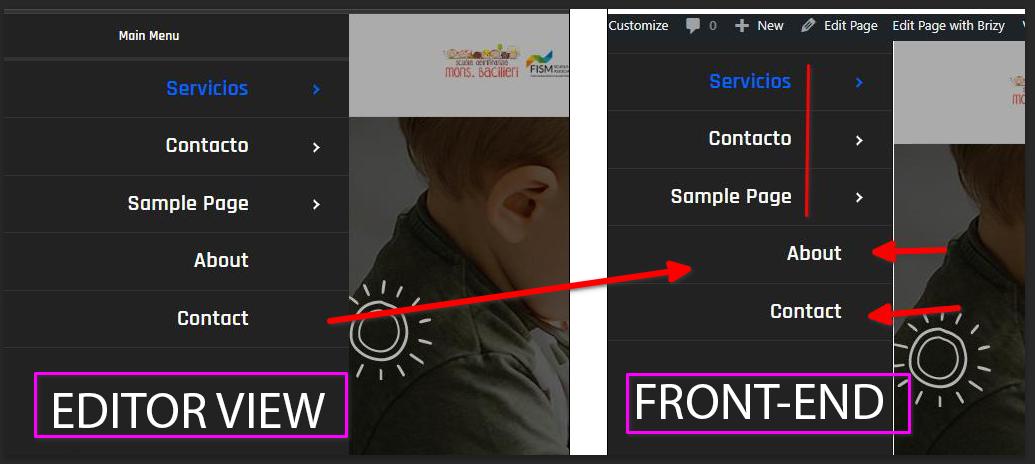
I also had a colleague look into this, and it appears to be a glitch on our side.
I’ll get back to you as soon as I have an update.
0
Please sign in to leave a comment.
Comments
5 comments