Some leads aren't forwarding to my email

Some leads on my main homepage form aren't making it to my inbox but show up in my leads list. Website: deleted (please redact).
What information do you need from me to troubleshoot?
-

Hello Brandon,
On your homepage, I see that you have 3 forms
- Form that pops up when clicking on the "Get My Free Quote" button in the header. I see that you have not configured email notification for this form. Kindly configure it.
- In the hero section. The "From Name" was not filled out in this form. Filling out this form field increases the deliverability of email notifications. I have added a "From Name" and tested the form and received an email notification. Kindly check if you received the same in your Inbox.
- In the second block above the footer: "From Name" is not filled out in this form. Kindly fill out the "From Name" and check if you receive email notifications.
0 -
I am receiving most emails, it's just a select few that don't go through. You are saying that this is likely due to the blank "from" field? I have filled it out now but the sender email has always been on my email whitelist.
0 -
Hello Brandon,
Please observe if all leads get delivered as email notifications in the coming week and let's know if the issue is resolved
0 -
If I give you a lead or two that was missed, do you have the capability to check anything behind the scenes to see if there were errors in forwarding it to my email?
0 -
Hello Brandon,
Yes, please provide us the leads, the URL of the page where the form is, and the form's location on the specific page. Before publishing your comment, we can remove the leads.
0 -
Here is one I cannot find any record of being forwarded.Your Full Name*: ...Email Address:...Phone Number*:....Address:....City:...State*:...Zip*:.....Tell Us How We Can Help*:AntsMay 2, 2026 | 09:00This is the hero contact form on our homepage (peerlesspest.com)0
-
Hello Brandon,
The above two leads came from the popup form attached to the "Get a FREE Quote" text in the normal header or the "Get my free quote" button in the sticky header.
Email notifications were not configured in the two forms. I have added email notifications configurations in both forms and tested it with the details you have provided above. I received the following email notification. Please check if you also received the same in your Inbox.
0 -
I received one email notification. Is the image you replied with publicly visible?
0 -
Yes; it is publicly visible; I have removed it.
I filled up the form just once. Feel free to test both popups. Email notifications should arrive from both.
0 -
I will test them. Please remove all images from this thread.
0 -
Done
0 -
I have a new lead that didn't forward. Please tell me where it was initiated so I can check investigate:
redact this before posting:
Your Full NameEmail Address:Phone NumberAddress:0 -
Hello Brandon,
When clicking on "Get a FREE Quote" text on your header, you see a form in a popup. The above lead may have come from this form.

Clicking on the "Get My Free Quote" button in the sticky header also opens up another form in a popup. The lead may have come from this as well.

Email notifications settings in these two forms appear correct. I am not sure why you did not receive a notification. Did you also check the SPAM folder?
0 -
I have notifications@brizy.cloud on a whitelist and don't see any emails in spam but found another several contacts that haven't come through properly.
Please redact personal info:
May 26, 2026 | 19:59Your Full Name*:Email AddressPhone Number*:AddressCity:State*:Zip*:Tell Us How We Can Help*:IMay 24, 2026 | 12:00Name*:Email Address:Phone Number*:Tell Us How We Can Help*:0 -
Hello Brandon,
I tested the "Get a Free Quote" form at the header and received the following notification.
..deleted
I tested the contact form at https://www.peerlesspest.com/contact and received the following notification
...deleted
Could you check if you received the same notifications.
0 -
Please remove that personal information and always redact personal information by default.
I do see the contacts you generated yesterday. Were they generated through the same means the orginals were and if so, did you make any changes?
0 -
Sure, I will redact personal information after you have reviewed it.
I filled out the "Get a Free Quote" form in the header as well as the form on the contact page with the lead data provided to us and submitted both. I also included my email address in the "Email To" area of the forms and then removed it after testing. Apart from that, we didn't change anything.
0 -
Is there any way Brizy could add to the each lead which section it was generated from so I don't need to ask you each time? Im still missing leads:
Name*:May 29, 2026 | 05:46andYour Name:May 28, 2026 | 12:420 -
Hello Brandon,
The first lead above originated from a form in your homepage's hero section. I tested the form with the identical lead data and received an email notification. Please check to see whether you received the same lead.
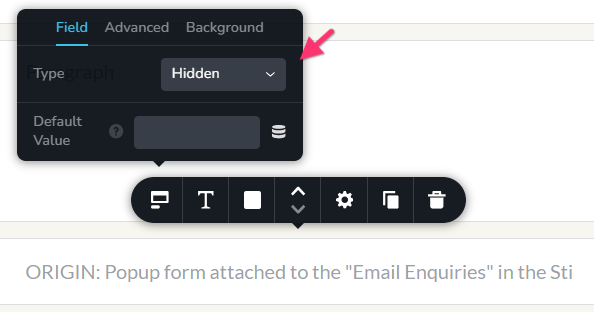
The second lead came from the popup form attached to the "Email Enquiries" text in the Sticky Header. You have not configured email notifications in this form. Kindly configure it and test the form. You can add a hidden field to each form, which can help identify its location on your website. Add a new field like in the example below and specify the form location in the field.
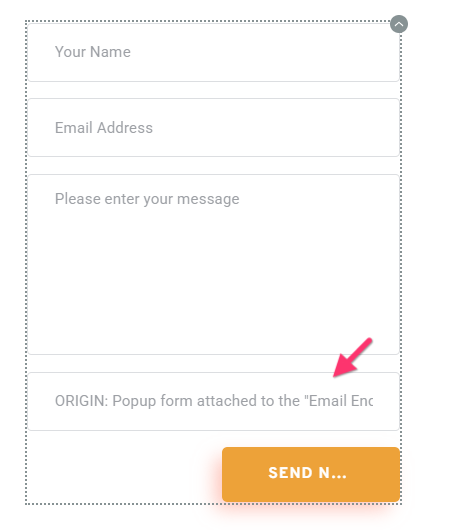 You can set the form field "Type" to "Hidden" to make the field invisible to users.
 0
0 -
I received the second one yesterday at 1:21 am EST but I received another inquiry from that name at a similar on the mid section bar form with a nonsense phone number. Are these both you?
I also wold like to understand why the original legitimate contact didn't go through but the second did.
Also, if I add that hidden form field will it show in the leads section of my brizy cloud portal? Thats the only place it would help since that's where they always show regardless of whether they are forwarding properly to my email.
I missed another lead from (redact) .... on May 30, 2026 | 14:23. Can you tell me where that was sent from?
0 -
Hello Brandon,
Before I had discovered the form attached to the "Email Enquiries" text in the sticky header, I had filled out the form at the mid section bar. That lead came from me.
At the moment, we do have clarity about why the original legitimate lead could not be delivebred to your email, while the second one did. If this continues to happen, we will need to investigate the cause behind it.
Yes; the hidden form fields will show in the leads section of your Brizy Cloud dahsboard.
The missing lead might have come from the popup form attached to the "Get My Free Quote" button on the sticky header. For some reason, changes to the popup are not getting saved; we will work on fixing this issue and get back to you.
 0
0 -
Hello Brandon,
The changes to the popup were not reflecting in the frontend becaue there were two popups involved.
- One popup attached to the "Get My Free Quote" button
- Another attached to the column around the "Get My Free Quote" button
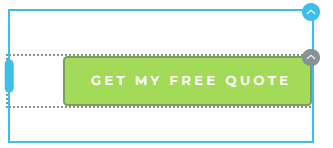
The modifications made to the form attached to the button were not reflected in the frontend since the form attached to the column was being displayed there. To fix the issue, we have removed the popup attached to the column. After that, I tested the form using the lead data you provided. I received an email with the subject line "Get My Free Quote form". Please check to see if you received the same notification.
0 -
Hi George, I did receive that lead after you re-sent it. Can you check another that got missed yesterday? Perhaps it came through before you implemented the fix.
(Redact this):
Your Full Name*:...
Jun 3, 2026 | 17:190 -
Hello Brandon,
Yes; the above lead might have come from the form which was fixed yesterday. Please continue to keep an eye on the missing notifications for a week or so.
0
Please sign in to leave a comment.
Comments
24 comments