contact from not sending

https://groundedinwellnessmassagetherapy.com/contact
contact page form wont send email. activated 2 step and have app password, treid 2 different ones. update site to latest brizy updates. have tried creating new form new page etc but doesnt seem to work. help please thanks
-

Hello Edgar,
When submitting the above form, I see "SMTP Error: Could not authenticate" in Chrome DevTools. Please see the screenshot at https://jmp.sh/j2EGSPvq. Please ensure that you have used your Gmail address as your username and Google App password as your password in the form.
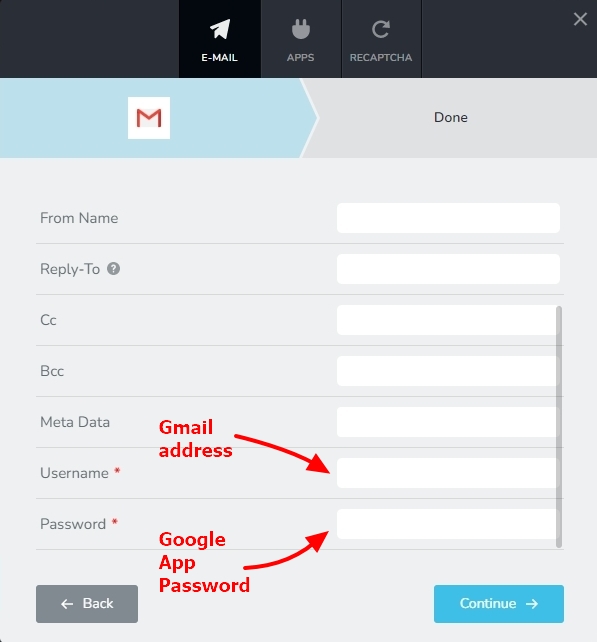
If this does not help, can we look at your WordPress dashboard to help you resolve this issue? Please add a new user to your WordPress Dashboard and send the following details to our email: communitysupport@brizy.io
- Support Forum reference: https://support.brizy.io/hc/en-us/community/posts/35317833288978
- WordPress Admin URL:
- Username
- Password
Your email must include a link to this thread's URL, otherwise we will be unable to locate your support ticket. Please notify us in this thread when you send us the email.
0 -

Hi Edgar,
Thank you for providing the login details.
We attempted to access your WordPress admin dashboard, but unfortunately, we were unable to log in using the credentials provided. Could you please review them and resend the correct login details?
Looking forward to your reply.
Kind regards,
Ariel H.0 -
Hi Edgar,
Just following up on my previous email to check if you had a chance to review it. Please let us know when you’re ready to share the details so we can proceed and help you fix the issue.
We’ve also recently released an update that addresses previously reported issues, so please make sure both Brizy and Brizy Pro are updated to the latest versions.

Let us know if this helps resolve the issue you’re facing.
Best regards,
Ariel H.0 -
Hi Edgar,
Thank you for the details.
The credentials you sent us gave access to https://www.launchstudioshq.com/ but not to the WordPress admin of https://groundedinwellnessmassagetherapy.com. Could you please give us access to the right site?
We’ll wait for your update.
0 -
i did update the plug as well, but seem to having the same issue
0 -
Hi Edgar,
Thank you for your patience.
We tried updating the contact page, but the layout breaks because it was originally edited using a Super Admin account. At the moment, the page does not render properly for standard administrator accounts, so further changes will require Super Admin access.
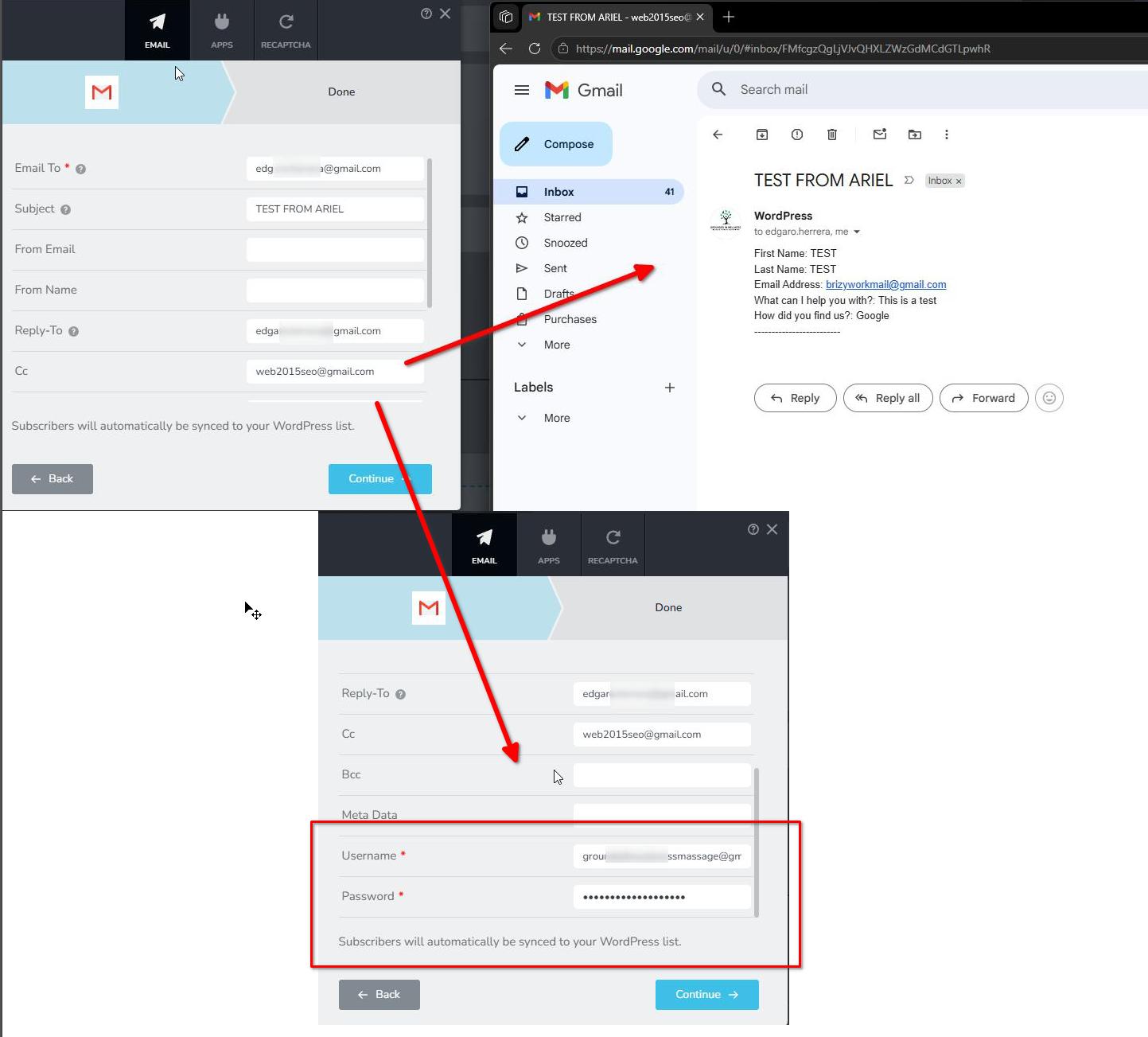
However, I imported the form into my test server and configured it using the email credentials you previously provided:
https://staging.brizywp.site/wp/_form/
The form appears to be working correctly on our end, and you may have already received a similar test email.
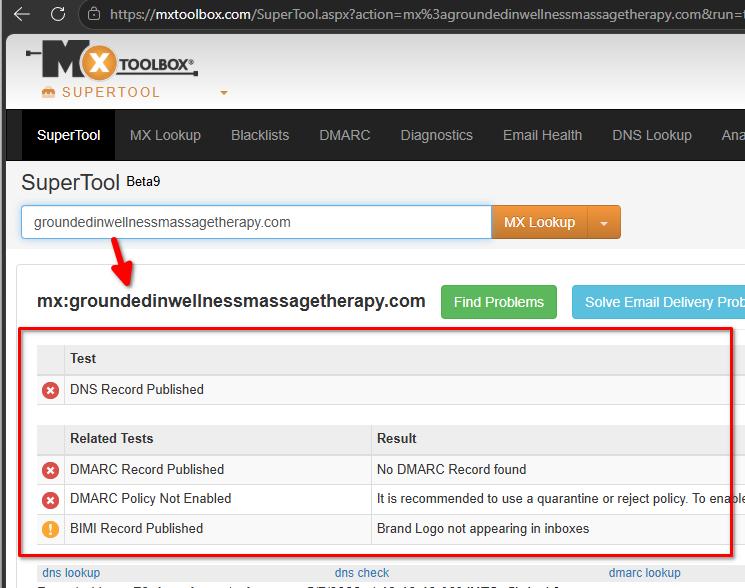
I also noticed that your domain does not currently have proper DMARC and DKIM DNS records configured. These records help email providers like Gmail verify that emails sent from your domain are legitimate. Without them, emails may be rejected or blocked even if the form submits successfully.
For reference:
https://postmarkapp.com/glossary/email-authenticationWe can see that submissions are being captured under Brizy > Leads, so the form itself appears to be working properly.
Please configure the DMARC and DKIM records for your domain and test the form again to see if that resolves the issue.
Let us know how it goes.
0 -
ok i'm not sure if i'm doing something wrong
I added all the records and verifeid in clouwayd via eleastic mail and added that the smpt plugin in wordpress , i tried the forms again using gmail and smpt but its still not working for me canyou please have a look again
0 -
sorry actauly i had wrong email domain in smpt configureation, witht eh update records it is acatully working correctrly. thank you for catching that and pushing me in the right direction !
many thanks 0 have a wonderful weekend
0
Please sign in to leave a comment.
Comments
9 comments