brizy menu is broke but if i update the plugins the entire sites styles break

brizy menu is broke but if i update the plugins the entire sites styles break
https://galvanizedcreative.com/michigan-web-design-services/
-

Hello Cari,
Please try the following steps to fix the issue with the broken menu.
- Open the page https://galvanizedcreative.com/michigan-web-design-services/ in the Brizy editor and access the header block's settings icon, increase its padding by one pixel and save your changes.
- Access the global block Display Conditions for the header block and click the "Save" button and update the project.
If this does not help, we would like to take a look at your WordPress dashboard. Please add a new user to your WordPress Dashboard and send the following details to our email: communitysupport@brizy.io
- Support Forum reference: https://support.brizy.io/hc/en-us/community/posts/35229226812818
- WordPress Admin URL:
- Username
- Password
Your email must include a link to this thread's URL, otherwise we will be unable to locate your support ticket. Please notify us in this thread when you send us the email.
1 -
i tried to suggested above and it did not help.
added user0 -
Hello Cari,
We have fixed the issue with https://galvanizedcreative.com/michigan-web-design-services/. Please check
0 -
what was the issue? and how can i fix it next time it happens on one of our many brizy sites?
also how to update brizy when i keeps breaking everytime it updates?0 -
Hello Cari,
Brizy had a global block compilation bug, which resulted in missing CSS files on various websites. This issue was fixed in Brizy 2.8.10. Following the release of this update, all global blocks, which are being used on any of the pages began to compile successfully.
There were global blocks in the above project that were not used on any page, resulting in the issue with the menu. I added all global blocks in the project onto a single page and clicked the "Update" button to force its recompilation. Recompiling of the unused global blocks fixed the menu issue.
Updating to the latest Brizy versions should not cause an issue. Should we do it for you?
1 -
sure if the site behaves nicely
0 -
I updated the Brizy plugins and checked a few of your pages at random. Everything looks good. Please also check from your end.
1 -
looks like it worked
what is the process of updating brizy and brizy pro successfully?
I tried to update to the newest versions on this site
https://templemilford.com/
the site completely broke so i had to revert the site to a backup0 -
Hello Cari,
Some issues are resolved by making a minor modification in the editor and pressing the "Update" button. If there are unused global blocks in the project, add them to a page and update the page to cause a recompilation of all global blocks.
If you want us to update Brizy plugins and fix any issues that come up, kindly share your WordPress credentials with us. Please add a new user to your WordPress Dashboard and send the following details to our email: communitysupport@brizy.io
- Support Forum reference: https://support.brizy.io/hc/en-us/community/posts/35229226812818
- WordPress Admin URL:
- Username
- Password
Your email must include a link to this thread's URL, otherwise we will be unable to locate your support ticket. Please notify us in this thread when you send us the email.
0 -
First I noticed there is no menu on the blogs or the author page. But also there is none across the site except the homepage. Can you fix it in Brizy?
When I tried to edit a page and re add the global hero block since I didn't see it in the editor it says that I can't re add but how do I get it to display again?
I have issues with all of our brizy websites every week with it breaking from updates or something else.0 -
And then I finally saw that the header section some how is now lower down the page somehow on all pages. So all I did was drag the header back up to the top of the page and hit save which then reflected across many pages of the site automatically.0
-
I had to fix each brizy template type across the site to drag each header back up the page. Any idea why this happened on almost all pages and templates?
0 -
Hello Cari,
Currently you have 50 Display Conditions for the header block.
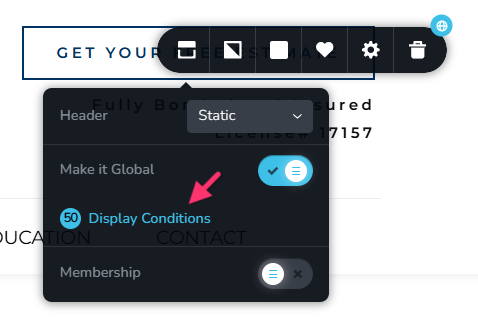
Can we simplify the Display Conditions by adding a single condition, Include - Pages - All and delete display conditions for individual pages?
 0
0 -
yes please
0 -
Hello Cari,
Setting the Display Condition "Include - All" appears to resolve the header block issue. I randomly checked a few pages. Please also check at your end.
To prevent the header block from altering its position on a page automatically, please follow the best practice below. A page must have one or more global blocks at the top and bottom, with all regular (non global) blocks in the middle. This best practice was not followed on your homepage; I've now set a few regular blocks global to force this best practice. Please monitor the header block's position over the next week to see if it shifts automatically.
0 -
I updated this site but some pages broke why is that?
https://grennanconstruction.com/siding-contractors/
Do i need to click through each page every time i update?0 -
The Sliding Contractor page looks good at my end: https://jmp.sh/9GbTFbux Did you restore from a backup?
Your pages should ideally work fine after an update. However it's important to check few pages randomnly to ensure everything works fine. If some of your pages do not work, those need to be fixed. If you need help with fixing those pages, please send us the credentials.
0 -
I had to revert to a back up to fix the site. I have sent the credentials.
0 -
https://lightupthesound.com/contact-us/
another site I had to revert back
please update sending credentials0 -
Hello Cari,
I have updated the plugins on both websites and fixed the pages with issues. Please check.
0 -
How did you fix the pages that had issues?
0 -
https://www.martinsonservices.com/ another site that broke
credentials sent0 -
Hello Cari,
- https://grennanconstruction.com/: I updated the Siding Contractors page. I also recompiled unused global blocks by adding all global blocks to a page and updating it.
- https://lightupthesound.com: After updating to the latest Brizy versions, the contact page started working fine.
- https://www.martinsonservices.com/: I did not find a page with issues here after updating to the latest versions. Please check.
0 -
the headers broke on this site as well after updating
the brizy editor broke so I couldn't edit the global section
reverted backup
sent credentials
https://powerfulpositiveparents.com/0 -
I have updated the Brizy plugins at https://powerfulpositiveparents.com/. I noticed that the header was not set as a global block and it was missing from most pages. I have set it as a global block. Please check if everything works as intended.
0 -
this site broke as well
reverted backup
sent credentials
https://templemilford.com/0 -
this site broke as well - header issues across site
reverted backup
sent credentials
https://thinkthrivesolutions.com/0 -

Hi Cari,
Please disregard our previous email.
We’ve updated both Brizy and Brizy Pro on both websites, and everything appears to be working properly on our end.
Please feel free to check and let us know if you notice anything unusual.
Best regards,
Ariel H.0 -
this site broke as well - menu drop down does not work
reverted backup
sent credentials
https://recoverymobileclinic.com/0 -
Hi Cari,
The recently rolled out update appears to have fixed the issue. We’ve already updated your website, and everything looks to be working properly on our end now.

Could you please check again and let us know if everything is working correctly on your side as well?
Kind regards,
Ariel H.0
Please sign in to leave a comment.
Comments
34 comments