Menu broken until turned off Caching

Hi Ariel,
This is just for info. Another site with menu issue https://www.mobileadventure.co.uk/.
To fix it we've had to turn of LiteSpeed cache which isn't ideal for obvious reasons.
Wondering what a long term solution is? As we can't turn of cahcing nor change all caching plugins so that they work with Brizy.
Thanks,
Darren
-

Hi Darren,
Thank you for reaching out.
From what we can see, this doesn’t appear to be a Brizy issue, but rather how LiteSpeed Cache is optimizing and serving the page. Some of the more aggressive options, especially JavaScript optimizations like delay, defer, or combining files, can interfere with menu functionality, which is why everything works once caching is disabled.
A better approach would be to keep caching enabled and fine-tune the settings. As a starting point, please try disabling JS Minify, JS Combine, and JS Combine External, and also turn off Load JS Deferred.
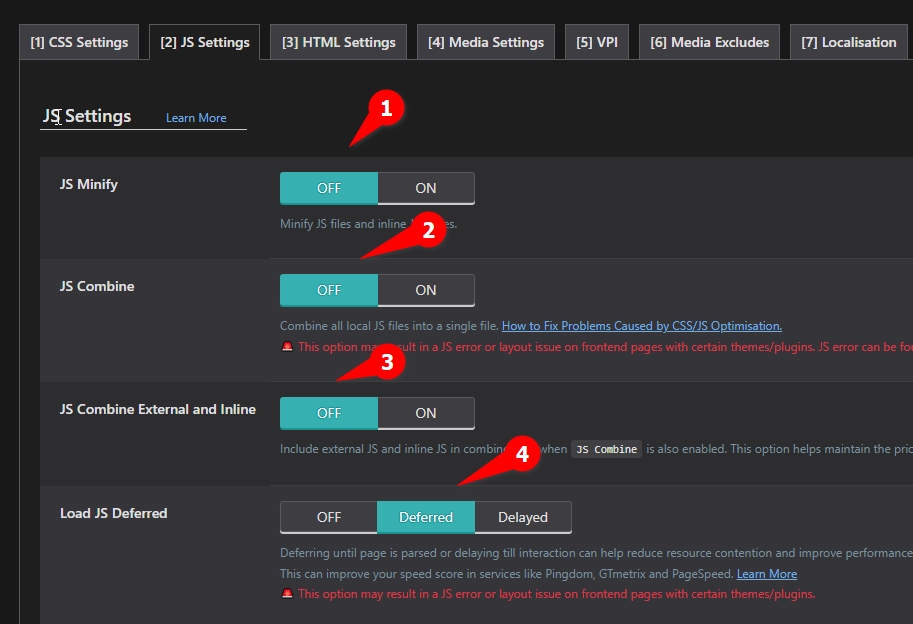
If that doesn’t resolve it, you can apply the same process to the CSS and HTML settings, gradually disabling minify or combine options, purging the cache after each change, and checking the front end.Please give this a try and let me know how it goes.
Best regards,
Ariel H.0 -
Hi Ariel,
We've already turned off LiteSpeed.
I think from our point of view, there's been a noticiable change / conflict between Brizy and LiteSpeed. Previously it happened every so often. But now it's becoming a regular issue. With well over 100+ sites using Brizy, that's really not managable.
Thanks,
Darren0 -
Hi Darren,
Thank you for the update.
I’ve asked a colleague to take a closer look at this issue for you.
We’ll keep you updated as soon as we have more information.
Best regards,
Ariel H.0
Please sign in to leave a comment.
Comments
3 comments