Brizy Slider showing black boxes around arrow/navigators before rollover in live site, but not in Brizy Builder

One of my Designers encountered an apparent new bug or issue that neither of us can fix in the Brizy slider. If you look at the live site, there are black boxes around the navigation (next/previous) arrows or other icons, but in the Brizy Builder, they appear as they should, standard/normal, no black boxes. We've tried removing backgrounds, changing the slider icons, emptying server cache, browser cache, and other tricks, but can't get rid of them in the live site...Since it appears correctly and as placed in Brizy, this must be a bug if the builder is different than the live view, correct? How do we fix? https://findyourcourage.coach/meditation-and-exercise/
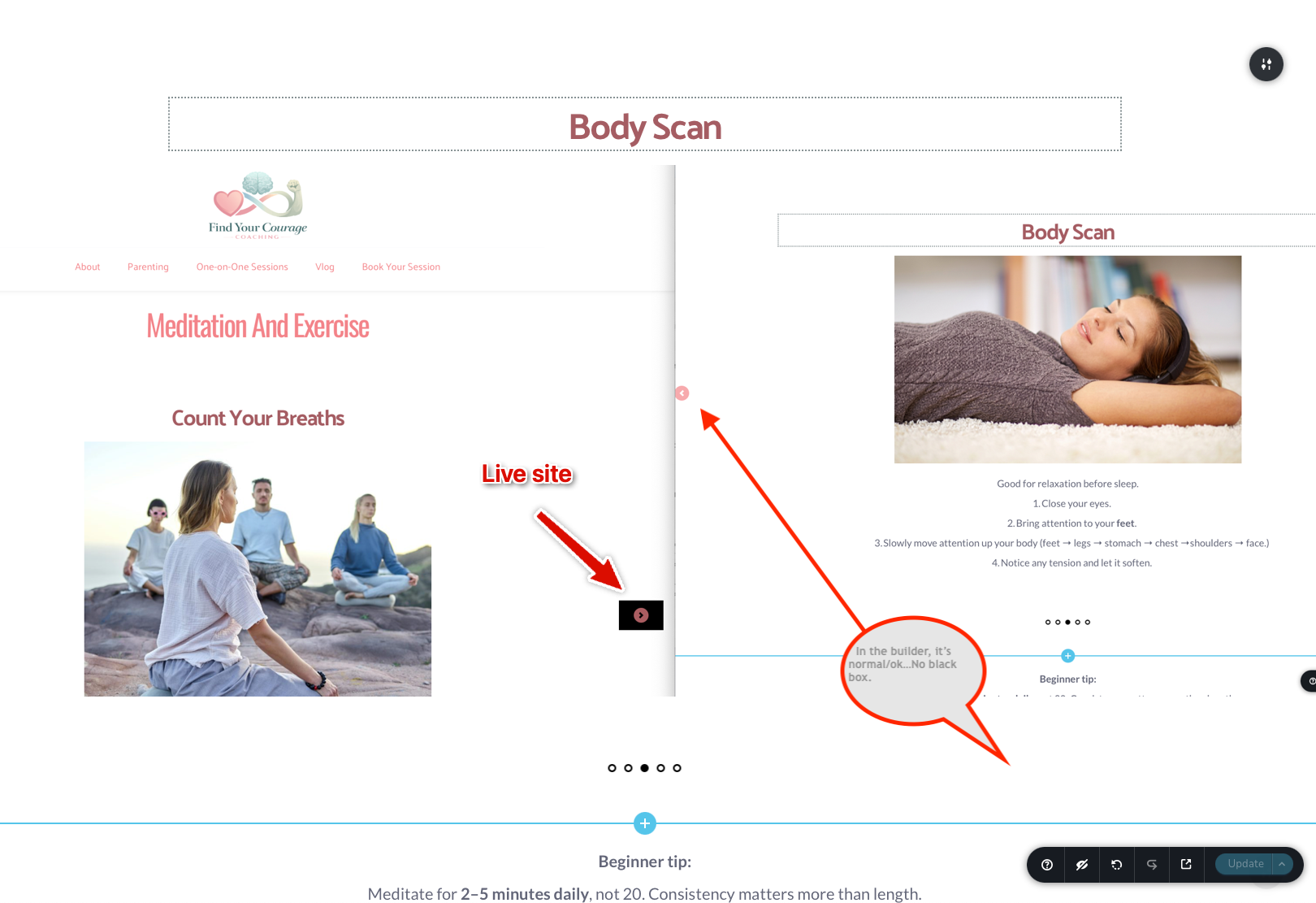
-

Hello Barry,
In the Carousel toolbar, have you selected "None" under the "Bg" tab after selecting the color icon?
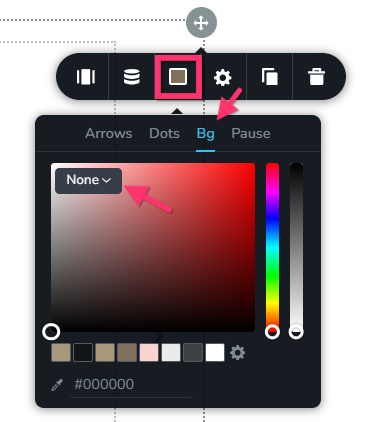
If you have, we would like to take a look at your WordPress dashboard to help you resolve this issue. Please add a new user to your WordPress Dashboard and send the following details to our email: communitysupport@brizy.io
- Support Forum reference: https://support.brizy.io/hc/en-us/community/posts/34716148761618
- WordPress Admin URL:
- Username
- Password
Your email must include a link to this thread's URL, otherwise we will be unable to locate your support ticket. Please notify us in this thread when you send us the email.
0 -
I have not heard back for many days from my email sent with credentials. And it is not a "Carousel" per se, it's Brizy's "Make it a slider" function, so we don't have "bg" controls ... Plus, it's appearing fine in Brizy but not in live; It's apparently a bug. Please fix & advise how to avoid or fix until Brizy is fixed for this issue. Thank you.
0 -
Hello Barry,
I checked our Inbox and SPAM folders. We do not find an email with credentials for https://findyourcourage.coach/. I also could not find an email with the forum reference https://support.brizy.io/hc/en-us/community/posts/34716148761618
Kindly resend the credentials in the requested format.
0 -

Hi Barry,
It looks like the issue is coming from the Twenty Twenty-One theme. When we temporarily switch to a different theme, such as Twenty Twenty-Five, the issue no longer occurs.
If you prefer to continue using Twenty Twenty-One, no problem, I’ve already added a small CSS snippet on your site to address this and ensure everything displays correctly.
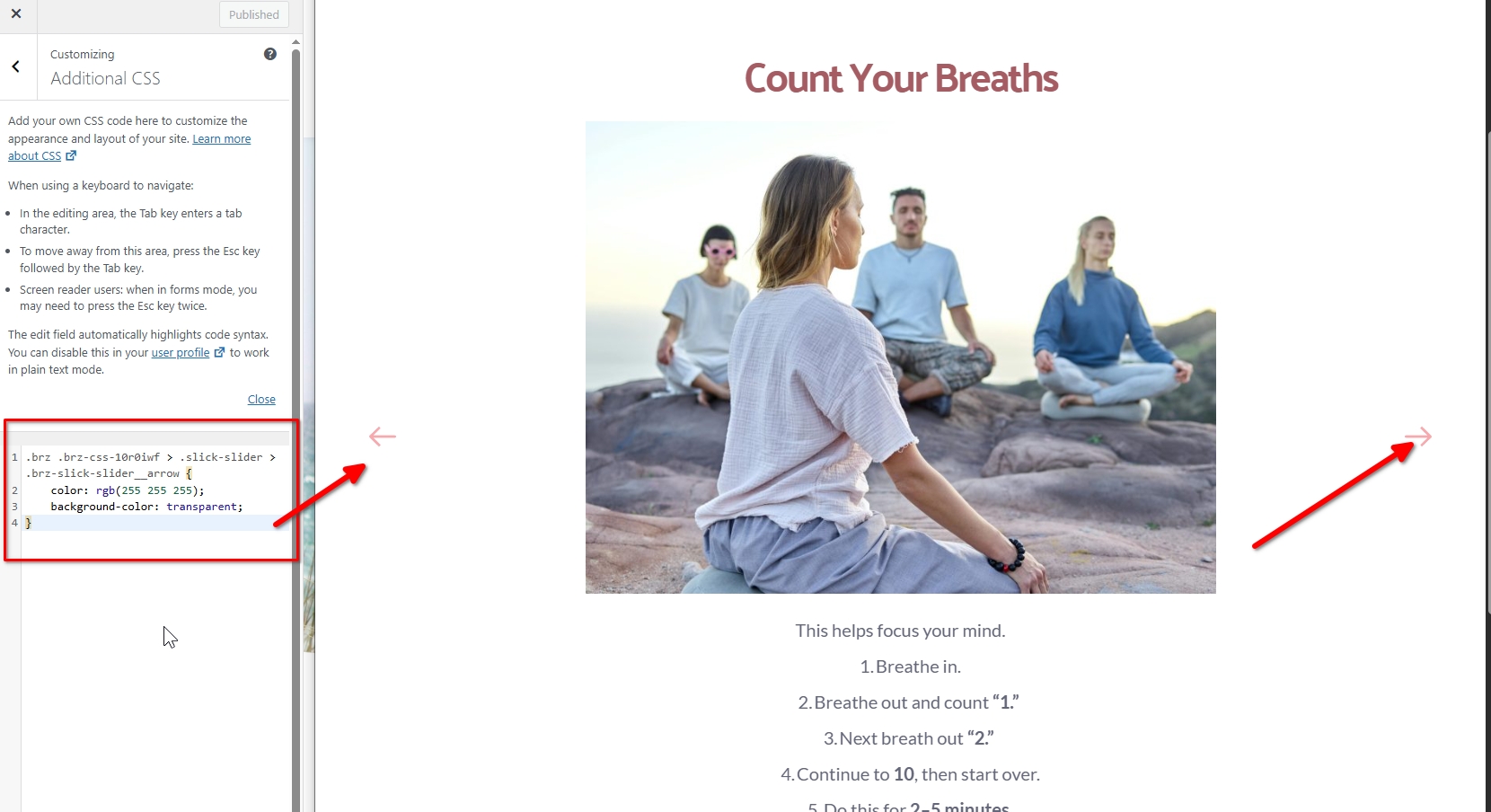
If you have any further questions, please let us know.
Best regards,
Ariel H.0 -
Thank you. It looks normal now. We choose that theme since it provides us Appearance: Menu and other past-Wordpress items. Is there another theme that you'd recommend that allows us the normal Menu controls?
Also: Shouldn't the Brizy builder render how it's going to render on the live site? My biggest issue is that we didn't see that behavior in the builder, but the client reported it on the live site. Is it a bug that was reported to the development team, or ?
0 -
Hi Barry,
This actually originated from the theme, likely due to a recent update affecting how layouts are rendered.
That said, Twenty Twenty-One is still a lightweight theme and works well with Brizy. If you’d prefer an alternative, you can consider Blocksy, as it offers more flexible layout controls and also has good compatibility with Brizy.
If you have any further questions, please let us know.
Best regards,
Ariel H.0 -
It's happening on multiple sites so we're having to add that code. I still think that it's a bug that should be fixed since the Brizy Builder does not show this behavior; it's not until the site is live and that can be missed. Thank you.
Follow-up question:
We use Twenty-one to have the Menu and other Appearance Menu items...What other themes allow the legacy "Menu" controls in Wordpress.0 -
Hi Barry,
Thank you for the follow-up.
This behavior is specific to the Twenty Twenty-One theme. In this case, we recommend reporting it to the theme developers so they’re aware of the issue and can possibly offer a solution.
As an alternative, you may consider switching to other themes that also support the classic menu, such as Blocksy, Astra, GeneratePress, and Page Builder Framework. These themes work well with Brizy and support the classic menu in WordPress.
This is demonstrated on this screencast - https://youtu.be/owSO5LRrk6wOtherwise, you would need to apply the CSS workaround to each website that use the Twenty Twenty-One theme.
If you have any further questions, please let us know.
Best regards,
Ariel H.0
Please sign in to leave a comment.
Comments
8 comments