Add to bag, checkout, etc.

Hello,
I’m having an issue with the Shop search/filter flow that appears to involve product card navigation rather than cart logic.
Context:
-
/shop/searchloads correctly - Sidebar filters work as expected and return the correct products
- Product card displays properly (image, title, attributes, price, compare price, savings, hover effects)
- Single Product template works correctly and includes Add More / Add to Bag / Go to Checkout
Problem: When clicking any element on a product card in the Shop Search / Filter results (image, title, etc.), nothing happens. The click does not navigate to the Single Product page.
I assume users must be routed from the search results to the Single Product page in order to proceed. Correct?
Question: Can you please confirm:
- Which element in the Search Results Product Card template is intended to handle navigation to the Single Product page?
- Whether this navigation requires an explicit dynamic link binding (Product → Product Page), or if it should occur automatically?
- Whether there is a known issue where these bindings can be lost after template edits or publishing?
If possible, please verify that my Search Results card has proper product‑page navigation enabled.
Thank you for your help.
-

Hello Wil,
Have a look at my test at https://jmp.sh/wIZXts9B. Products in the Shop/Search Results page are linking to its respective product pages. Are you saying that this does not happens at your end?
0 -
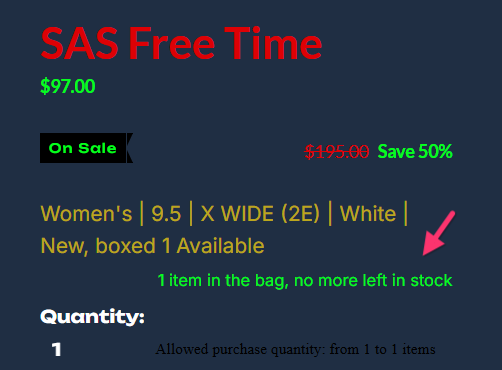
Yes, it "was" not happening on my end. Thanks for your support. It is working. I do have a couple of other issues I would like to discuss however. When an item is selected and the product appears, I have a PayPal ad this appearing in an area that is not convenient. How can I eliminate that option or move its location? At a minimum the text color has to be changed. Also, Allowed purchse quantity from 12 1 items appears in black. I don't see a way to change that font color. I light grey color would be fine I believe for both of these items. Is there a way for me to edit this data? When Add to Bag is selected, 1 item in the bag, no more left in stock appears and is overlaying Quantity. Can I edit that spacing and position? Finally, when checkout is selected, the PayPal ad pops up again. The location is fine, but the color needs to be grey or shade of white. Can I make these edits? If so, how and where. I also need to eliminate the promo coupon and redeem coupon data. Not relevant to my store at the moment. Thanks again for looking into this.
0 -
Hello Wil,
Let me go over the different points
- In all the product pages I have checked, I do not see a PayPal ad. Can you please share the URL of a product page where you see the PayPal ad?
- An option to customize the "Allowed purchase quantity: from 1 to 1 items" color and font is missing. We will get back to you about this after checking with our developers
- I have adjusted the space between items to avoid the overlap between the Quantity and the "1 item in the bag, no more left in stock" notification
- I do not see the PayPal ad in the Cart and Checkout page. Can you share a screenshot of the Cart and Checkout page?
- I have paused all the coupons setup in your store and the "Have a promo coupon? Redeem your coupon" notification does not show in the Cart and Checkout page.
0
Please sign in to leave a comment.
Comments
3 comments