Several Brizy Websites broken

The last update seems to have broken the output of several websites using the brizy page builder. In the backend everythings looks finde. But the frontend of the website is a mess. Examples:
https://www.mvzsw.de/
https://www.brillenschmiede-holzgerlingen.de/
-

Hello Martin,
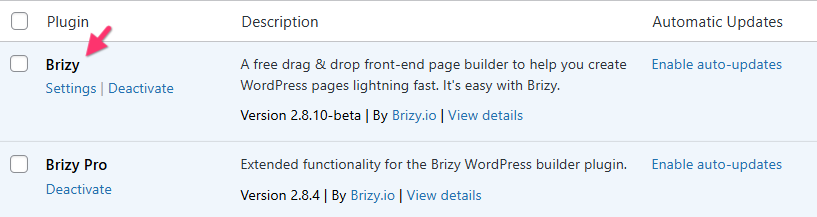
We apologize for the inconvenience. Kindly deactivate and delete Brizy plugin and download Brizy 2.8.10-beta version from https://jmp.sh/KCSY9BJZ and upload it to your website and check if the issue resolves. If this does not help, kindly get back to us and we will take a look at your WordPress Dashbaord to fix the issue.
0 -

To clarify the answer above, I learned by trial and error that I believe you are referring to removing Brizy "Free" and reinstalling via the beta version... not deleting Brizy Pro, which I just did and now have to reinstall.
0 -
Hello Adam,
Yes; by Brizy, I mean the plugin with the name "Brizy" in your WordPress Dashboard, which is the free version.
 1
1 -
Now this is funny:
I did as you told me, but the Beta-Version destroyed the Website Output even more. So I deactivated and deleted the beta-version and reinstalled 2.8.9 - and now the website (mvzsw.de) is back up an running... on the other website (brillenschmiede-holzgerlingen.de) installing the beta-version fixed the problem.
Thank you!0 -
Hello Martin,
Do you want us to make https://www.mvzsw.de/ work with the latest Brizy versions so that you can keep the plugins up-to-date? If you do, please add a new user to your WordPress Dashboard and send the following details to our email: communitysupport@brizy.io,
- Support Forum reference: https://support.brizy.io/hc/en-us/community/posts/34576807059858
- WordPress Admin URL:
- Username
- Password
Your email must include a link to this thread's URL, otherwise we will be unable to locate your support ticket. Please notify us in this thread when you send us the email.
0 -

Hi Martin,
We’ve released Brizy 2.8.10 and Brizy Pro 2.8.4.
Could you please update to the latest versions and let us know if there’s any improvement or if the issue still persists?
We look forward to your feedback.
Best regards,
Ariel H.0 -

KC George / Ariel, I installed Brizy 2.8.10 and Brizy Pro 2.8.4 and my site is still wrecked. Maybe a cache issue? How do I clear Brizy cache?
Please advise!0 -
Hello David,
Brizy does not have its own cache. Can we examine your WordPress Dashboard to resolve the problem? Please provide the details requested in my previous comment.
0 -
Hi Ariel,
I just updated to Brizy 2.8.10 and Brizy Pro 2.8.4 and so far it seems to work!Thank you!
0 -
Ok, wait. When I tried to update the next website, both Brizy Versions 2.8.10 and 2.8.9 both deliver the same error as described above on https://www.arztpraxis-holzgerlingen.de/
I am sending the login details vie E-Mail ...
0 -
Ok, sorry, now it's working. Seems you have to open any site with the brizy page builder and refresh one site to solve the error on the whole website.
0 -
KC George / Ariel, I sent you the login info. Good luck! 🤞🏻
0 -
Hi David,
Could you please check again on your end and let us know if everything is working properly?
If the issue is still occurring, we may need to temporarily revert Brizy and Brizy Pro to version 2.8.0 until a permanent fix is in place.
Looking forward to your update.
Best regards,
Ariel H.0 -
Hello Ariel,
Seems to be in good shape, thanks for fixing it! Can you please share, what exactly did you do? I have to do this on at least 3 other websites.
Thank you,
David
0 -
Hi David,The issue is related to FOUC (Flash of Unstyled Content) affecting the menu, where it briefly appears without styles while the CSS is still loading.
As a temporary fix, we added a custom class to the column containing the menu so it can be targeted with CSS. We then added CSS in Appearance > Customize > Additional CSS and a small JS snippet in the global footer. This delays the menu from displaying until it is fully loaded and styled, preventing the flash.
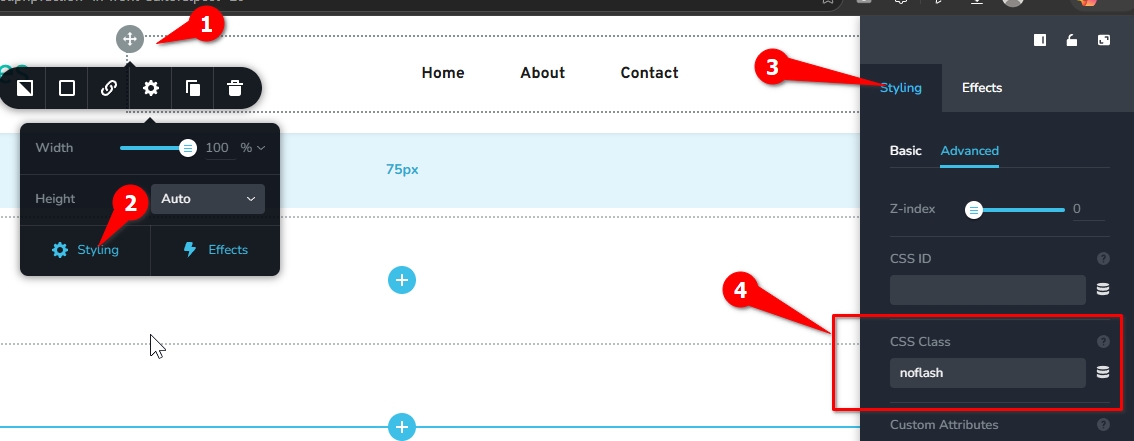
You can copy the same setup (class, CSS, and JS) to your other sites as a workaround.
Our developers are already working on a permanent fix. Apologies for the inconvenience.
Best regards,
Ariel H.0 -
Ok, I'll wait for your update fix. Hopefully that will roll out quickly.
Thank you,
David
0
Please sign in to leave a comment.
Comments
16 comments