CUSTOM POST TYPE TEMPLATE

Hello Brizy Team,
I have just started building a custom post type for Tour Packages and would like guidance on creating both a single page template and an archive page for these packages in Brizy.
I’m coming from Elementor, so I’m finding it a bit challenging to fetch dynamic data in Brizy. Currently, I have created the custom post type and fields using Advanced Custom Fields (ACF) only. I have not used CPT UI, and I’m wondering whether that might be affecting my ability to fetch dynamic content.
Specifically, I would like to dynamically display:
-
Featured image (or main image)
-
Location
-
Days
-
Nights
All these fields were created using ACF and assigned to my Tour Package post type.
Could you please advise:
-
How to properly create the archive template for listing packages as cards
-
How to create the single template for individual packages
-
Whether CPT UI is required, or if ACF alone is sufficient
-
The correct way to fetch ACF fields dynamically in Brizy
Any guidance or documentation references would be greatly appreciated.
Thank you.
My goal is to replicate this elementor card template in brizy 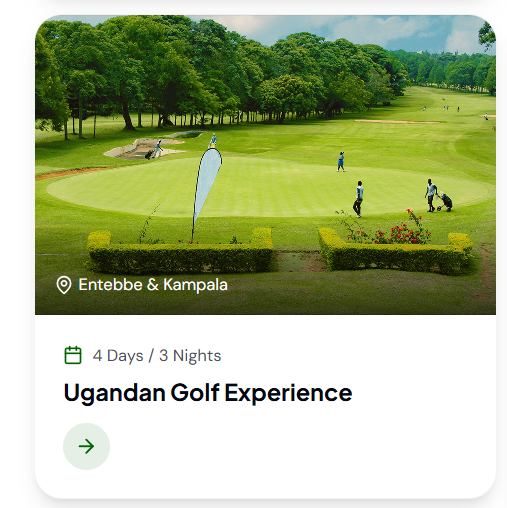
-

Hi there,
Thank you for reaching out.
I’ve created a similar setup based on your requirements and shared it in the screencast below. My apologies, I didn’t have time to record a voice-over, but the steps should still be clear as you follow along.
Screencast - https://youtu.be/6Fe1jstlrVMIf you’ve previously worked with Custom Post Types and ACF in Elementor, the process in Brizy is quite similar in principle. You should be able to follow the example and adapt it to your Tour Packages setup.
If anything is unclear while going through the screencast, feel free to let me know and I’ll be happy to clarify further.
Best regards,
Ariel H.0 -
Hello Ariel H I am grateful for your help and its been straight helpful with the archive page .
There is still an issue with the single post. I hope you spare some time and let me know where i might be going wrong
I tried to explain my issues here https://drive.google.com/file/d/1aaW1_ XgcyLlkXLiJrNZ5OlDi_l6sGNQq/ view?usp=sharing 0 -
Hi,
Could you please provide temporary administrator access to your WordPress dashboard so we can take a closer look at the issue?
Kindly send the following details to communitysupport@brizy.io:
Community post link: https://support.brizy.io/hc/en-us/community/posts/34509245019538
WordPress Admin URL:
Username:
Password:We’ll be glad to assist as soon as we have access.
Best regards,
Ariel H.0 -
Hi,
I just wanted to follow up regarding the temporary WordPress Admin access we requested so we can check the issue mentioned in your community post. Please let us know once you’ve added us as an Admin user and sent the details to communitysupport@brizy.io.
Best regards,
Ariel H.0
Please sign in to leave a comment.
Comments
4 comments