Brizzy Model not working

I define a single post model, nut it seems the page dont recognize it
-

Hello there,
Are you saying that you have setup a Brizy template for single posts, but the blog posts do display the design added to the template? Kindly open your blog post template Display Conditions by clicking on the "Edit" option

Check if you see the "Delete" option next your Display Condition. If you see an "Add" button in place of the "Delete", please click on it to add the Display Condition and check if the issue resolves.
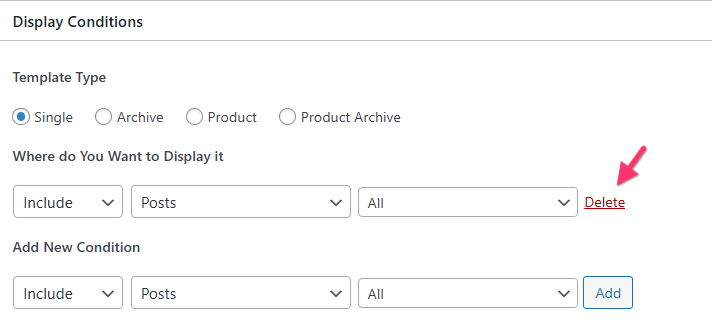
If this does not help, kindly get back to us. We will take a look at your WordPress Dashboard to fix the above issue.
0 -
He didnt help, it assume the model but completly messed. Can you check please.
0 -
Hello there,
Can we look at your WordPress dashboard to help you resolve this issue? Please add a new user to your WordPress Dashboard and send the following details to our email: communitysupport@brizy.io
- Support Forum link: https://support.brizy.io/hc/en-us/community/posts/34468202425618
- WordPress Admin URL:
- Username
- Password
Your email must include a link to this thread's URL, otherwise we will be unable to locate your support ticket. Please notify us in this thread when you send us the email.
0 -
Details sent to your email
0 -
Hello there,
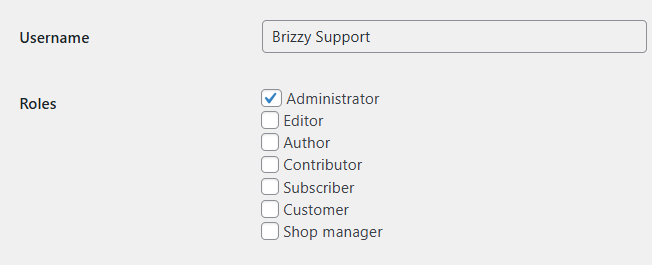
Your blog post template is correctly setup. However, when viewing the blog posts in the frontend, we see a few Brizy files with 404 error. We would like to check the plugins. Can you grant Brizzy Support user the role of an Administrator so that we can investigate further what is causing the 404 error?
 0
0 -
Access granted
0 -
Hello Bruno,
We have fixed the issue with blog posts by uploading missig CSS files. Kindly keep the login active until Monday; our developers would like to inspect your website to determine the cause of the missing CSS files.
0
Please sign in to leave a comment.
Comments
7 comments