Accidentally Deleted Website

This morning, we accidentally deleted the website that one of our developers finished creating yesterday. Is there any way to recover it?
0
-

Hello Mevin,
Kindly follow the steps below and give us the requested details. You can also watch the screen recording at https://jmp.sh/QHRhTWkr where I demonstate how to capture the editor URL of the deleted project.
- Request your developer to hit "Ctrl-H" on the browser he was using to edit the project in order to view the browsing history. The browsing history is organized under each day. In the browsing history, look for the day and time he was working on the project and identify a URL like Page | Home admin.brizy.io.
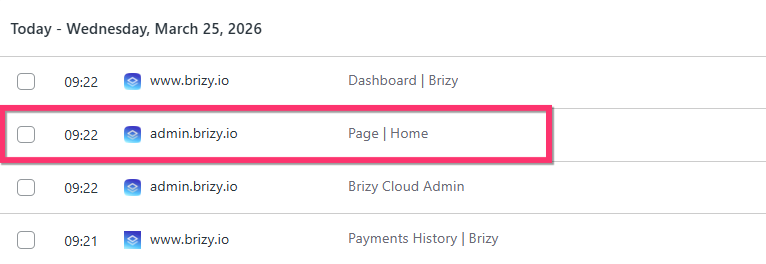
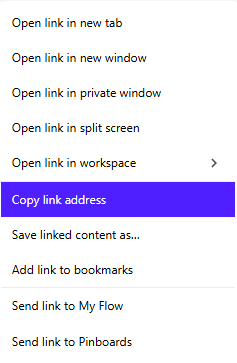
- Right click on the page link and copy its URL by selecting the "Copy link address" option and send it to us. The URL should look something like https://admin.brizy.io/projects/20472406/editor/page/4986473
- Please also share with us the date and time (feel free to mention a time window Eg:10:00 AM to 12: 00 noon) when the developer was working on the project and his timezone or his city.
Once we receive the URL of a page from the deleted project, the date, time and timezone, we will attempt to restore your project from the backup.
0 - Request your developer to hit "Ctrl-H" on the browser he was using to edit the project in order to view the browsing history. The browsing history is organized under each day. In the browsing history, look for the day and time he was working on the project and identify a URL like Page | Home admin.brizy.io.
Please sign in to leave a comment.
Comments
1 comment