Snapshot of a Brizy Cloud Website

I've designed and deployed a website to a customer. I've now also given them access to make modifications to it via the account permissions. The idea is that they can update text and images to stay current.
Is there a way to make a snapshot of the website as it is incase they do something really bad and we want to revert it back to the way I gave it to them?
-

Hi Phil,
At the moment, we don’t have a built-in snapshot or rollback feature for this. As a workaround, you can duplicate the project, which will create a separate copy of the site in its current state that you can keep as a backup.
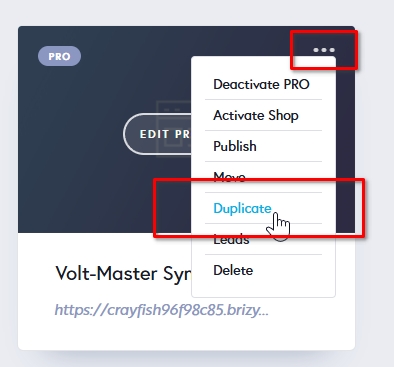
If anything goes wrong, you can simply unpublish the affected site by removing its domain, then assign that domain to the duplicated project to restore the previous version.
Best regards,
Ariel H.0 -
I see. But if the website I designed is using the "Pro" features, the duplicate will also need the "Pro" features right? I'm on an AppSumo 5 pack, so each Pro license is precious.
Unless the Pro licenses are counted differently.0 -

Hello Phil,
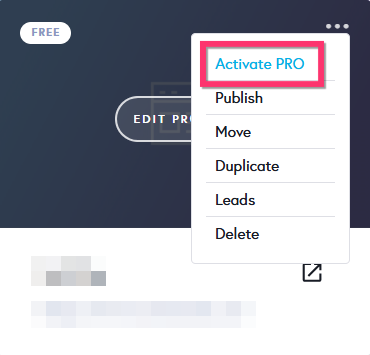
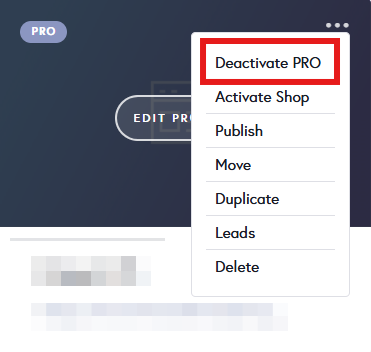
A PRO license can be transferred from one project to another without affecting the total number of licenses. The "Deactivate PRO" option in a PRO project can be used to deactivate the PRO license, while the "Activate PRO" option in the project thumbnail can be used to activate the PRO license in a FREE project.
 0
0 -
I see. So if I duplicate the project, and deactivate Pro on the duplicate, the designs and content stay there and as long as I don't change anything, nothing will break?
If I need to go back to it, I just transfer the Pro license and then do the edits and it'll just work?0 -
Hi Phil,
Yes, that’s correct.
You can duplicate the project and deactivate Pro on the duplicate your design and content will remain intact as long as no changes are made.
If you ever need to revert to it, you can simply transfer the Pro license back to that project. Once reactivated, the Pro features will be unlocked again, and you’ll be able to edit the site as usual.
Best regards,
Ariel H.0
Please sign in to leave a comment.
Comments
5 comments