Can't edit site

can't edit brizy site. no plugin or server conflicts - editor works on new pages, only after error is generated and page is refreshed. but once page is full of content, can no longer save or update. global blocks also no updating/syncing. example page on this site is https://www.protekpartners.com/cts-5
-

Hello D'mario Design,
We apologize for the inconvenience.
Please check the PHP Post Max size set in your WordPress Dashboard under Tools > Site Health > Info tab > Server. Please have a look at the screenshot at https://jmp.sh/jhMe11Hu. Kindly increase PHP Post Max size to 1024M. Please also increase the PHP memory limit to 512M and Max input time 120.
If you have access to cPanel you can follow the procedure at https://jmp.sh/2JOiMBXk to set these values. If you use a different hosting control panel, the procedure could be different. Kindly request your hosting support to increase these values for you if you do not know the procedure. Once you make the above change, please check if changes to longer pages can be saved.
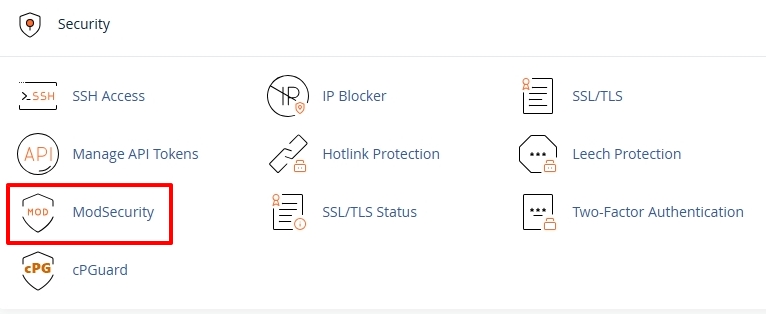
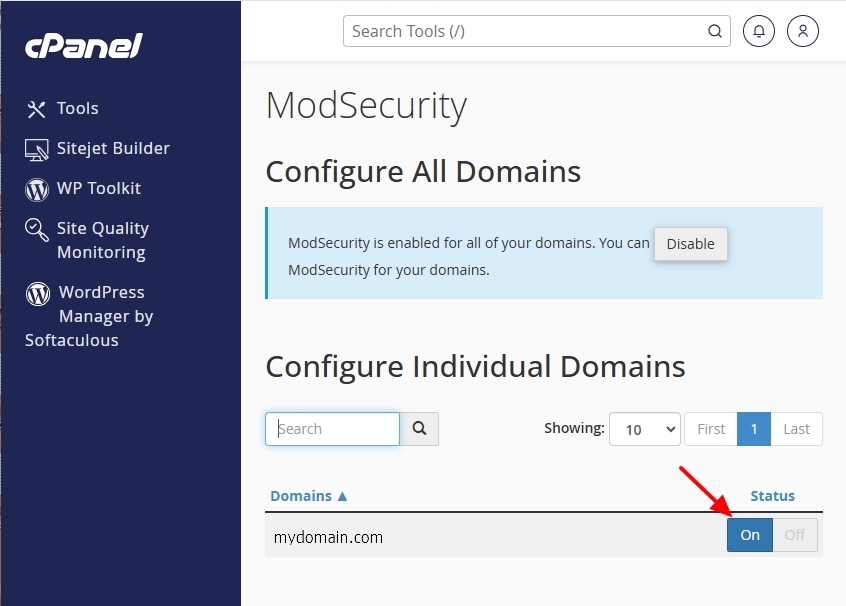
To check whether ModSecurity, a security software, interferes with the Brizy editing, temporarily disable it by choosing the ON/OFF toggle switch in the cPanel, then check whether you can save changes to your Brizy page.
Please get back to us with your findings.
0
Please sign in to leave a comment.
Comments
1 comment