Global image not appear the same at the top of the page

Hi Dear team Brizy,
Can you help me, on my website , those 2 pages (Big image at the top) appears differently and I would like it appears exactly as the english version (the image covers the header). Do you have any idea to do so ?
I am also using Blocksy if this can help.
Here the 2 pages :
Séjours à thèmes - Azores Freediving
Themed stays - Azores Freediving
Thanks for your help.
Ondine.
-

Hello Ondine,
Kindly add a top negative margin to the hero block to extend the background image to the top of the page as demonstrated at https://jmp.sh/ksoUsKV0
0 -
Thanks a lot KC George for taking of your time to answer me. I tried but it did not work though, the pic dimension changes but never covers the header as if it was 2 different layers.
If you have any other suggestions, I would be happy to hear them.
Actually All my other pages are good, they all cover the header but with this one, I had recently some troubles, I had to re-do it with Brizy and now there is this problem..
0 -
Hello Ondine,
Can you give us access to your WordPress dashboard so that we can implement this change for you? Please add a new user to your WordPress Dashboard following the procedure at How to Add New Users To Your WordPress Site and send the following details to our email: communitysupport@brizy.io.
- Support Forum link: https://support.brizy.io/hc/en-us/community/posts/34078348493970
- WordPress Admin URL:
- Username
- Password
Your email should include a link to this thread's URL, otherwise we will be unable to locate your support ticket. Please notify us in this thread when you send us the email.
0 -
Hello Ondine,
We have received credentials to your website. The header of the page https://azoresfreediving.com/sejours-a-themes/ is setup using the WordPress theme and the reason why the background image does not show is because the header is not transparent. We need access your theme customizations to fix this issue.
With the Role you have assigned to us, we do not have access to the theme customizations under the "Appearance" menu in your WordPress Dashboard. Can you please assign the "Administrator" role, so that we have access to the "Appearance" menu?
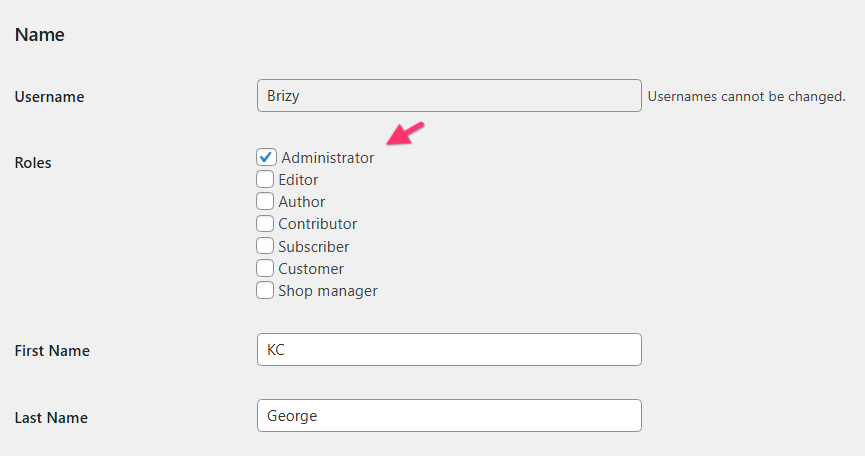 0
0 -
Hello Ondine,
I have made the header for the Séjours à thèmes page transparent in Blocksy Header settings by following the procedure at https://jmp.sh/deNrSUCl
0
Please sign in to leave a comment.
Comments
5 comments