Adobe Variable Fonts

How can I apply a different font weight e.g. 600 when using Adobe variable fonts?
-

Hello Andi,
After uploading a varaible font, you can set its weight in the Typography toolbar. Have a look at New Variable Fonts In Brizy WordPress and Cloud for a detailed explanation.
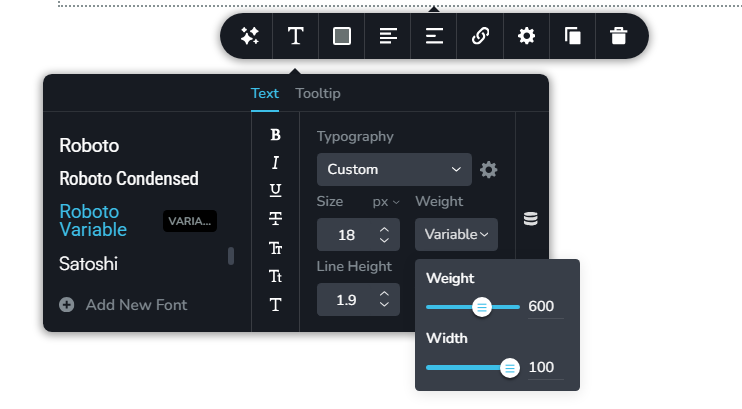 0
0 -
That’s wrong! The Adobe variable fonts are not recognized in Brizy:
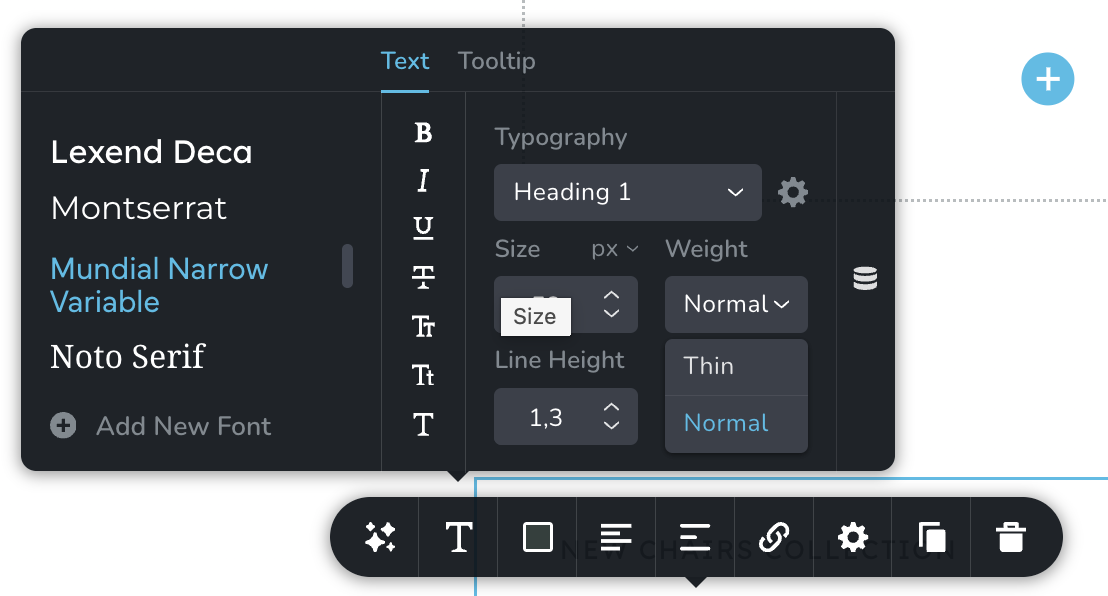
How can this be fixed?
0 -

Hi Andi,
If the variable fonts do not appear in the font list, please try refreshing the Adobe Fonts integration.
You can do this by temporarily removing the Project ID from the integration settings, saving the change, and then adding the Project ID again.
After adding the Project ID back, please force the page to save by making a small change to the page, for example, add a bit of padding or add a period to a text element. This will make the Update button appear so you can save the page. Once saved, reload the page and the fonts should refresh, as demonstrated in the screencast - https://streamable.com/ywzfv9
Please let me know if it works on your end.
Best regards,
Ariel H.0
Please sign in to leave a comment.
Comments
3 comments