Question about Mega Menu width

Hi Brizy Team,
i try to create a menu (with two different menus) one on the left and one on the right (to get some space between) as seen in the screenshot
i use the mega menu on the left menu and how ist it possible to extend the mega menu from the width because when always i change the width of the mega menu to as example 130% it works in the editor but not when i check the site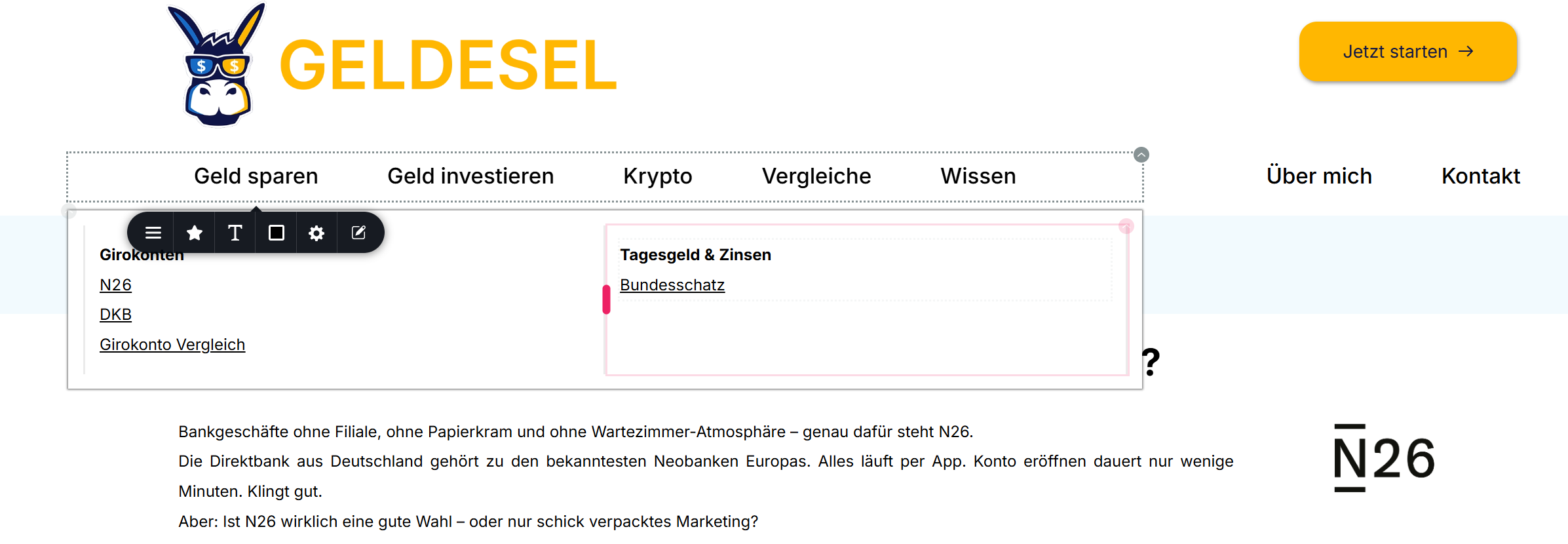
-

Hello Bernd,
When a mega menu's width is set to 100%, the menu container expands to fill the entire column in which the menu is present. Have a look at Got Stumped Setting Your Mega Menu Width for a more detailed explanation. It is not possible to increase the mega menu container's width beyond the parent column's width. Kindly keep this limitation in mind when designing your mega menu.
0 -
Hello,
okay thank you for your information
how can i do it that when i use one menu the two right menu entrys (ÜBer mich & Kontakt) to be aligned right
i want an empty space as shown in my screenshot? but using only one menu
Big THanks again0 -
Hello Bernd,
You cannot extend the mega menu container to the region where the second menu with ÜBer mich & Kontakt is located because the width of the container cannot exceed the width of its parent column. If you want the mega menu container to extend to the full width of your screen, you must delete the second menu and add ÜBer mich & Kontakt to the left menu.
0 -
Hi again,
yes i fully understand and i changed it again to one menu - but is it possible to add a space between some entries of the (so that the Über mich and Kontakt are on the right side)0 -
Hello Bernd,
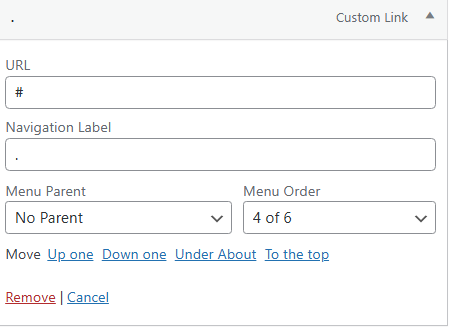
We are not aware of a good approach to impement a gap between two menu elements. Have a look at the navigational menu at https://brizy.support/ for something close to what you are looking for. Between About and Blog, you can see a dot. You could setup something like this. The Navigational Label is set as a dot for the specific menu element.

 0
0
Please sign in to leave a comment.
Comments
5 comments