Automated Splash Intro Page

I have a client who wants a 15-20 video to open and autoplay when someone enters what would otherwise be the homepage. At the end of the video, he wants an 'Enter the Site' button to appear. I attempted to do the whole thing using a full-page pop-up, but it was a bit slow in loading (thought set to '0') and clunky.
I was thinking of placing the video on a separate page or post and setting a 302 Redirect but have been warned that search engines may not read it correctly and place it in the roll of Homepage.
Any suggestions?
-

Hi Michael,
Thank you for contacting us.
You’re right that most modern browsers only allow autoplay if the video is muted, so that part is expected behavior.
Instead of using a popup or a 302 redirect, the better approach would be to make the video part of the homepage, set it as a full-screen section that autoplay (muted), then reveal the 'Enter the Site' button once the video ends. This avoids SEO issues and performs better than popups or redirects.
Let me know if you’d like help setting this up.
Best regards,
Ariel H.0 -
Ariel,
I am not sure how you are suggesting that I do this without it taking up valuable real estate on the homepage.
0 -
Hi Michael,
Thank you for the update.
My suggestion was that the video would not permanently take up space on your homepage layout. It would function as an intro screen that displays first, and once visitors click the Enter the Site button, they would proceed to the normal homepage content.
However, if you have a live site example that shows the exact experience your client wants, that would be very helpful. Once we see a working reference, we can suggest the most suitable solution for you.
Best regards,
Ariel H.0 -
Ariel -
Do you have an instructional video that will show how to create an 'intro screen' that will display first? These are the mechanics with which I am unfamiliar.
0 -
Hi Michael,
Thank you for the update.
At the moment, we don’t have an instructional video specifically for creating an intro screen
However, I’ve created a working example for you here: https://staging.brizywp.online/demo01/
Please have a look and let me know if this matches what you’re trying to accomplish. If it does, I’ll be glad to record a short screencast and provide the exact steps (including the scripts needed) so you can replicate it on your site.
Best regards,
Ariel H.0 -
Ariel -
That is EXACTLY what I am hoping to accomplish. Hopefully, you won't keep your genius to yourself ;-)
0 -
Hi Michael,
Here is the video link: https://youtu.be/T2zolrhVpno
Please make sure to set the YouTube player to 1080p for better viewing quality.
The video explains how to use the scripts below to create the splash screen.Below is the first script:
<div style="width:100%; height:100vh; display:flex; justify-content:center; align-items:center; overflow:hidden;">
  <video
    id="mp4-video"
    style="width:100%; height:100%; object-fit:cover;"
    autoplay
    muted
    playsinline>
    <source src="https://staging.brizywp.online/splashdemo/wp-content/uploads/2026/02/Hero-Header-anim-5s.mp4" type="video/mp4">
  </video>
</div>
Please make sure to replace the video SRC with the URL of the video you uploaded to your own site.
Here is the second script:
<script>
document.addEventListener('DOMContentLoaded', function () {
  const video = document.getElementById('mp4-video');
  const buttonContainer = document.querySelector('.gotoHome');

  if (!video || !buttonContainer) return;

  // Keep hidden initially
  buttonContainer.style.zIndex = '5';

  video.addEventListener('ended', function () {
    buttonContainer.style.zIndex = '20';
    buttonContainer.style.opacity = '1';
  });
});
</script>
This script should be placed below the video, ideally in a second Embed element under the first one.
And finally, add this CSS:
.gotoHome {
  opacity: 0;
  z-index: 5;
  transition: opacity 0.4s ease;
}
You can add the CSS in Appearance → Additional CSS.
Here is the tutorial video on how to properly compress your video for web use:
https://www.youtube.com/watch?v=sgmE1T8A4UY&t=23sIf you have any further questions, please let us know.
Kind regards,
Ariel H.0 -
Ariel -
This is spectacular and I will be able to tackle these instructions just fine come Monday morning if you can leave up the video until then. Thanks again for all your help!
0 -
Hi Michael,
Thank you for the update.
If you run into any questions or need a hand while implementing the script, please don’t hesitate to reach out. I’ll be glad to assist.
Best regards,
Ariel H.0 -
Ariel -
The installation of the desktop version went flawlessly, but the video won't autoplay on any other browser. All that shows is the black opening screen. I will admit that Handbrake only took it down to 9MB, could that be the issue?
0 -
Hi Michael,
Could you please provide temporary administrator access to your WordPress dashboard so we can take a closer look at the issue?
Kindly send the following details to communitysupport@brizy.io:
- Community post link: https://support.brizy.io/hc/en-us/community/posts/33592073274898
- WordPress Admin URL:
- Username:
- Password:
We’ll be glad to assist as soon as we have access.
Best regards,
Ariel H.0 -
Hi Michael,
Thank you for your cooperation.
Modern browsers block autoplay for videos that have sound because unexpected audio can disrupt users.
To allow a video to start automatically when the page loads, it must be muted. Otherwise, browsers like Chrome, Safari, Firefox, and Edge will prevent it from playing until the user interacts with the page.
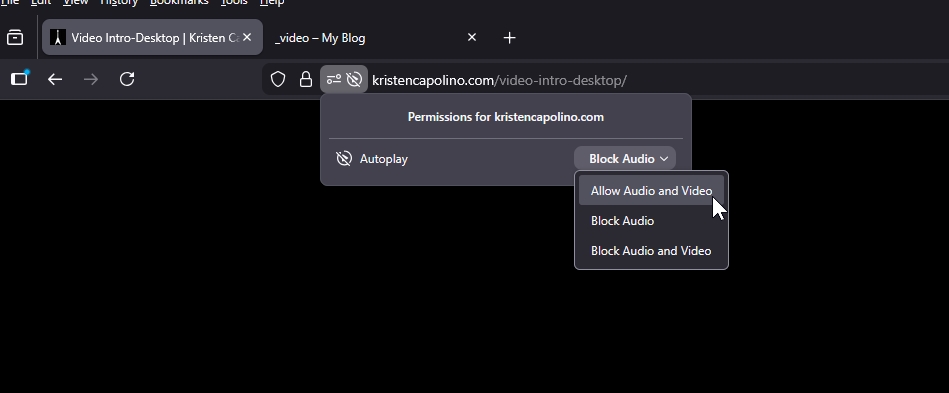
This is why muting the video ensures consistent autoplay across all devices and browsers.
You can also test this behavior on my staging site here:
https://staging.brizywp.online/demo01/_video/Reference:
https://developer.mozilla.org/en-US/docs/Web/Media/Guides/AutoplayPlease update your script to the following:
<div style="width:100%; height:100vh; display:flex; justify-content:center; align-items:center; overflow:hidden;">
  <video
    id="mp4-video"
    style="width:100%; height:100%; object-fit:cover;"
    autoplay
    muted
    playsinline>
  <source src="https://kristencapolino.com/wp-content/uploads/2026/03/Supernova-desktop_compressed.mp4" type="video/mp4">

  </video>
</div>
Best regards,
Ariel H.0 -
Would it be possible for me to add a prominent button that would unmute the video?
0 -
Hi Michael,
Could you please review the page here when you have a moment:
https://kristencapolino.com/_test/We’ve added an audio toggle button in the upper left corner of the page and updated the JavaScript so the sound can now be toggled on and off.
Best regards,
Ariel H.0 -
That is perfect.
0
Please sign in to leave a comment.
Comments
15 comments