Urgent: Security vulnerabilities and production impact (Brizy Pro <= 2.6.1)

Dear Brizy Security / Support Team,
I am formally requesting an urgent update regarding the following security vulnerabilities affecting Brizy Pro <= 2.6.1:
-
Reflected Cross-Site Scripting (XSS)
-
Broken Access Control
-
Cross-Site Request Forgery (CSRF)
A production website under my administration was successfully compromised. The attack vector appears to be related to Brizy Pro and potentially the recommended theme integration.
Although I was able to restore the website from a full backup, the environment has not returned to a stable and secure state.
Currently:
-
It is not possible to safely edit live pages.
-
The editor returns errors (see attached screenshot).
-
The production environment cannot be considered secure.
This is a serious issue affecting business continuity and security compliance.
Please provide:
-
A confirmed timeline for security patches.
-
Official mitigation steps for affected installations.
-
Clarification whether the recommended theme contributes to the vulnerability surface.
-
Guidance on restoring full editor functionality in a secured environment.
Given the successful exploitation, I consider this matter urgent and expect a prompt response.
Kind regards,
Kazik Karczewski
-

Hello Kazimierz,
The Cross Site Request Forgery and the Cross Site Scripting vulnerabilities affect websites in the WordPress Multisite environment. If your website is not part of a WordPress Multisite network, these two vulnerabilities will not impact your website.
We have developed a patch for the above three vulnerabilities. Those patches are currently in testing phase. A new Brizy Pro version with the patch for the three vulnerabilities is likely to get released within 7-10 business days. Once the new version is released, updating Brizy Pro plugin to its latest version should apply the patch in your WordPress instance.
The WordPress theme you are using may not contribute to the vulnerability. When a new Brizy Pro version with the patch is available, we will check your WordPress Dashboard to restore editor functionality. We will keep you updated in this post when we release a Brizy Pro version with a patch.
0 -
Hello KC George,
Thank you for the update. I’m very glad to hear that a patched version will be released soon.
However, I need to update important information on the website today, and currently I am unable to edit the pages at all. This is a serious issue for me.
Your account is still active in the system, so I would appreciate it if you could log in and check what needs to be corrected in order to restore the website to full working condition as soon as possible.
I would be grateful for your prompt assistance.
Best regards,
Kazik0 -
Hello Kazik,
Please provide the URL of your project so we can locate the credentials you had previously shared with us.
0 -
Hello,
The project URL is: https://pttk.pl
Please let me know if you need anything else from my side.
Best regards,
Kazik0 -
Hello Kazik,
I opened the homepage in the Brizy editor and made a minor change and I could save my work. Kindly see my test at https://jmp.sh/cflxiyAE. What error do you see at your end? What are the steps we must follow to see the same error?
0 -
Hello KC George,
Please find the screenshot attached.
The issue occurred on the “Informacje” page.
Please let me know if you need any additional details from my side.
Best regards,
Kazik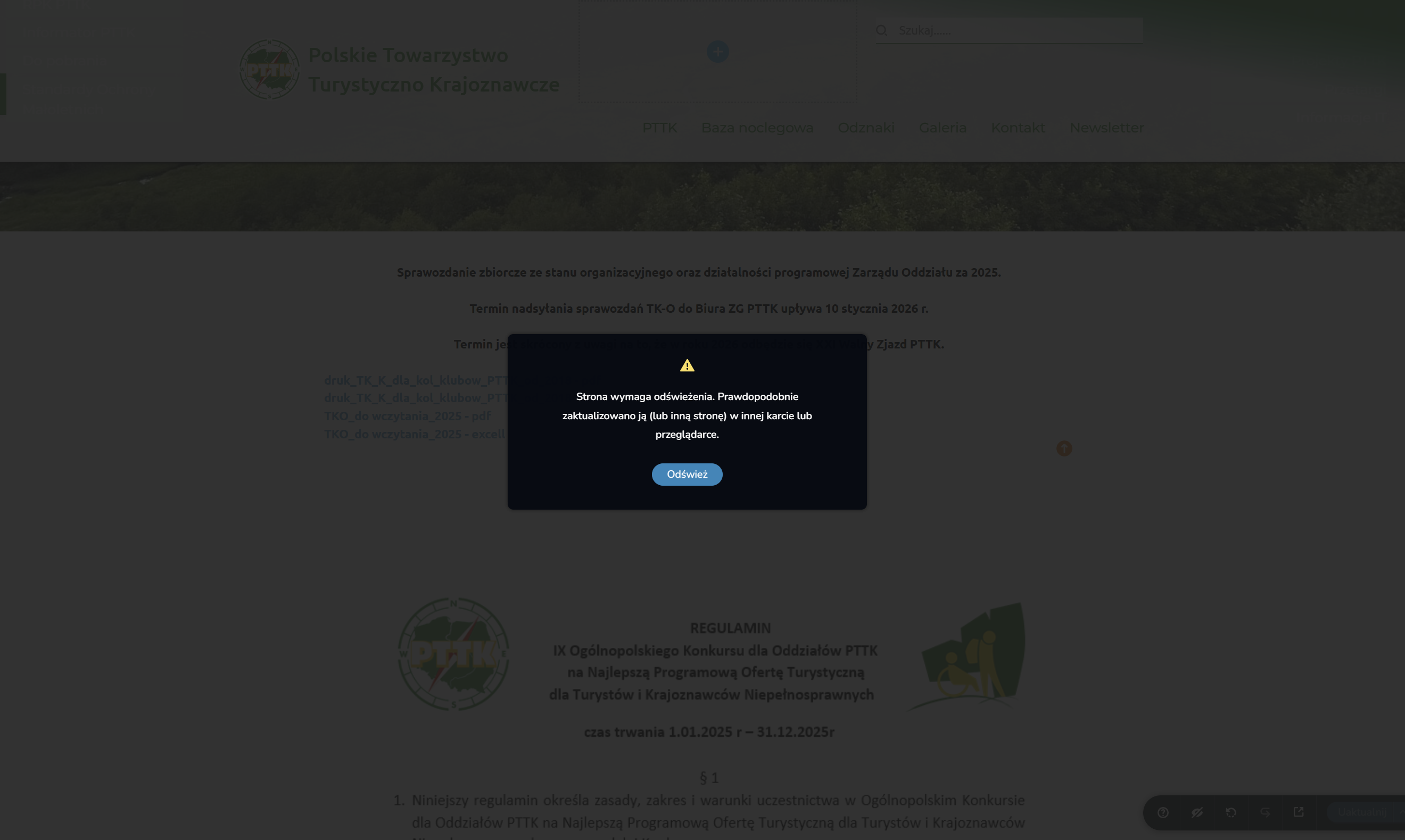
 0
0 -
Hello Kazik,
Due to around 10 image files added to the page, like https://pttk.pl/wp-content/uploads/brizy/imgs/regulamin-konkursu-Rady-TON-2025_001-1904x2580x0x0x1886x2580x1743486258.png, the size of your page might have exeeded the PHP Post Max Size set in your server.
The current PHP Post Max size is 128M. You can see this in your WordPress Dashboard under Tools > Site Health > Info tab > Server. Please have a look at https://jmp.sh/jhMe11Hu. Kindly increase this value to 1024M. Please also increase the PHP memory limit to 512M and Max input time 120.
If you have access to cPanel you can follow the procedure at https://jmp.sh/2JOiMBXk to set these values. If you use a different hosting control panel, the procedure could be different. Kindly request your hosting support to increase these values for you if you do not know the procedure. Once you make the above change, please check if the the "Informacje" page is editable.
0 -
Hello KC George,
Thank you for your suggestion.
I have increased the limits significantly — Post Max Size has been raised well beyond the previously recommended values (currently set extremely high), PHP memory limit has also been increased, and Max Input Time adjusted accordingly.
Unfortunately, the issue still persists. The “Informacje” page remains non-editable.
For context: I am the server administrator. This cPanel server hosts over 400 websites. All accounts operate under identical PHP limits and configuration. We run approximately 250 WordPress installations, around 100 Joomla sites, and various other applications. Everything functions correctly except this single WordPress instance.
This strongly suggests that the issue is not related to server-side PHP limits.
Additionally, this particular site performs noticeably slower than others on the same infrastructure, even under minimal load.
I would kindly ask you to take a deeper look into this case from the application/plugin side.
Please let me know what diagnostics you would like me to provide.
Best regards,
Kazik0 -

Hi Kazik,
Thank you for the update.
Could you please provide temporary administrator access to your WordPress dashboard.
Kindly send the following details to communitysupport@brizy.io:
Community post link: https://support.brizy.io/hc/en-us/community/posts/33560496905106
WordPress Admin URL:
Username:
Password:We’ll be glad to assist as soon as we have access.
Best regards,
Ariel H.0 -
Hi Ariel,
Thank you for your message.
KC George already has administrator access to the WordPress dashboard, so there is no need to create additional credentials. I am currently online and performing administrative work on both the server and the WordPress instance, so we can troubleshoot this in real time if needed.
Additionally, we have identified the root cause of the 413 errors occurring during Brizy save operations.
The issue was triggered by Imunify360 WAF. The firewall reported a request body parsing error during POST requests to:
/wp-admin/admin-ajax.php
(actions:brizy_update_item,brizy_update_block_screenshot, etc.)After excluding
/wp-admin/admin-ajax.phpfrom WAF inspection, the save requests proceed correctly and the 413 error no longer occurs.This indicates that the payload generated by Brizy (large
application/x-www-form-urlencodedrequests during layout updates and screenshot creation) may trigger false positives in certain WAF configurations.Please let me know if you would like any additional logs or request details for analysis.
Best regards,
Kazik0 -
Hello Kazik,
Updating the "Informacje" page, still returns the error "server responded with a status of 413 (Request Entity Too Large). Even after increasing the PHP directives, it seems like the page is still hitting some server limits. Please see the screenshot at https://jmp.sh/hXMbSKqo
We can also attempt an alternate approach to fix this error. Currently in your "Informacje" page, all the 10 image files are part of a same block (section). Is it possible to recreate the page by distributing the 10 images across 5 blocks, with approximately 2 images per block? This might solve the issue as well.
0 -
Hello KC George,
Thanks for the update.
Just to clarify: this 413 error is not coming from PHP directives (post_max_size / memory_limit / max_input_time). The request is being rejected at the web/WAF layer before it reaches PHP.
We have confirmed the root cause in the server logs: Imunify360 WAF reports a “Request body parsing error” for Brizy save requests to
/wp-admin/admin-ajax.php(e.g.brizy_update_item,brizy_update_block_screenshot). After excluding/wp-admin/admin-ajax.phpfrom WAF inspection, the save request succeeds and the 413 error disappears.So the issue is triggered by the payload size/structure generated by Brizy during save (large
application/x-www-form-urlencodedPOST), which can cause false positives or parsing failures in some WAF configurations.Regarding your workaround suggestion (splitting the 10 images into multiple blocks): we can try it, but it would only be a workaround to reduce payload size. We would prefer a proper fix/recommendation from your side, such as:
-
a Brizy-side change to reduce/chunk the save payload (if possible), or
-
an official WAF/ModSecurity/Imunify360 rule exclusion recommendation specifically for Brizy editor save endpoints.
Please advise on the best supported approach.
Best regards,
Kazik0 -
-
Hello KC George,
I have implemented a temporary workaround on the server side by adding a scoped rule in ModSecurity (Imunify360) to exclude Brizy editor AJAX actions from WAF inspection. After applying this rule, the 413 error no longer occurs and the page can be saved correctly.
However, this is not a proper long-term solution. The root cause is that the current Brizy save request (large
application/x-www-form-urlencodedpayload via admin-ajax.php) triggers request body parsing errors in enterprise WAF environments.Ideally, the request structure and/or payload handling should be improved on the application side (for example, reducing payload size, chunking, or using a different transport mechanism). This is especially important for production environments running standard security layers such as ModSecurity or Imunify360.
For now, I am leaving the exclusion rule in place so that the editor remains functional, but this should be treated as a temporary measure.
Please advise how this can be addressed on the Brizy side.
Best regards,
Kazik0 -
Hello Kazik,
Have a look at https://support.brizy.io/hc/en-us/articles/22590197512210 for instructions on setting "SecRequestBodyLimit" and "SecRequestBodyNoFilesLimit" directives for ModSecurity to cope with the increased payloads while saving Brizy pages. These settings are typically modified in the ModSecurity configuration files (/etc/modsecurity/modsecurity.conf)
While saving a page with several blocks, Brizy recompiles only modified blocks rather than the entire page in order to lower the overall payload. Hence I suggested splitting the block with 10 images into multiple blocks.
0 -
Hello KC George,
Thank you for the article.
In our case the issue is not only the size limit. Imunify360 WAF was reporting a request body parsing error during Brizy save requests to
/wp-admin/admin-ajax.php(e.g.action=brizy_update_item, screenshots, etc.), which resulted in Apache returning 413 before PHP was reached.Because this server hosts 400+ websites, increasing
SecRequestBodyLimit/SecRequestBodyNoFilesLimitglobally in/etc/modsecurity/modsecurity.confis not an acceptable approach from a security and operational standpoint.What works reliably on our side is a scoped ModSecurity rule that excludes only Brizy editor AJAX requests (host
pttk.pl, URI/wp-admin/admin-ajax.php,action=brizy_*) from WAF inspection. This keeps WAF enabled for the rest of the site and for other hosted domains.Regarding splitting images into multiple blocks: I understand the intention and it may reduce payload size, but it is still a workaround and does not address the root cause (WAF parsing failures caused by the request payload/format).
Could you please provide an official, recommended mitigation suitable for production environments with ModSecurity/Imunify360, ideally:
-
a documented scoped exclusion for Brizy editor endpoints/actions, and/or
-
improvements on Brizy side to further reduce/chunk the payload (especially for large
application/x-www-form-urlencodedsaves)?
For now we will keep the scoped exclusion in place so the editor is usable, but we would like a proper long-term fix/recommendation.
Best regards,
Kazik0 -
-
Hello Kazik,
The most frequent cause for the request body parsing errors in Imunify360 WAF is Request Body Size exceeding the configured limits. Since you do not want to increase SecRequestBodyLimit and SecRequestBodyNoFilesLimit globally, the next best option would be to disable Mod_security for a specific path.
Kindly consider using a custom_exclude.conf file to exclude specific paths from ModSecurity WAF. You could add the LocationMatch for the url to exclude. Kindly refer to https://support.atomicorp.com/hc/en-us/articles/360000188848-Modifying-Ignoring-Mod-Security-Rules for more details. You could use the following path to exclude just the Brizy related admin-ajax requests
https://pttk.pl/wp-admin/admin-ajax.php?action=brizy_*
0 -
Hello KC George,
Understood — and this is exactly the approach we have already implemented.
We do not disable ModSecurity globally and we also do not disable it for the entire
/wp-admin/admin-ajax.phpendpoint. Instead, we applied a scoped exclusion that targets only Brizy-related admin-ajax requests:-
Host:
pttk.pl -
URI:
/wp-admin/admin-ajax.php -
Parameter:
action=brizy_*
This resolves the Imunify360 request body parsing / 413 issue while keeping WAF protection enabled for all other admin-ajax actions and for the rest of the site.
What we need from Brizy is an official, documented recommendation for production environments using ModSecurity/Imunify360 that matches this scoped approach (Brizy-only), rather than a broad LocationMatch exclusion of admin-ajax in general.
Please confirm that excluding only
action=brizy_*onadmin-ajax.phpis the recommended/supported mitigation for Brizy editor save operations, or provide an equivalent best-practice rule.Best regards,
Kazik0 -
-
Hello Kazik,
Yes; I have a confirmation from one of our developers that what you have mentioend aboved is the right approach to exclude all Brizy related admin-ajax requests from ModSecurity.
0 -
Hello KC George,
Thank you for confirming with your development team.
We will keep the scoped ModSecurity exclusion limited to
action=brizy_*on/wp-admin/admin-ajax.php, which ensures the editor works correctly while maintaining WAF protection for all other requests.I appreciate your assistance in validating the correct approach.
Given that this required infrastructure-level troubleshooting and temporary security-layer adjustments on our side to restore full editor functionality, would you be willing to consider a goodwill extension or credit on the next subscription?
Looking forward to your response.
Best regards,
Kazik0 -
Hi Kazik,
Thank you for the update. We truly appreciate your collaboration and the time and technical effort you dedicated to troubleshooting and implementing the necessary security-layer adjustments on your end.
Regarding the goodwill extension or credit, we unfortunately don’t have a provision to offer compensation for troubleshooting contributions. We apologize for any inconvenience this may cause.
Best regards,
Ariel H.0 -
Hello Ariel,
Thank you for the clarification — I understand.
I appreciate the collaboration and the confirmation from your development team regarding the correct scoped ModSecurity exclusion approach. We will keep the rule limited strictly to Brizy-related admin-ajax actions to maintain proper security coverage.
Instead of a goodwill extension, I would kindly ask for something potentially more valuable to us long term: if possible, we would appreciate a direct or priority technical contact path for future cases involving infrastructure-level interactions (WAF, ModSecurity, payload handling, etc.).
Since we manage multiple production environments and Brizy installations, having faster alignment between infrastructure and application layers would help us resolve similar cases much more efficiently.
Thank you again for your cooperation on this matter.
Best regards,
Kazik0 -
Hello Kazik,
Sure, we are happy to offer direct technical contact path for future cases involving infrastrure level interactions. Kindly let us know how we should do it.
We appreciate your partnership in resolving the above issue.
0 -
Hello KC George,
Thank you — that is much appreciated.
For infrastructure-level matters (WAF, ModSecurity, reverse proxy behavior, payload handling, etc.), the most efficient setup for us would be:
-
Either a direct technical contact email (to a senior support / developer-level queue),
-
Or a way to clearly flag tickets as “Infrastructure / WAF related” so they can bypass first-level scripted troubleshooting and reach the technical team directly.
Since we manage multiple production environments, being able to shorten that initial escalation layer would significantly reduce resolution time.
Please let us know which option works best on your side.
Best regards,
Kazik0 -
-
Hello Kazik,
Our support team isn't multi-tiered. All support requests are handled by Tier 1 support personnel. Issues that fall under one of the bug categories are reported to the developers. Two to five percent of queries are escalated to developers, while the rest are handled by Tier 1 support.
Both the development team and the support team do not have expertise in server administration related to WordPress. If server management inputs are required, we typically collaborate with the hosting support team and based on their inputs (eg: access to server logs) we arrive at a solution. A direct contact with technical team you are thinking about is non existent in our case.
0 -
Hello KC George,
Thank you for the clarification — I appreciate the transparency.
That is completely understood. In that case, we will continue to approach infrastructure-level matters collaboratively, providing detailed server-side logs and diagnostics whenever needed so your team has the necessary technical context.
Since we manage the hosting layer directly, we are comfortable handling ModSecurity, WAF tuning, and related server adjustments on our end when required.
Thank you again for your cooperation and for validating the correct approach in this case.
Best regards,
Kazik0
Please sign in to leave a comment.
Comments
25 comments