ACF dynamic fields cannot stay side by side in Brizy template

Hi,
I am using Brizy Pro with ACF and a Theme Builder single template.
I created a row with two columns (50/50). When I use static text, the layout works correctly and both columns stay next to each other.
However, when I insert ACF dynamic fields inside the text elements, Brizy forces the content to stack vertically instead of staying side by side in the two columns.
Is there a way to have these in a row and fit next to each other? 
-

Hi,
Thank you for contacting us.
Instead of inserting the ACF field as a separate dynamic element, please try using the # dynamic placeholder directly inside the Text element, similar to what’s shown in the screenshot.
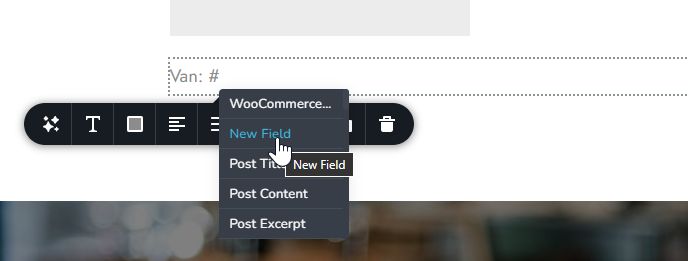
Click inside the text, type #, and then select your ACF field from the dynamic options. This allows the content to remain inline and should prevent the columns from stacking vertically.
Please give that a try and let us know how it goes.
Best regards,
Ariel H.0 -
Thats works great!
Thank you for the asistance Ariel0
Please sign in to leave a comment.
Comments
2 comments